
While using the DIXF (data import export framework) tool, I noticed that my selection to use business logic upon insert/update was not happening as I had expected it to. There were two reasons for this.
Class method DMFProductEntityClass.insertUpdate has as input parameters, two booleans called _callInsertLogic and _callValidateLogic. This is all well and good until you see that in line 121, super is called without passing those parameters. Super, which is DMFEntityBase.insertUpdate, certainly expects them as input. So, modify line 121 to pass the parameters. I only see this in the Product entity.
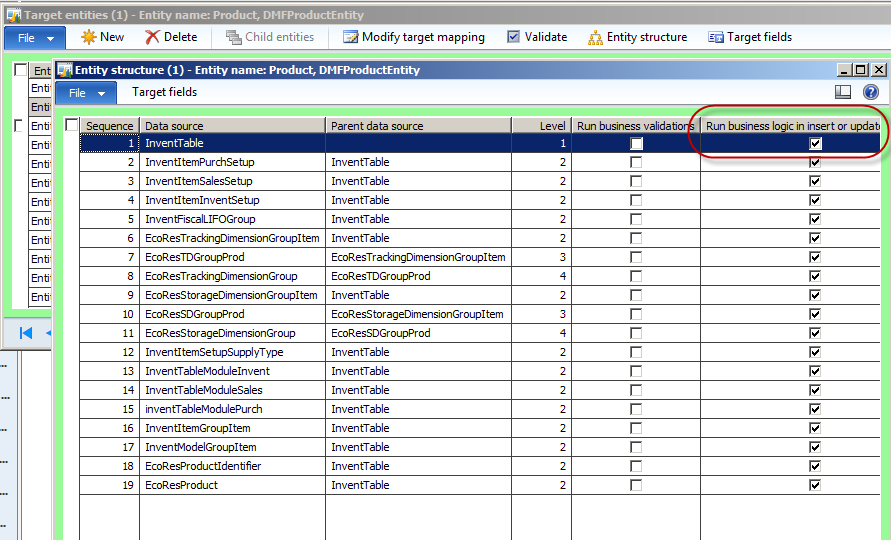
Second, there is a second place where you can and probably should select this option, to validate your data. It is under Entity structure, see screenshot:
I hope you are enjoying the tool. It’s way better than anything we’ve had before!
Happy DAXing!




 janeteblake
In my experience (without this modification), I had to select the “Run business logic in insert or update method” option on both the processing group entity AND the target entity structure in order for the logic to run.
LikeLike
Yes, Seth, thanks! That’s what I meant to say but didn’t express clearly. I agree!
LikeLike