Parm methods in AxBC classes (Is this a bug? Let me know!)

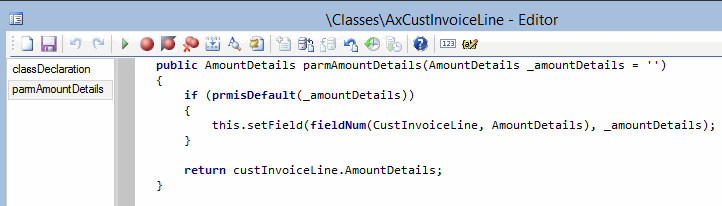
I was cleaning up some BP – so crucial to do! – and I found some standard code which seems to have a bug. Whereas your typical parm method in a table class (AxBC-class) will test for !prmIsDefault, there is one class parm method in R2 and R3 which appears to have forgotten its “not.”

There are two other methods which don’t contain the ! but they look OK. It’s the AxCustInvoiceLine.parmAmountDetails that worries me, in both R2 and R3. Please see screenshots below of the original code, and with my fix.

Feedback is always welcome!

Happy DAXing!

orig

fixed

Posted in AX2012, AX2012 R3, Bug, Dynamics AX | 4 Comments

Custom prefixes for custom number sequences

For those who are looking to create a new number sequence (say, for a new module), there are many references available online.

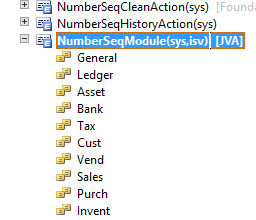
However, I could not find the last thing that I wanted to do: Put a specific prefix on the number sequence. It appears to default to the first four letters of the module’s name: Accounting sequences begin with Acco_ and our JointStuff sequences began with Join_. We wanted JVA, our prefix used elsewhere, instead.

This is set from the base enum NumberSeqModule.

20141030a

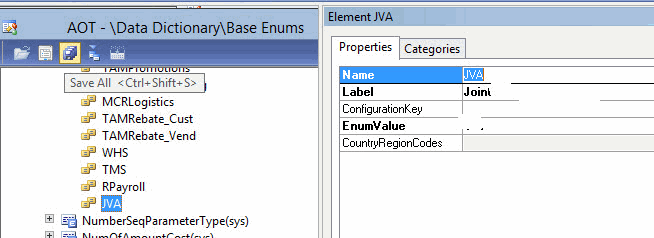
Go to the specific value that you created

20141030b

And change its label to simply the prefix that you want:

20141030c

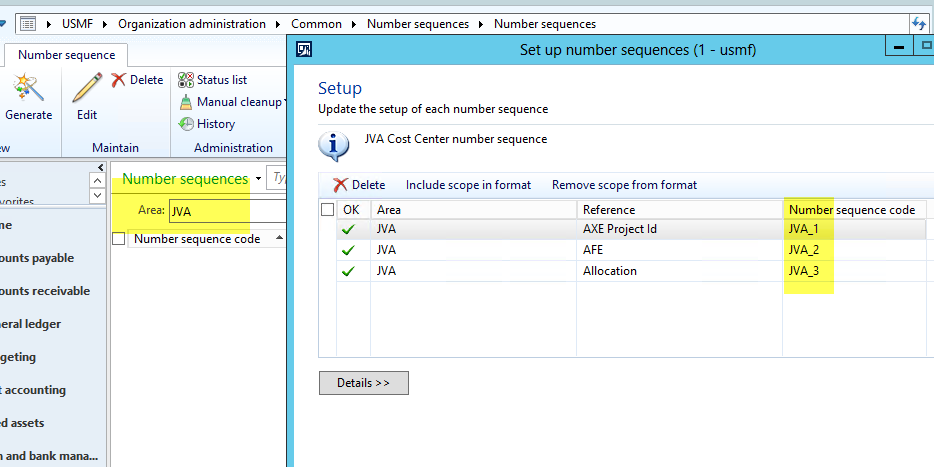
Then, your number sequences will be prefixed (segmented) with the code that you want. Note, too, that it also specifies the “Area” in the number sequences screen.

20141030d

Happy DAXing!

Posted in AX2012, Dynamics AX | Leave a comment

An open letter to Mr. Satya Nadella

I enjoy genealogy, and it was quite a thrill to find out that I was related (via our STILLWELL line) to Grace Murray Hopper. Admiral Hopper was, after all, a computer pioneer in every sense of the word. I have ever since then aspired to be like her. (Wikipedia link)

My dad had three daughters rather than the son he’d been hoping for. But he swallowed his old prejudices and raised us to believe we were just as good as anyone else. When I showed an interest in computing, he encouraged me, telling me that a career in technology would stand a much better chance of gender pay equity. That was quite a while ago!

Mr. Satya Nadella has thrown us back to the Dark Ages. The CEO of Microsoft stated that women whose pay was significantly less than that of comparable men should not ask for a raise, but to “have faith that the system” will take care of it. “It’s good karma.” Not only that, but he said it at a conference named after Admiral Hopper herself, to an audience of women in technology.

My employer has always shown gender fairness and in fact, so did all of my employers, so it was quite a jolt that these old prejudices exist. It didn’t take much digging to find that I’ve had rose colored glasses on: “Men who hold graduate or professional degrees earn a whopping 73 percent more than women with the same educational qualifications” as per Joint Venture Silicon Valley.

The face of industry is changing rapidly, and we must adapt and embrace. Old prejudices (even when they are quickly backpedaled) must not stand unchallenged. This is an open letter to Mr. Nadella to challenge him to walk among his employees and see that there is not really such a gender difference as he seems to believe. Our industry in particular needs good, solid, sharp resources and should not be ostracizing approximately half of them.

To quote the late, great, George Carlin, “Men are from Earth, women are from Earth. Deal with it.”

Happy DAXing!

Posted in Dynamics AX | Tagged , , | 5 Comments

AX Technical Conference 2015 dates announced

I noticed on LinkedIn (shared by Jesper Rødkjær) that the dates for #AXTech2015 have been announced! Feb 2-4, 2015. The dates are blocked in my calendar already. Hope to see you there!

 http://www.microsoft.com/dynamics/AXtechconference/

Happy DAXing!

Posted in Dynamics AX | Leave a comment

AXbuild.exe – faster than ever!

If you thought AXbuild.exe was great in Dynamics AX R2 CU7 – you just wait!

Everyone cheered in CU7 when axbuild.exe came out. My own organization experienced drop in AOT compile time at a typical client from 7 or 8 hours to 1 hour. It didn’t take much to gain traction with us, or with the AX community at large!

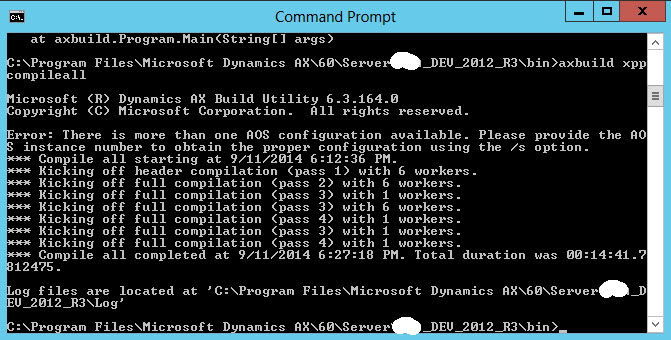
What surprised me is how much it’s been improved in R3. It has not been advertised that I can see (http://technet.microsoft.com/EN-US/library/dn600262.aspx) BUT we stood up a virtual machine and got a 14 minute 41 second compile!

14 minute compile

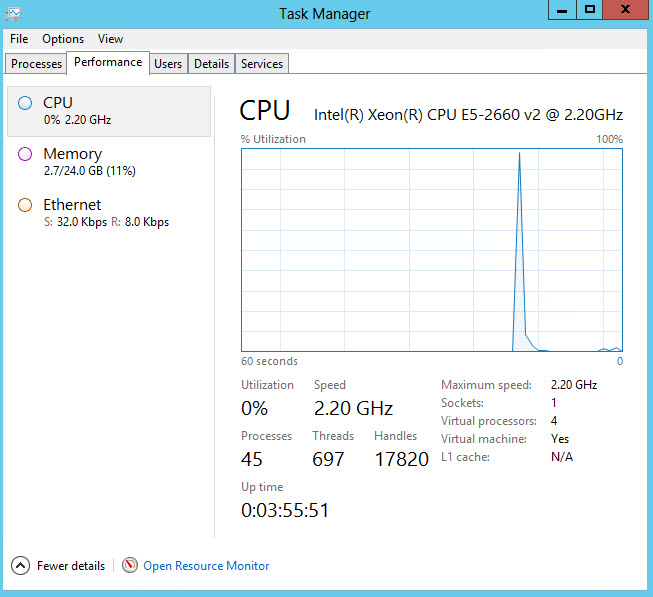
The machine is nothing special – 2.2 GHz, 24GB of RAM, 4 virtual processors, SQL Server on a different machine. And, to make it even more exciting, it had custom code on it! An entire module that we wrote, not in the least stripped down!

Machine specs

So hop over to an R3 machine and check out what they’ve done to it!

Happy DAXing!


EDIT: Adding more specs and timings as requested, for https://axbenchmark.github.io/


AX Version Processor Hard drive Compile X++ (hh:mm:ss) Compile CIL (hh:mm:ss) Sync (hh:mm:ss) Overall (hh:mm:ss)
6.3.164.0 Intel Xeon CPU E5-2660 v2 @ 2.20GHz ? 126GB 00:14:41 00:13:26 00:06:39 00:34:46
Posted in AX2012, AX2012 R3, Dynamics AX | Tagged , , | 1 Comment

Free book: Building Cloud Apps with Microsoft Azure

Just got some good news today in my Microsoft Learning email: the above book is available, and for free! I have downloaded and am anxious to read. We all know that we’re heading to the cloud.

Microsoft Press/Books
Free E-Book: Building Cloud Apps with Microsoft Azure
A new free e-book from Microsoft Press: Building Cloud Apps with Microsoft Azure: Best practices for DevOps, data storage, high availability, and more, by Scott Guthrie, Mark Simms, Tom Dykstra, Rick Anderson, and Mike Wasson.
Here are the download links: PDF (6.35 MB), EPUB (22.7 MB), and MOBI (12.3 MB). Read more about this e-book on Microsoft Press blog.

Original Publication Date: 07/31/2014

Happy DAXing!

Posted in Cloud, Dynamics AX | Leave a comment

Palle Agermark was kind enough to alert us in reference.html to some new Microsoft documentation at http://www.microsoft.com/en-pk/download/details.aspx?id=17093 .I wanted to note a very interesting tab on that sheet:

Tables removed as of R3

Table name
AifDataContainerRecurrence
CopyOfcustCustomerService_ImportTable
CreditCardCustNumber
CreditCardMicrosoftSetup
CreditCardProcessorsSecurity
custCustomerService_ImportTable
DOCommerceConfiguration
DOCommerceEntityGroupSyncState
DOCommerceMarketplaces
DOCommerceOnlineStores
imp_CustAll
imp_Party
imp_VendAll
InventTestDocumentTypeTmp
PurchReqLineHistoryTotals
PurchReqTmpCountByFilter
PurchReqTmpCountByStatus
PurchRFQCompareLineTMP
PurchRFQCompareTMP
ReleaseUpdateBulkCopyField_GLS
ReleaseUpdateBulkCopyTable_GLS
SysFillUtilityLog
SysFillUtilityLogLine
TestDate
TmpSysFillUtility
vendVendGroupService_ImportTable

Thank you for sharing, Palle!


Happy DAXing!

Posted on by janeteblake | 4 Comments

Automatically run an AX form on startup

A client just went live on Dynamics AX this month, so YAY to them!

Believe it or not, go-live is not always just pressing a button and sitting back. A few things came up, and I’ll blog them if I think they might be useful. This is the first of these.

The client wanted AX to automatically run a specific form when they started up, rather than having the users navigate (to the clock in/clock out screen). As always, I stand on the shoulders of giants, and borrowed heavily from the internet, including Palle Agermark’s blog , TechNet, and the X++ code itself.

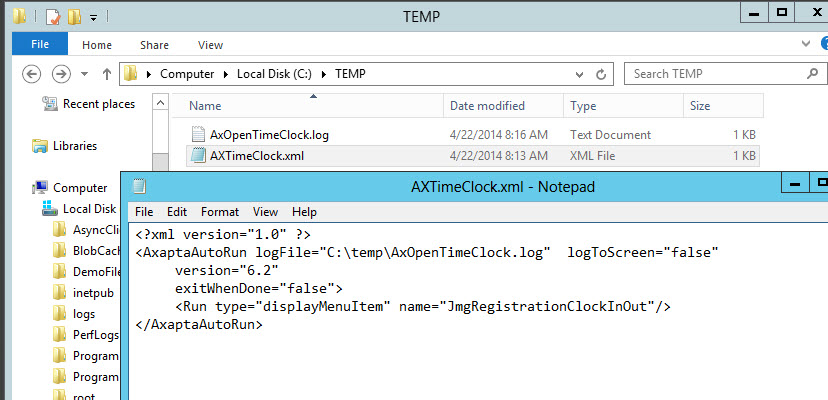
We did it in a two-step process. Number one was to create an xml file to specify what should be run:

<?xml version=”1.0″ ?>
<AxaptaAutoRun logFile=”C:\temp\AxOpenTimeClock.log”  logToScreen=”false”
version=”6.2″
exitWhenDone=”false”>
<Run type=”displayMenuItem” name=”JmgRegistrationClockInOut”/>
</AxaptaAutoRun>

Image

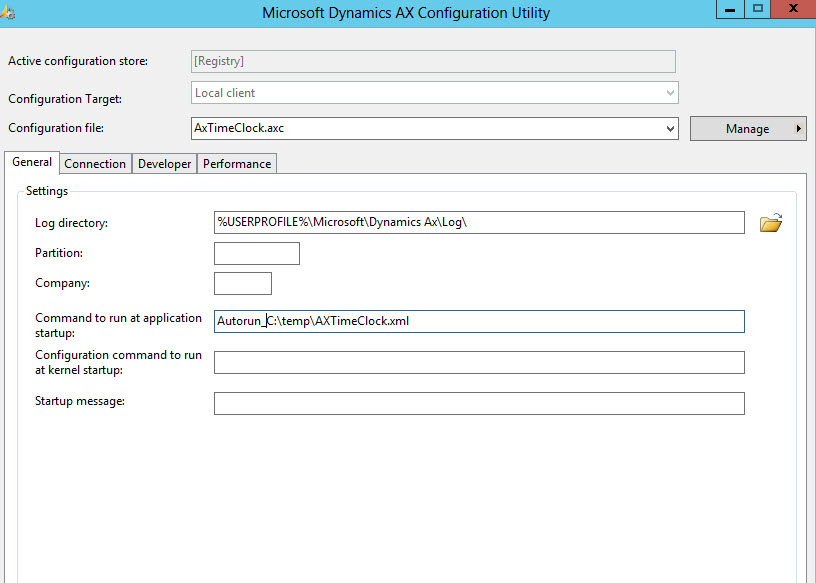
Number two was to set this xml file as an autorun in the .axc configuration file, using “Command to run at application startup” and Autorun_File:

Image

Now when I log into AX using that configuration file, we see the clock in/out screen!

Happy DAXing!

Posted in Dynamics AX | 5 Comments

Microsoft MVPs announced

I am so pleased to see the new list of Microsoft MVPs announced. A filter on the technology of Dynamics AX produces 30 recipients of the honors. (22 named individuals and 8 anonymous ones.) I’m thrilled that I’ve met several of them and look forward to increasing that number in the time going forward.


Many, many congratulations and good work to you winners! You deserve it!

http://mvp.microsoft.com/en-us/search-mvp.aspx?ty=a&ex=Dynamics+AX


Happy DAXing!


Andre Arnaud de Calavon
Antonio Gilabert
Brandon George
Deepak Agarwal
Denis Patrakov
Dick Wenning
Dominic Lee
Francisco Silva Junior
Fred Shen
Joel Leichty
Joris de Gruyter
Jose Antonio Estevan
Justin Carter
Kranthi Kumar Vangala
Kurt Hatlevik
Manel Querol
Martin Dráb
Murray Fife
Scott Hamilton
Sergey Mazurkin
Steven Weaver
Tommy Skaue


Posted in Dynamics AX | 2 Comments

Guest blog: Security breach in employee attendance

I am wrestling bears at three different implementation stages, and have not been writing any blogs lately. Fortunately, my coworkers are covering for me again. 🙂 Jesse Higdon recently corrected an issue one of my clients was experiencing: They could un-filter employees and see everyone. Jesse quickly figured the fix and was kind enough to blog it for us. Thanks, Jesse! Hope to see you blogging again soon!

Happy DAXing!

From Jesse:

Gotcha, Microsoft!

Recently I was given an interesting task. A client had an issue that they deemed was a security issue.

The form is located at Human resources > Inquiries > Time and attendance > Attendance. The user is prompted to select a calculation group from a dropdown. A manager selects their own calculation group and they get to see a form with attendance information for their own employees. The issue is that once they clicked the Attendance button, after closing it either with the X or the Close button, upon returning to the list of employees it would no longer be filtered and they would be able to see and select and modify data for any employee in the system.

I tracked the issue to a bug in some stock Microsoft code.

The form is JmgEmplSignedIn. There is a method on this form called retriveAttandenceDataForCalcGroup(). It takes a single argument: JmgCalcGroupId _calcGroupId. The calc group selected on the dialog gets passed to this method because this is the method that actually filters the data on the form.

This gets called when the form is opened, but it gets called again when the user closes that second form. The bug is that when the user closes the second form, the method is called without specifying a _calcGroupId. This means that the filter that was originally applied is effectively removed and the user will end up seeing all employees. Since there’s no data level security behind this form, there’s nothing to stop a manager from messing with another manager’s employees as long as he can see them in the grid.

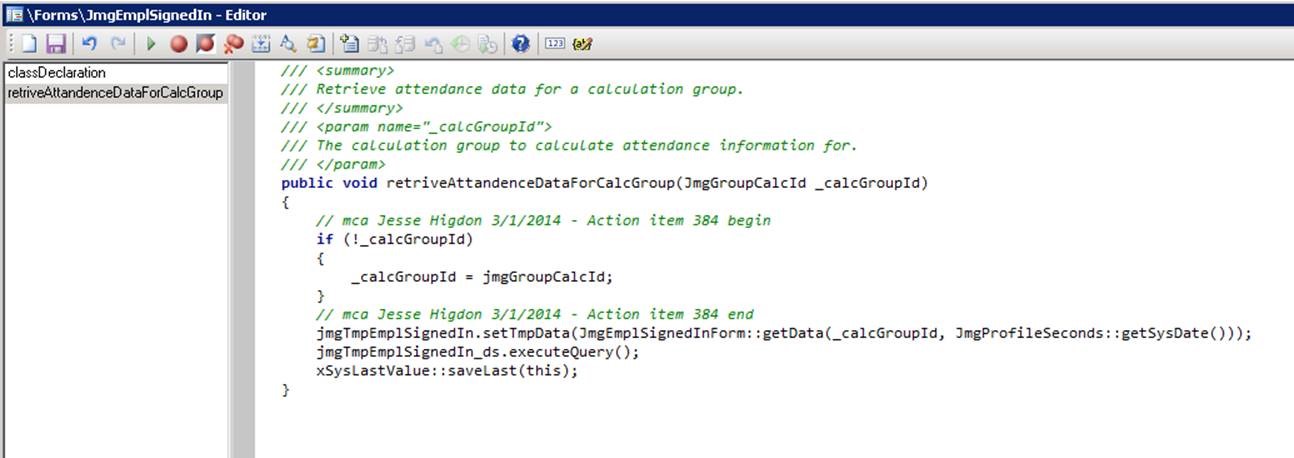
The solution to this isn’t the most elegant code I’ve ever written, but it contains the solution inside of one method and keeps it short and sweet.
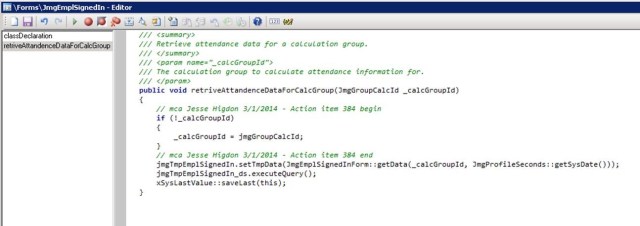
 

jessescreenshotI check if _calcGroupId is blank, and if it is then I simply assign it the value of jmgGroupCalcId. When the dialog gets the calc group id from the user, it stores this into a class variable called jmgGroupCalcId which doesn’t get overwritten by a null string when the user returns from the second form.

I could also have made a change like this:

public void retriveAttandenceDataForCalcGroup(JmgGroupCalcId _calcGroupId = jmgGroupCalcId)

In retrospect, that could be a more elegant solution, but it’s not one that I have tested, so use it at your own risk. The solution I show in the screenshot has definitely been tested and confirmed to work by myself and the client.

Never thought so early in my Dynamics AX career I’d manage to find and fix a bug in stock Microsoft code, but that just goes to show that even Microsoft developers are still human.

Posted in AX2012, Bug, Dynamics AX | Leave a comment