Microsoft Dynamics Technical Conference, 2016 / Day 3 Session 3

My report from the technical conference.


For Day 3 session 3 I went to Better together: How Microsoft Dynamics AX leverages SQL Azure and the latest Microsoft data platform with Sunil Agarwal, Michael Gall, and Milinda Vitharana.


Lots of visuals today.


Agenda

  • Topology in the cloud or on premise using SQL Server 2016
  • Dynamic scaling of server in the cloud
  • Multiple read-only databases to distribute the load
  • One database for OLTP and Analytics workloads
  • In-memory OLTP for highly performant operations
  • Dynamics AX Entity store and scenarios
  • Cortana Analytics suite integration

You can dial up or down the database to meet the load demand

No more cubes. Analytics are served by the real time database

Topology in cloud or on-premise


Dynamics AX platform
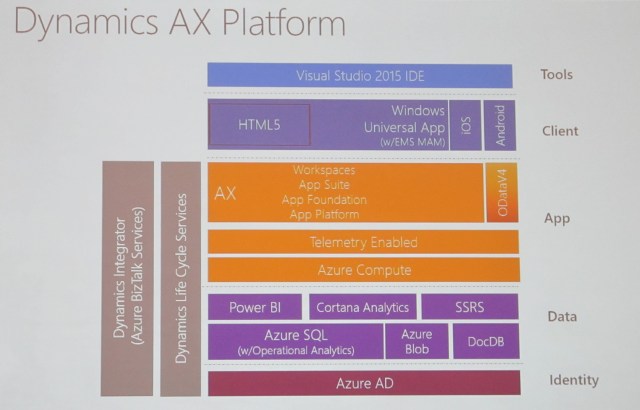
IMG_2177

We’ll be talking about the data layer in the photo


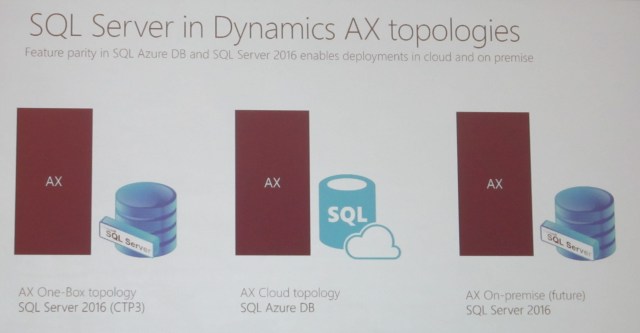
SQL Server in Dynamics AX topologies
IMG_2178

Back end is not SQL Server; it’s SQL Azure

Features released to the cloud before they are released to the box. Then customers test them then we send a high quality product to the box


Dynamic Scaling


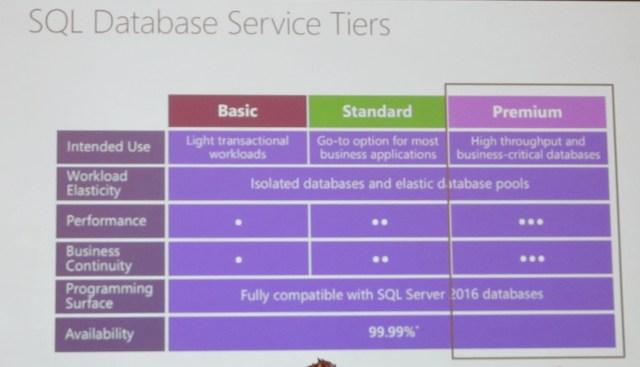
SQL Database service tiers
IMG_2179

Premium = Enterprise


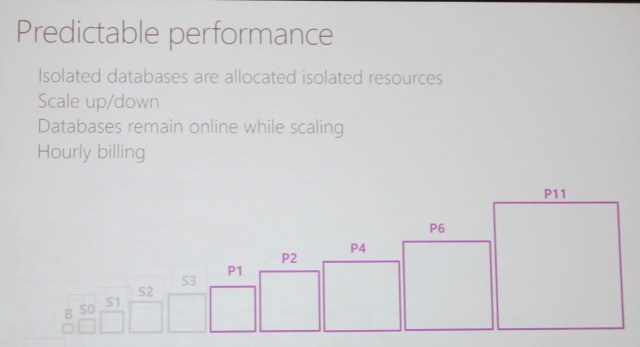
Predictable performance
IMG_2180.JPG

Microsoft scales up and down as needed; it is invisible to the user


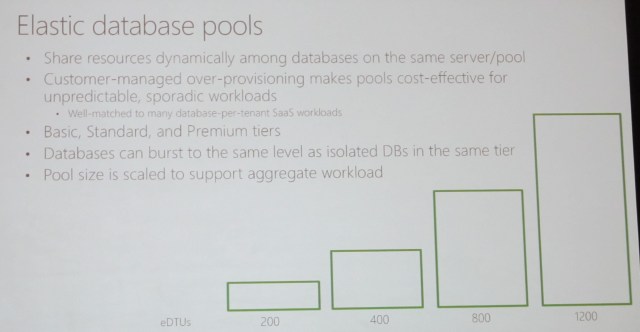
Elastic database pools
IMG_2181

Multiple read-only databases


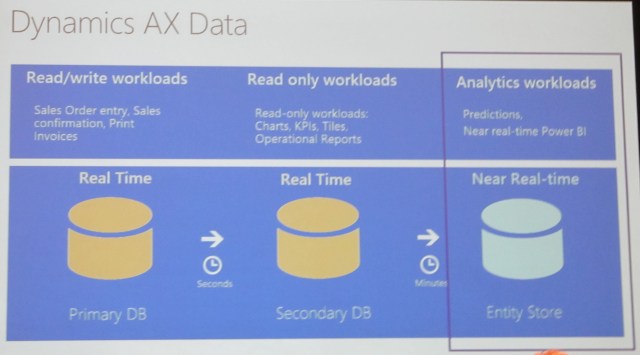
Dynamics AX data

Primary to secondary in seconds

Secondary to entity store in minutes
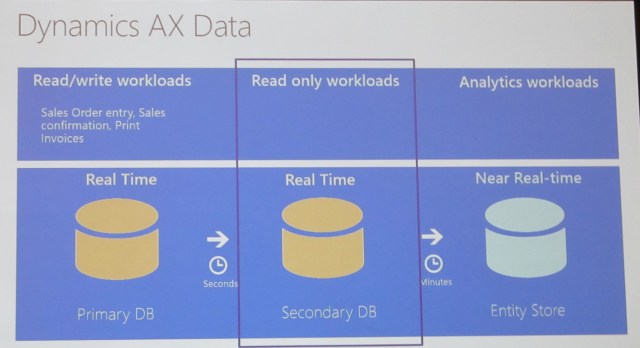
IMG_2182

Read only secondary (ROS) DB

  • Available in production environments
    • One or more ROS DBs provisioned based on volume and load
  • Selected workloads routed by AOS to ROS
    • Workload patterns determine whether they can be run on ROS. Developer doesn’t choose
  • Some (limited) configuration options
    • Ex: Tile cache can be optimized by administrator where required
  • Exact copy, seconds late…
    • Data in primary DB is reflected in secondary within seconds


Multiple Read-only Secondary Databases

IMG_2184

Real-time operational


Minimizing data latency for analytics
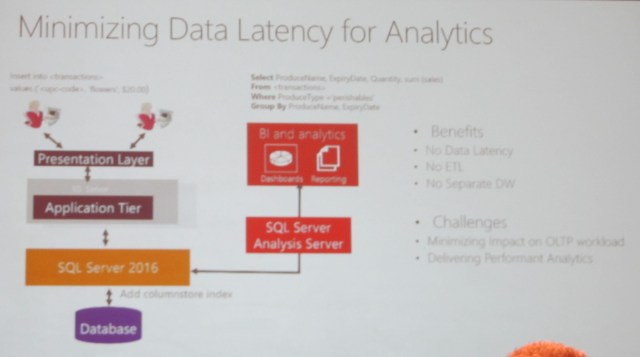
IMG_2191

Add challenge: Delivering Performant Analytics


Real-time analytics
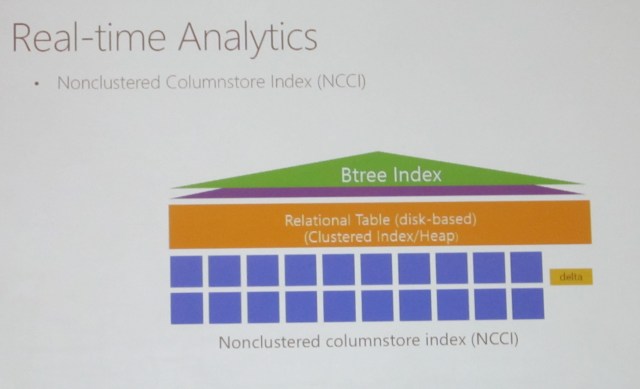
IMG_2192

NCCI is very efficient


Real-time analytics: Minimizing columnstore overhead

IMG_2193

Demo: How AX leverages SQL Operational analytics

Index type can be index or columnstore


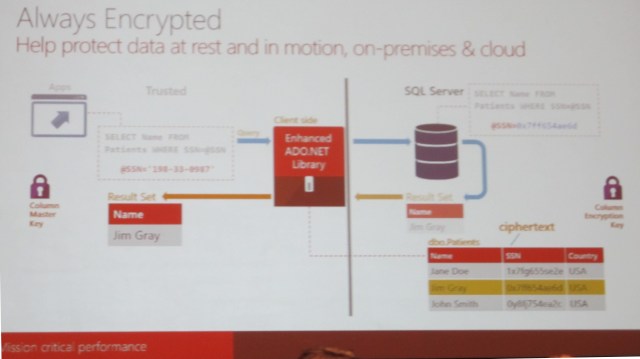
Future: Secure data on the move and at rest


Always encrypted

“like” is not available because similar strings encrypt differently

Temporal option available so you can restore from 5 or from 20 minutes ago

Future: in-memory OLTP
IMG_2195


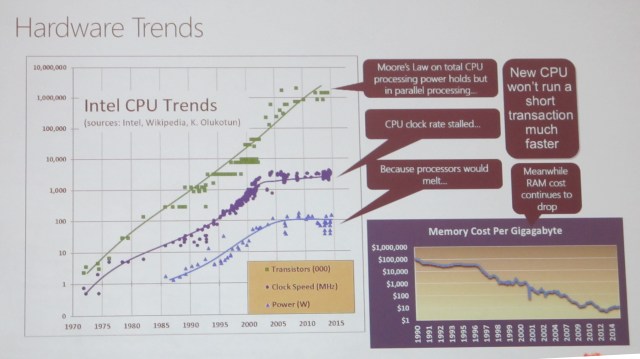
Hardware trends

IMG_2196

In-memory OLTP – architectural pillars

Transform high level operations to C programs

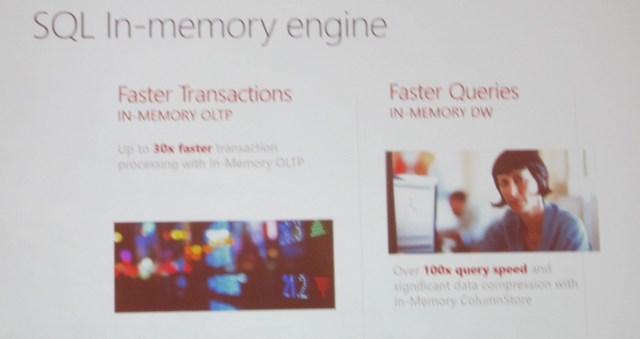
30x performance improvement

IMG_2198

SQL In-memory engine

IMG_2199

How AX7 uses in-memory OLTP

In 2016 we allow 2TB for in memory

In the future: Dynamics AX entity store

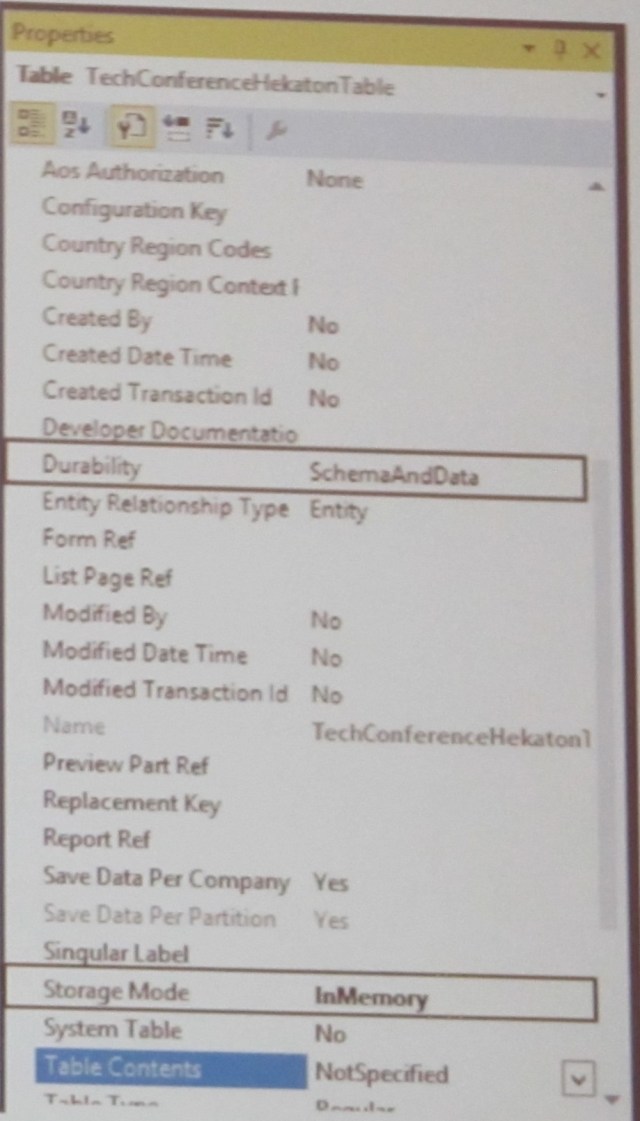
  • Mark the table as Storage Mode = InMemory
  • Set Durability:
    • SchemaAndData: Data can be recreated after crash (from transaction log)
    • Schema: Data is lost after crash
  • System administrator has to accept the setup
IMG_2200 - Copy


Dynamics AX data

IMG_2201

Entity store – key scenarios

  • High volume, near real-time Power BI reporting
    • De-normalized schema, CCI to enable faster query responses, incremental update from AX, direct Query Power BI models
  • Intelligent business processes with Cortana Analytics suite
    • Stage data for Azure Data Factory pipelines, Consume in Azure Machine Learning
  • IoT, external data integration
    • Staging in Azure Data Lake and Azure Data warehouse


Entity store – key tenants

  • Designed for analytical scenarios
  • Azure DB entity store included in AX license
  • AX manages deployment and refresh
  • Optionally, customer can stage data in Azure DB, DL and DW for read-write scenarios
  • Coming soon to AX2012 R3


There will be an entity store for AX 2012

Future: Cortana Analytics Suite Integration


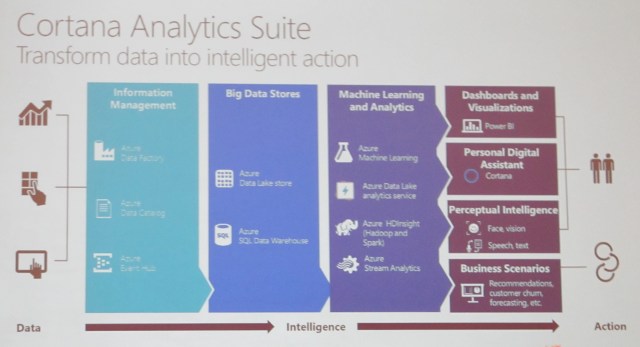
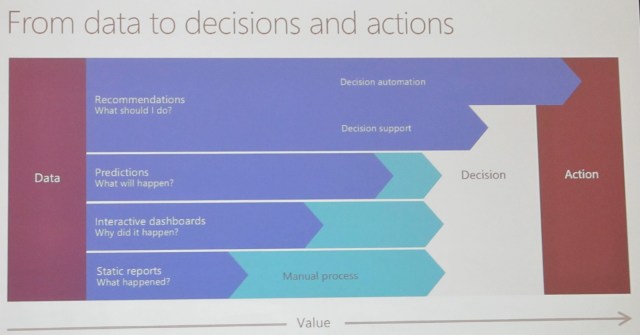
From data to decisions and actions
IMG_2204

Cortana Analytics Suite

IMG_2205

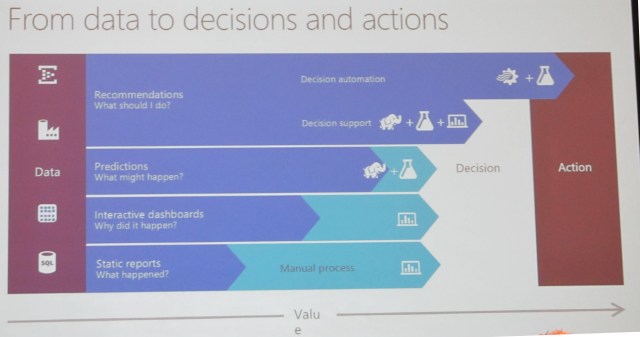
From data to decisions and actions

Updated
IMG_2206

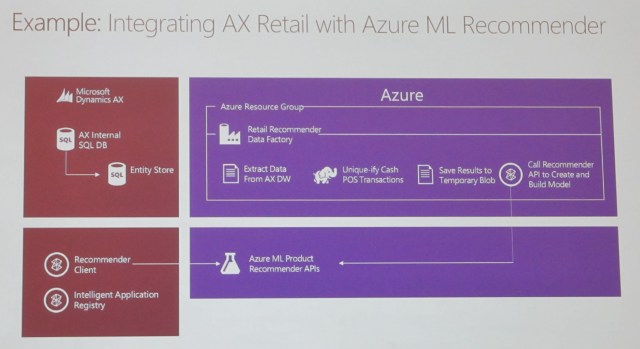
Example: Integrating AX Retail with Azure ML Recommender
IMG_2207

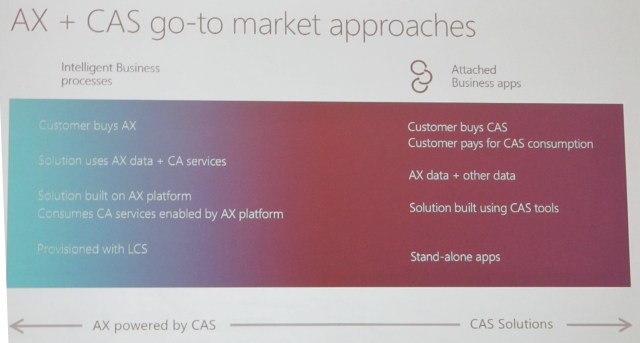
AX + CAS go-to market approaches

IMG_2208

CAS = Cortana Analytics Services


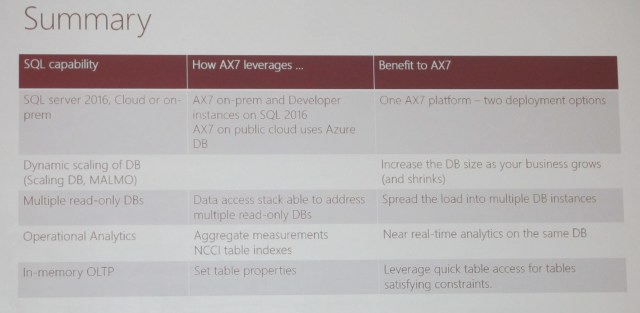
Summary
IMG_2209


Happy DAXing!


Posted in ax 7, AX7, Dynamics AX | Tagged , , | Leave a comment

Microsoft Dynamics Technical Conference, 2016 / Day 3 Session 2

My report from the technical conference.


And many, many thanks to those who retweet these blogs! It’s much appreciated. I am now pushing to complete this… look for this to be wrapped up by Monday morning.


I went to Mining the metadata and authoring X++ best practice rules in Microsoft Dynamics AX with Peter Villadsen, program manager.


It was full (of course) but I refused to miss another Villadsen breakout session, so sat on the floor. I started a trend and had lots of company.


Session Objectives and Takeaways

  • Session Objective(s)
    • Learn about the role of metadata in Dynamics AX7 and how to leverage its value
    • Understand the extensibility story for the new X++ compiler
    • Understand how to write add ins into Visual Studio to provide new functionality
  • The metadata is more pervasive and more useful than ever
  • The AX development environment can be extended
  • It is possible to extend the compiler easily


Dynamics AX Metadata

  • The Dynamics AX environment is based on metadata
  • Metadata is now stored in XML files in the file system, not in a database.
  • Everything is open; there are no “blobs”.
  • The XML files are the unit of Source Control.
  • The metadata access does not depend on server


XML Metadata files

Showed them on the file system

Application explorer is a read-only view

Metadata access


Consuming metadata

  • There are several ways of consuming metadata in Dynamics AX7:
    • Using raw System XML APIs
    • Using the dict* classes from X++
    • Using the automation API from Visual Studio add-ins
    • Using managed APIs: (compile time, general)
    • Using the OData service


Consuming metadata as XML

  • You saw the XML metadata stored in files by package, model, and kind
  • It is easy to do sweeps of these files using XML APIs in either X++ or C#.
  • Pros:
    • XML can be accessed on any device, everywhere
    • Easy to search using LINQ or XPATH
  • Cons:
    • It is not type safe
    • It is slightly clunky


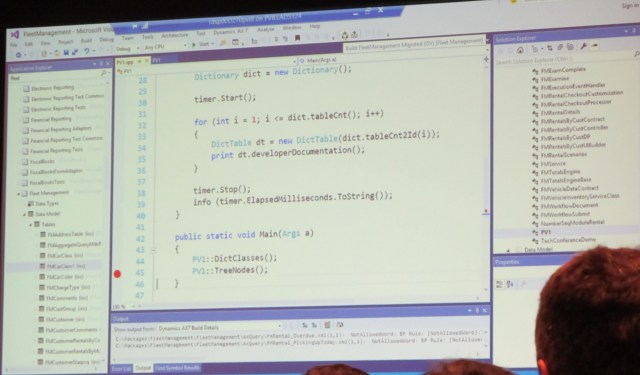
Demo

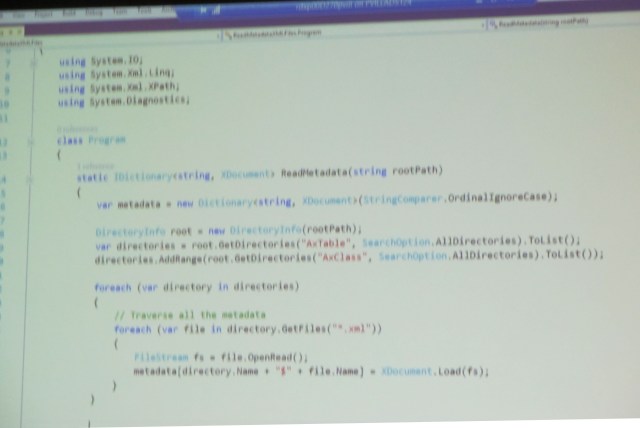
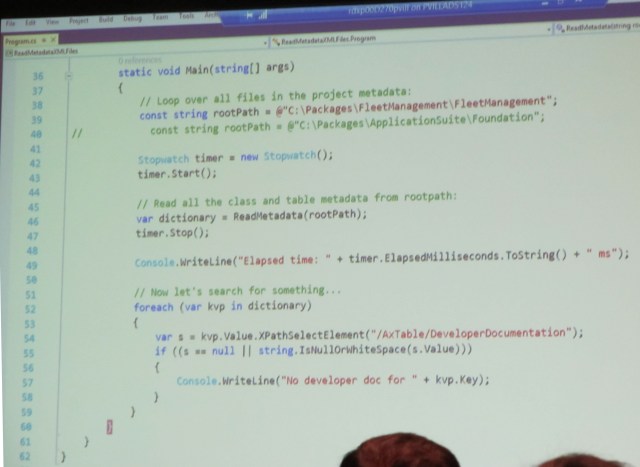
IMG_2159

IMG_2160


Application note: large scale query map of metadata files. Used an open source edition, ran even faster


Using the dict* classes

  • The dict* classes from AX6 were re-implemented on top of the new metadata API
  • They support existing code, but new metadata is now leveraged through these APIs
  • The TreeNode API is available too for some cases (except for writing)
  • Pros:
    • Compatibility
    • Easily used from X++
  • Cons:
    • A little kludgy
    • Inelegant but they do work


Consuming metadata through dict* classes

Demo

Legacy code will probably work

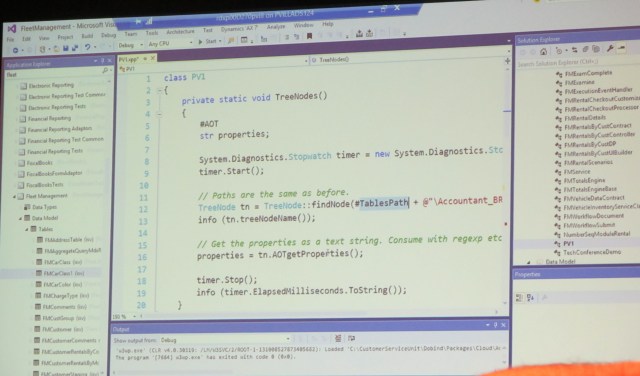
IMG_2162

IMG_2164


Accessing Data Entity metadata through ODATA

  • It is possible to access Data entity metadata through services
  • We can open this service up for other metadata artifacts as well, as needed
  • Currently only open to entities. In the future will be tables


Using the managed metadata classes

  • The managed metadata API are used throughout the platform
  • They are classes that expose all the metadata in a type-safe, DOM-like way
  • Pros:
    • The metadata can be consumed using state-of-the-art C# constructs
  • Cons
    • There is a certain learning curve to negotiate
    • There are several different APIs, for different scenarios


Managed metadata access

  • Metadata is accessed through a metadata provider
  • There are three distinct kinds of managed metadata access:
    • From Visual Studio Extensions
    • From compiler scenarios
    • General metadata access APIs
  • Traverse with LINQ or using custom code
  • Stay tuned for examples…


Checkpoint

  • You understand the concept of metadata and how it relates to Dynamics AX
  • You have seen several ways to query the metadata
  • Let’s do something useful with this knowledge!


Extending the Visual Studio experience through add-ins

Demo

Visual Studio

File > New > Project

DAX: BP tools, dev tools add-in

You get a template, just complete the TODOs

System.console.writeline(“stuff”)

iForm, iTable are the VS views


Metadata access

  • You have the choice between two different metadata providers:
    • One is for accessing the MD as it is loaded in VS (using classes in the Microsoft.Dynamics.Framework.Tools.MetaModel.Automation namespace)
    • Example: ITable
    • The other is the global metadata store (using classes in the Microsoft.Dynamics.AX.Metadata.MetaModel namespace)
    • Example: AxTable


Compiler Extensibility

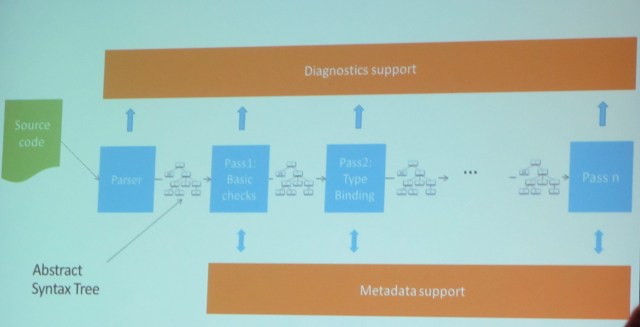
IMG_2170


Simple parsing and analysis demo

Compile xpp – collect error messages

Create metadata provider

Get tabl emetadata

Compile class declaratino

Dump diagnostic messages

Run pipeline

Dump messages

“Macros are evil”

API is not elegant


Checkpoint

  • You have seen how the metadata can be queried
  • You now understand the concepts of Abstract Syntax Trees and how they relate to X++ source code.
  • Let’s put this to good use!


Extending the compiler with BP rules demo

Visual Studio > File > New project > Use BP add in

Creates a template

There are white papers on writing BP checks

When you need to debug BP

Attach to XPPc agent

Check the wiki


Using the cross reference

  • The cross reference database (DYNAMICSXREFDB) lives in the SQL database on your development box
  • The format has been significantly simplified: it is mainly two tables
    • Names
    • References
  • The cross reference powers the VS experience


Building the xref is relatively expensive but not absolutely expensive (4 minutes)


Q&A

IMG_2175


Happy DAXing!


Posted in ax 7, AX7, Dynamics AX | Tagged , , | Leave a comment

Microsoft Dynamics Technical Conference, 2016 / Day 3 Session 1

My report from the technical conference.


For the first session of the last day, I went to Ask the Experts: Developer and customization experience with Peter Villadsen, Robert Badawy,and  Joris de Gruyter. Quite the lineup!


Being an Ask the Experts, it had no set structure other than a Question & Answer format. Here are my scribbled notes on them. Note that it seemed everyone was sick & there was a lot of coughing during the questions and answers.


  1. Replicated DB’s: adding indexes, etc.
  2. Upgrade: prepare your code in 2012, split it in AX 7. Wiki has hints on code upgrade
  3. One solution with two projects: cut and paste across projects
  4. No need for remote based app / remote desktop
  5. Security and data
  6. DB replicas are read only, near real time. Can we query this? Not sure
  7. SSRS still used, pretty unchanged. We don’t yet support extensions on reports
  8. Jobs – now class – static void main(Args) and set as startup. Alternatively for data update you can create a data project. Use the data management framework
  9. Alternative to SSIS: Whole new world of BI. Use Wiki > Analytics
  10. PowerBI?
  11. Move elements to different model? Yes. In projects via cut and paste. Alternatively just move the files. While you’re doing that, consider creating extensions.
  12. Wiki > Developer > Code migration > Prepare to migrate 
  13. Something how long it takes to run. Load balancing, zero downtime, deployment – automated on our end but manual work on Microsoft’s end. They are improving.
  14. Printers – still support ZPL / zebra. Install an app locally that has access to printers
  15. Extensions – there is a metadata API. It’s all file based.
  16. How to develop. We do not recommend or support development in a shared AOS. Multiple developers can be on the same box. You can also duplicate the modelstore: Copy the packages folder in C:\ or J:\
  17. XLNT framework? Use Raw API and somewhat raw API
  18. Deploying deltas. If you overlay, it contains models underneath it
  19. Unit tests. You can write unit tests. Remember that testing is very data bound. Microsoft test code is large
  20. Multiple developers on the same box. Production database copied to development box – talks are ongoing
  21. How browser connects to server. Use SysOperation framework. Use cancel button
  22. Models, XML files are design time concept. Labels have no IDs now. You should name your labels
  23. Explanation of packages and extensions. In the file system you see packages when you create an extension. You create a new package.
  24. Copy of production database that’s not being refreshed for sandbox – the features exist, are currently being worked on.
  25. Code refactoring. There are not very good tools. Macros cause issues.


Here I need to give a shout out to the guy with the great shoes! Keep on stylin’!

0225160948 - Copy

Happy DAXing!


Posted in ax 7, AX7, Dynamics AX | Tagged , , | 2 Comments

Microsoft Dynamics Technical Conference, 2016 / Day 2 Session 5

My report from the technical conference.


This was the session where I mentioned ahead of time that I had a heart-rending decision to make. Fortunately, it was made for me.


I went to The new X++ compiler and the Microsoft Dynamics AX development platform with Peter Villadsen and Robert Badawy but it was completely full.


So I then went to Deep dive into Microsoft Dynamics AX packages and extensions with Joris de Gruyter. That had also been threatening to fill up, but they moved him to a bigger room.


Choice made, by default. I mean, everyone needs and wants this session! Go look it up!


Customizations = overlayering

Extensions

Some customers have reimplemented


Agenda

  • Model Store > Packages > Layers > Models
  • Customizations vs Extensions
  • Extension Scenarios
  • Upgrading to Extensions
  • Tips and Tricks
  • Extensions into the Future


Model Store > Packages > Layers > Models

  • Layers and models are a design-time concept only; they mean nothing at runtime
  • A package is one independent, individual set of layers and models; we are now compiling directly to dll’s
  • A package is a set of folders, consisting of XML files representing the objects; XMLs sit in a folder according to the package and model they’re in
  • A package as a whole translates 1:1 with a unit of compilation, i.e. an assembly (DLL)
  • Packages can have references to other packages, just like .NET assemblies can reference each other. But they cannot be circular
  • One or more packages combine into a deployable package, i.e. a unit of deployment


Demo: Packages, files and folders

“Model view” breaks it out by model

J:\AOSService\PackagesLocalDirectory\<Package>\<Model>

Descriptor folder is like the model manifest


Customizations vs Extensions

  • Customizing (“over-layering”)
    • Granularity of over-layering is down to the property level. So different customizations can change different properties on the same control. You’ll never want to over-layer a menu.
    • “Delta” files store changes only, with their original value
  • Models technically also “over-layer” each other
    • No more “traditional” model conflicts, only over-layering
    • Model conflicts don’t require changing the model’s contents
    • Over-layering granularity avoids most conflicts


Demo: Customizing, overlayering concepts, delta files

Project can only be in one model

Right click on the object and select customize or create extension

The XML stores both “original” and “yours” – if an ISV sends a hotfix, you now have a three way compare

Search bar: CF: = conflicts. Right click and resolve code conflicts

If you customize thru overlayering, upgrades will be far easier


Customizations vs extensions

  • Extensions are the new customizations (however going to pure extensions is near impossible)
  • Extension enablers
    • Events, metadata extension features, extension methods
  • Extension packages
    • Benefits on a code base short and long term
    • Package split impact on customizations
  • Change your extension suffix


Q: Can you turn an extension off? A: No
Demo: Extensions, capabilities

Everything extends platform, then foundation, then application suite

We use a lot of attributes

Name is: form.extension

Can rename to form.NewExtension

You can open an element in a specific project, package, etc. and that affects what you see.

Hierarchy of models? Last one installed wins


Extension Scenarios

  • Adding table fields, UI changes
    • Table extensions, form extensions, data entity extensions
  • Pre / post and other event handlers
    • Table event handlers, UI event handlers, traditional pre/post and [hookable]
  • Customization / extension hybrids
    • Customize based on extension artifacts, delegates
  • Plugins
    • Make your code extensible
  • “Package split” effects
    • Customize multiple packages
  • If a method is private, you can’t do event handlers on it unless you make it hookable.
  • Plugins are like the extension framework in 2012


Upgrading to Extensions

  • New artifacts vs customized artifacts
    • Moving new artifacts has consequences
  • Refactor vs upgrade
  • Current limitations
    • Queries (you can’t really extend a query), over-layering extensions
  • Security
    • Roles, duties – not privileges (you can’t extend privileges)


Tips and tricks

  • Metadata search
  • Go to form BaseForm
  • Quick way to move a control on a form is cut and paste
  • Tags
  • Visual Studio has bookmarks
  • Projects are not in your AOT; they’re just files in your file system
  • Reports don’t allow extensions
  • Element IDs are unnecessary now


Shout out to Yagesh! And sorry if I spelled your name wrong. Thanks for saying hi.


Happy DAXing!


Photo: Olympic Sculpture Park. Credit: me.

IMG_0806

Posted in ax 7, AX7, Dynamics AX | Tagged , , | Leave a comment

Microsoft Dynamics Technical Conference, 2016 / Day 2 Session 4

My report from the technical conference.


Sorry to say that the fourth session on the second day was a letdown.


I attempted to get into The X++ language with Peter Villadsen but it was full – completely, overflowingly, full. They need to get him into bigger rooms. I gather it is currently available at  but I don’t have Dynamics Learning Portal so I’m out of luck for now.


So then I went to a lab on Applying form patterns with Jason Green. It had a lot of potential, but too many wrinkles to work out. I ended up leaving. But here was the overview of the lab:


Lab: take a 2012 form and apply a pattern

Lab overview –

  • Apply the details master form pattern
    • In Solution Explorer, open a form
    • Right click, set as startup object
    • Press Ctrl-F5 to build/run
    • Open the Patterns Information Panel by clicking the Patterns tab in the form designer
    • Right click Design, point to Apply pattern, then select the pattern (details master)
    • Add missing groups and controls
    • When done, press Ctrl-F5 to build/run
  • Utilize documentation to learn about patterns
    • Help is at the AX Help Wiki at http://ax.help.dynamics.com; search for “details master” and open the “Details Master – Form Pattern” article
  • Apply subpatterns to form controls
    • In VS, in the form designer, right click the form, select Addins, and select Form statistics
    • You will see coverage – look for Pattern=Unspecified to be zero
    • Use the VS form search to find all instances of “unspecified” in the form
    • Subpatterns are part of the Selecting a Form Pattern wiki page
    • Right click Comments, select Apply pattern, and select your pattern
    • Repeat until there are no more unspecified
    • Press Ctrl-F5 to run
  • Use patterns-related Visual Studio add-ins
    • In VS, click Dynamics AX, Addins, Run form patterns report
    • You’ll get a notification of where the csv went; open it in Excel
    • Filter it to your model and/or form


Shout-out tonight to Bobby Small – thanks for reading my blog and taking the time to say hello!  Bobby is @daxioms on twitter and daxioms.blogspot.com.


Happy DAXing!


Photo: Washington Park Arboretum Credit: me

IMG_0775

Posted in ax 7, AX7, Dynamics AX | Tagged , , | Leave a comment

Microsoft Dynamics Technical Conference, 2016 / Day 2 Session 3


My report from the technical conference.


Our third session on the second day, Wednesday February 24, 2016, was a breakout session, called  Microsoft Dynamics AX implementation methodology, with Clay Wesener and Paul Wu, of the SA group.


I hope you can make sufficient sense of my scribbled notes. This was definitely a lot to take in but of course very important. We really need to be comfortable with this. You may have noticed, I’m trying not to infringe on Microsoft’s slide decks, but I think they’re necessary for clarity in this case.


Implementation methodology

There is now a customer LCS project

This is about the tools


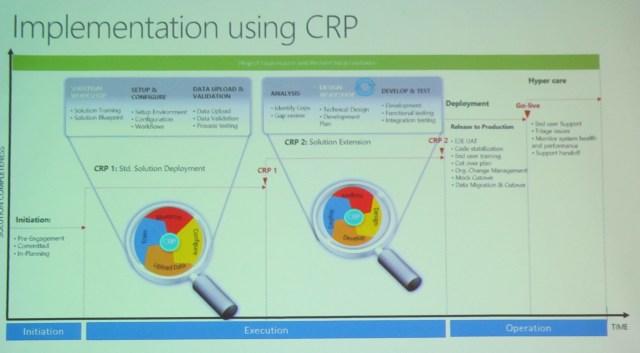
Implementation using CRP

  • Smaller iterative approach
  • Easier to spin up
  • Also see implementation lifecycle workshop

IMG_2139

LCS based tooling

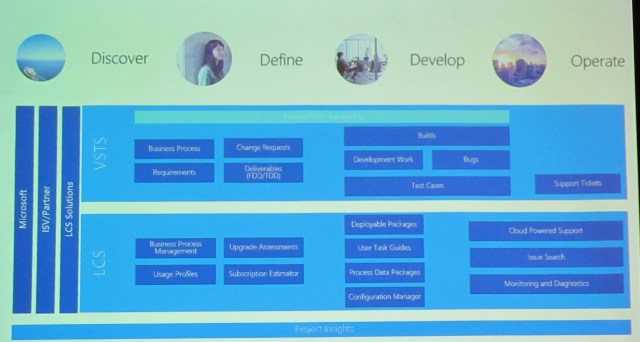
Discover-define-develop-operate

Business process management is much improved – it can support off-AX things

VSTS – business processes, traceability requirements, change requests, deliverables (FDD/TDD), builds, dev work, bugs, test cases, support tickets

LCS – BPM, usage profiles, upgrade assessments, subscription estimate, deployable packages, user task guides, process data packages, configuration manager, cloud powered support, issue search, monitoring and diagnostics

If you get nothing else from this post, then “get” this chart:

IMG_2142

Demo: Deploying an environment (Paul Wu)

IMG_2144

Demo: BPM and task guides (Clay)

LCS > Business process libraries

You can edit a recording

You get an APQC library with AX


Usage profiles and subscription estimator

LCS > Subscription estimator


Can monitor a VM, but can’t dynamically adjust it


BPM, process data packages (associates DP with a process in your BPM library), configuration Manager

BPM library

You actually load the data into AX from LCS

LCS > Data management

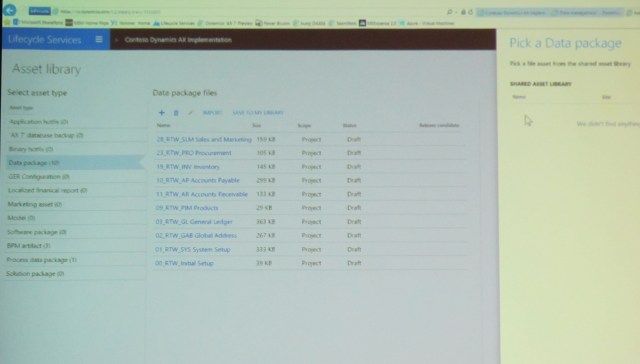
LCS > asset library: you can put in data packages

IMG_2145


DIXF – configuration manager – process data package


We can specify dependencies (sequences). They advise, not enforce.

IMG_2146


TR code gets checked into VSTS


Support and operations demo (Clay)


Happy DAXing!


Posted in ax 7, AX7, Dynamics AX | Tagged , , | Leave a comment

Microsoft Dynamics Technical Conference, 2016 / Day 2 Session 2

My report from the technical conference.


Our second session on the second day, Wednesday February 24, 2016, was a breakout session, called Microsoft Dynamics AX 2012: Performance tools overview and best practices, with Tom Treen, Senior Support Engineer.


Yes, I went back to 2012, because who couldn’t use performance tips?


Tom has a few favorite tools, which you will see mentioned here. He also provided several links for downloads and more information, do make sure to check them out!


Agenda

  • Performance monitoring tools
  • Setup and configure
  • Performance configuration best practices


Performance monitoring tools

  • Dynamics Performance Analyzer
  • Microsoft Dynamics AX Trace Parser
  • Performance Analysis of Logs (PAL) tool
  • SQL performance dashboard reports


Microsoft Dynamics Performance Analyzer

V2 just came out, it’s still in Beta

We are catching data more frequently

Uses:

  • Database performance tuning
  • Microsoft Dynamics AX setup & best practices checks

Features:

  • Database setup and settings
  • SQL query details and analysis
  • Missing indexes
  • Table setup and caching
  • Number sequence analysis
  • Hidden index scans


Microsoft Dynamics AX trace parser

Uses:

  • Microsoft Dynamics AX client and AOS trace file analysis

Features:

  • Drill down view of captured sessions
  • Captured SQL statements
  • X++ methods
  • Comparison between traces
  • Sub-trace creation


Performance Analysis of Logs (PAL) tool

Uses:

  • Windows performance monitor automated analysis

Features:

  • Template generation for system, SQL, Microsoft Dynamics AX Counters, plus more
  • HTML report produced form analysis
  • Ability to queue up analysis for multiple files
  • Multi-threaded


SQL performance dashboard reports

Went a long time without getting updated

Uses:

  • View live and historic data SQL Data

Features:

  • SQL server management studio report
  • Simple setup
  • SQL query history
  • IO statistics
  • Wait stats


Demo: Setup and Configure

Dynamics Perf is a download

Now installation solution and analysis data solution

Open the installation solution

Take a look at their views in SSMS and at SQL Server agent jobs

Check the RunAs for permissions

There is an xpo you should load and incremental CIL and run – set up as a recurring batch job

Open analyze data solution / project

Max degrees of parallelism should be 1, unless you’ve got 16 cores, then 2-3

Check max server memory – sometimes you need to adjust it down

Distribute the load

Trace [illegible]

Suggested indexes: don’t necessarily create all that are identified there

AX server configuration > performance > 128

Number sequence form – cache allocation


PAL tool

Threshold file

AX tracing cockpit

Services – start trace, do stuff in ax, stop trace


Trace Parser


SQL performance dashboard

Free download

IO statistics is a great report


Performance configuration best practices

General SQL settings:

  • SQL Trace flags – normally recommend 1117, 1118, 1224, 2371 and 4199
  • Review max server memory
  • Ensure that max degrees of parallelism is set to 1. For higher (16+ CPU servers), try increasing this to 2 or 3
  • Within local security policies, set the “Lock pages in memory” and “perform volume maintenance task” has been assigned to the SQL server service account
  • Check for maintenance plans for index rebuilds and statistics updates
  • Index fill factor

TempDB:

  • Recommend that you have one data file for each CPU core, up to between 8 to 12 files


Database settings for the Microsoft Dynamics AX DB

  • Check the SQL collation matches the TempDB collation
  • Check if read committed snapshot on
  • Check auto update stats, auto create stats are on
  • Make sure that auto shrink and auto update stats async are off

Microsoft Dynamics AX settings:

  • Ensure that AOS debugging is disabled
  • Review number sequences – where possible do not use continuous sequences, and use fetch ahead for the most used non-continuous
  • Review the entire table cache settings and set the AOS server cache to 128KB
  • Parameter sniffing fix
  • Review database logging and alerts
  • Disable fact boxes


Download Links

Dynamics Performance Analyzer https://dynamicsperf.codeplex.com/

Performance Analysis of Logs (PAL) Tool https://pal.codeplex.com/

SQL Performance Dashboard Reports https://www.microsoft.com/en-us/download/details.aspx?id=29063


Info Links

Dynamics Performance Analyzer

http://blogs.msdn.com/b/axinthefield/archive/2015/12/30/dynamicsperf-2-0-deployment-guide.aspx

https://blogs.msdn.microsoft.com/axinthefield/2015/12/30/dynamicsperf-2-0-installation-for-dynamics-ax/


Microsoft Dynamics AX parameter sniffing fix

https://blogs.msdn.microsoft.com/axinthefield/2014/01/09/sql-server-parameter-sniffing-with-dynamics-ax-just-plain-evil-redux-5-19-2014/


Link Microsoft Dynamics AX users to SQL SPID

https://technet.microsoft.com/en-us/library/hh699644.aspx


Happy DAXing!

Seattle cityscape, from Denny Park

IMG_0798

Posted in AX2012, Dynamics AX | Tagged , , | Leave a comment

Microsoft Dynamics Technical Conference, 2016 / Day 2 Session 1

My report from the technical conference.


Our first session on the second day, Wednesday February 24, 2016 was a general session, this time with Mike Ehrenberg, Technical Fellow, Microsoft Corporation.

IMG_2126


It was cool to get the technical point of view; this was, after, all, called a technical conference. Although there were LOTS of functional breakout sessions.


Mike emphasized that AX is cloud first and optimized for Azure.


The mission statement is:

To empower every person and every organization on the planet to achieve more          

  • Create more personal computing
  • Reinvent productivity and business processes
  • Build the intelligent cloud


He promised that coming soon would be upgrade and migration story. He pointed us to Channel 9 videos for more information. He showed us that Microsoft reinvented the experience, for a reinvented product. There was a lot of emphasis on how the whole user experience is different.


One way is a brand new trial experience. A potential customer who is interested in AX can spin up (have a partner spin up?) a trial box in LCS, just like how we currently spin up development and build boxes.


LCS is still the order of the day – it was recommended in AX 2012 and it’s required now.


The new Dynamics AX: What comes next?

  • Customer learnings
  • Automate everything
  • Performance, scale, reliability and COGS (cost of operating a service)
  • Service best practices and certifications
  • Customize through configuration, not code
  • Workload deployment and implementation
  • Systems of intelligence


Takeaway? This is the start of the next generation.


There was a Q&A:

Q: What is the current and ongoing role of the partner?
A: We are taking some of the partner work to let them focus on productivity / business value

Q: Integration with CRM

A: Totally new approach to integration shipped with 1700 data entities out of the box. Service industries: different approach. Employee self service and manager self service (HR) are much better now

Q: Upgrade from 2009, 2012

A: 2012 upgrade has code tools, second half of this year

2009 migration – the approach is a new implementation

The base for the new AX is the latest 2012. The schema is very consistent. We will provide tools for data.

Q: huge investment in own data center

A: Windows server 2016, SQL server 2016, Azure stack


– shoutout to the guy who sat behind me in this session – I hope that an energetic toddler with restless leg syndrome sat behind you on the flight home! –


This is the start of the next generation.


Happy DAXing!


Posted in ax 7, AX7, Dynamics AX | Tagged , , | Leave a comment

Microsoft Dynamics Technical Conference, 2016 / Day 1 Session 5

My report from the technical conference.


Our fifth (and last) session on opening day, Tuesday February 23, 2016 was another breakout session. I chose Microsoft Dynamics AX Application Lifecycle Management (ALM) with Joris de Gruyter, Senior Solution Architect.


Being Joris, this was another overfull session. 🙂 Also everyone is understanding how crucial ALM is to implementations going forward. Please find below my notes from the class. I hope that you will agree that it’s of interest, and look up the recording when it’s posted.


Agenda

  • Source control: Setup, usage, advanced scenarios (branching shelvesets, Git)
  • Testing: X++ unit tests, task recorder, test data
  • Automated builds: Build VM, build definition, output


Source Control

  • Visual Studio Team Services (VSTS) and LCS
    • Initial setup
    • Deploy Dev and Build VMs separately, not at once – URL issues, can start and stop separately, naming
  • On the VM
    • Workspace mapping
    • Creating your first version controlled model


Demo: Setting up

  • If you deploy a local VM, it’s a development environment
  • Project settings is where everything is set up
  • Go to your profile > security to create personal access tokens
  • Build agent can be used (deployment settings)
  • VSO credentials are deprecated, if you used them in earlier versions or CTPs
  • Then map the workspace: Metadata and project documents. Don’t check in all the code, only check in what you need, otherwise the build takes hours.
  • Projects are not so important in AX ‘7’ just try to be consistent
  • Then start working. Add it to source control. But an edit will automatically check it out. Since we went to files, source control “just works.”
  • Create a new model. Add the descriptor file.


Source control

  • Branching / merging
    • Trunk/main and releases
  • Advantages and disadvantages of branching and merging
    • Needs strict policing and tracking through environments (versioning?)


Demo: releases branch


Source control

  • Shelvesets
    • Work as expected (don’t forget to delete when done)
    • Can work with build VM, we’ll get to that
  • Code reviews
    • Code reviews use shelvesets, which work
    • However, reviews use XML viewers to look at the work
  • Compare with previous version


Demo: Shelvesets


Do not share a (development) VM because you are editing files


Source control

  • Other VCS
    • Whatever Visual Studio supports (or add-ins) should work but are not supported
  • New VSTS Feature
    • One VSTS project with both TFVC and Git repositories
    • Not officially supported and manual labor


Testing

  • X++ Unit testing
    • SysTest framework
    • Advantages to using extensions, handlers, etc.
  • Task recording
    • Essentially “Coded UI tests” from task recorder output
    • Data points can be coded in
    • Validations
  • Integration inside Visual Studio


Demo: Testing

  • Validate a field ex: credit limit and number of days to pay
  • Put your tests in a separate package because there’s no need to deploy the testing to production
  • After building a test, stop and start Visual Studio
  • Task recording then look at the code it wrote


There’s documentation on how to get the task recorder to do load testing [I did a search of the wiki at https://ax.help.dynamics.com/en/ but did not find it; it could be in LCS; I did not check there.]


Testing

  • Test data for unit tests
    • Independent of other tests
    • Setup and rollback
    • Isolate
  • Test data for coded UI
    • Planning is everything
    • Chaining is not recommended
    • Build vs Dev VM


Automated builds

  • Build VM from LCS
    • Agent pool
  • “Clean build” principle
    • Packages, DB, full clean option
  • VSTS build definition (vNext)
    • Add scripts, demand agent capabilities, support branching
    • proj


If you do it from Visual Studio, it includes everything from the dev box. This isn’t really desirable


Demo: Build setup

VS TS > Build > Build Main

Edit and see the steps

Repository > mapping note this, check it. By default it’s correct, but if you start branching it may not be.

Deltas can be an issue if you’re using shelvesets.

Interesting variables

Skip sync

Skip deploy reports

Triggers: Continuous integration, scheduled, gated check-in

Retention

General > demands

Update model version number with build number (Hey Steve! Should we send your code that does this?)

Gated check-in: only if it all succeeded [Sounds like a great idea to me…]


Dependencies

If you have dependencies on binaries, check the dll’s in to VSTS

Output: – deployable package, and a model (they are called runtime and source)


Happy DAXing!

Posted in ax 7, AX7, Dynamics AX | Leave a comment

Microsoft Dynamics Technical Conference, 2016 / Day 1 Session 4

My report from the technical conference.


Our fourth session on opening day, Tuesday February 23, 2016 was another breakout session. I chose Developer experience and customization in the newest release of Microsoft Dynamics AX with Robert Badawy, Senior Program Manager and Peter Villadsen, Principal Project Manager.


Last year I had mentioned that any Villadsen session was a must-attend. Well, apparently word is spreading! The crowds were spilling out the door (insert foreshadowing to the day 2 sessions). Fortunately, I was able to attend. Here are my notes.


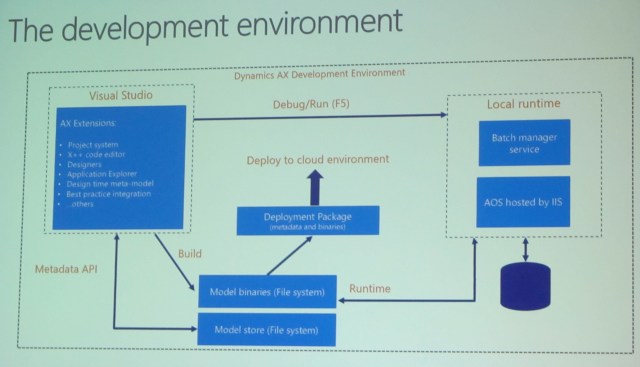
The Development Environment

Extension on top of visual studio that handles all we need

Metadata includes source code (open code, source code, are a recurring theme in this conference)

IMG_2105


The Visual Studio development tools

Visual Studio is the exclusive integrated development environment

  • Familiar AX 2012 concepts and patterns, like model elements, models, tree designers, the AOT, and others have been adapted to the Visual Studio development paradigms
  • There is no AOS needed at design/compile time as development is performed against files
  • A model element is represented by an XML file containing metadata and source code
  • The model store is represented as a set of folders and XML files, organized by model
  • Executing X++ code, displaying a form, or running a report is integrated with the familiar Visual Studio debug (F5, Ctrl-F5) experience
  • Execution is through the AOS web application that is running in the local IIS


Make sure you understand these bullet points

There are no blobs in the database, everything is open (see?)


Demo

Visual Studio with AX extensions installed

AOT is in Application explorer (AE), similar to 2012, but it’s a read-only view

New in the AOT is the model view

AE has a lot of nice search features

New: Static preview of the form you’re working on

There are XML files behind what you’re working on in VS

You can set your form as a startup object

A Build is an incremental build. It now includes report deploy, cross reference, can do sync

AOS was not running till we hit F5

Every project belongs to one model


Overview of packages and models

Definitions

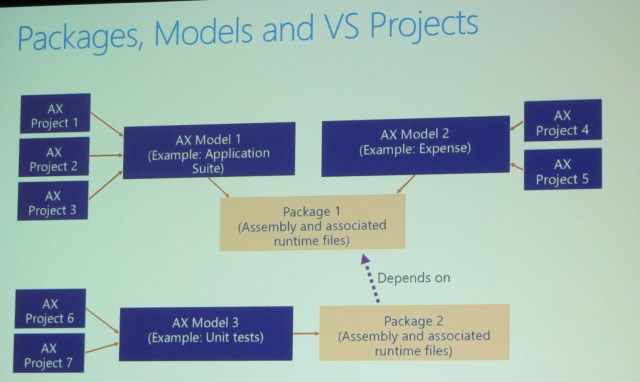
  • A Dynamics AX model is a group of elements (metadata and source files) that typically constitute a distributable software solution (including customizations of an existing solution). A model is a design-time concept.
    • For example: A warehouse management model, a project accounting model, etc.)
  • A Dynamics AX package is a deployment and compilation unit of one or more models. It inclues model metadata, binaries, cubes and other associated resources. One or more AX packages can be packaged into a deployment package, which is the vehicle used for deployment on UAT and production environments.
    • Packages are packed into a deployable package file for deployment to Sandbox or production environments.


Package is like a modelstore (already compiled)

Model is source code. Multiple models are in a package.


Packages, models, and Visual Studio projects

IMG_2108

Packages on disk

  • Packages are folders located in the model store folder of the Dynamics AX application.
  • The default model store folder is typically “C:\Packages\”.


Model descriptors

  • A package folder contains a descriptor folder that lists all models that belong to the package.
  • A model descriptor file contains metadata about a model’s properties.


Application Explorer – we skipped over this slide


Full build dialog

  • Access the full build dialog from Dynamics AX > Build models…
  • All packages are listed, one package = one compiled assembly.
  • Models within a package are shown in brackets.


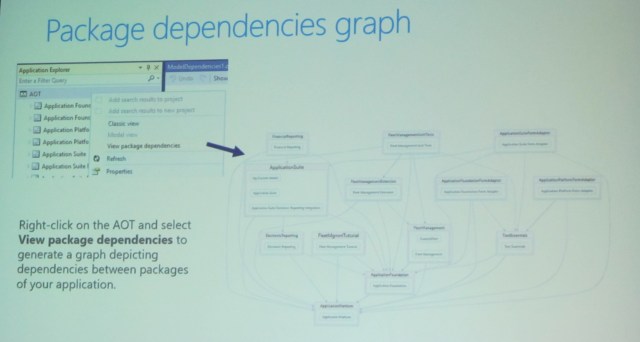
Package dependencies graph

IMG_2112

Demo

K service volume\aos services\packages local directory \ package \model \axtables

Productivity features – from an extended TAP program

  • Drilling
  • Add search results to project
  • Add BP errors to new project
  • You don’t package a project or a model


The Dynamics AX customization framework


AX 2012: Layers and models. Compile collapses customizations across models and layers


Customization concepts in Dynamics AX

Overlayering, extensions, and hybrids

Don’t overlayer MS code – create an event delegate


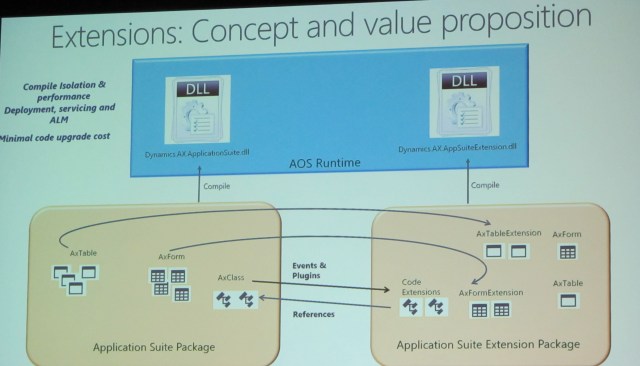
Extensions: Concept and value proposition

IMG_2115

Supported extensions as of today

Metadata: new elements, extend tables, forms, menus, enums, duties/roles, data entities

Source code: New X++ classes, app events, framework events, plugins, extension methods to classes and tables

No more client and server tier (server only)

No more client, only web browser


At this point I needed to leave to take an important call – regarding a new job – the parts that I missed are a demo on customizations and a Q&A.

Happy DAXing!


Posted in ax 7, AX7, Dynamics AX | Tagged , | 2 Comments