Building Responsible AI: Ethical Challenges and Solutions

Blog Series: Exploring the Power of AI

Building Responsible AI: Ethical Challenges and Solutions

Introduction

Ethics in AI is not just important for researchers and developers, but for everyone who uses it. Here are some reasons why:

  • Impact on daily life: AI is becoming more and more a part of our day to day actions. We need to understand the concerns and make sure we are addressing them, as well as having our own privacy respected.
  • Fairness: AI is only as good as the data it’s trained on, and if it has limited viewpoints in its input data, its output can perpetuate bias. This can only be corrected with a very conscious and deliberate effort. We can impact the input data.
  • Privacy: we need to make sure our privacy is being respected, and be aware of who collects (and shares) what information about us.
  • Transparency: it’s important for companies to make clear what data is used for what purposes. Only then can we all be accountable.
  • Autonomy: When we make decisions based on data, we need to make informed decisions with knowledge of the source of data. Is this the opinion of, say, an expert who has done this many times before, or a LLM which is predicting the next words in a phrase?
  • Consequences: standards that are established now will inform standards going into the future. In a new field, it’s especially important to try to get this right.

I urge you to read about Microsoft’s six principles of responsible AI. They make a really strong case for: fairness, reliability and safety, privacy and security, inclusiveness, transparency, and accountability.

Discussion

Practically speaking, what does this mean to the average user of AI? I propose three questions to ask:

  1. Where did the model’s data come from?
  2. Where is my data going?
  3. Should I give credit?

Source of data

Where did the model’s data come from? Did it scrape content from creators who have not given permission? Did it duck behind paywalls? Steve Little has an example, what if Steven King gave permission for a website (and only that website) to share the first chapter of one of his books, and a model uses the data for training? Late last year, the New York Times  (and later other newspapers) sued OpenAI and Microsoft for using its published work as input. (Gift NYT link) (As far as I can tell, the matter is still open.) We ought to keep awareness of which models are sourcing ethically.

Data sharing

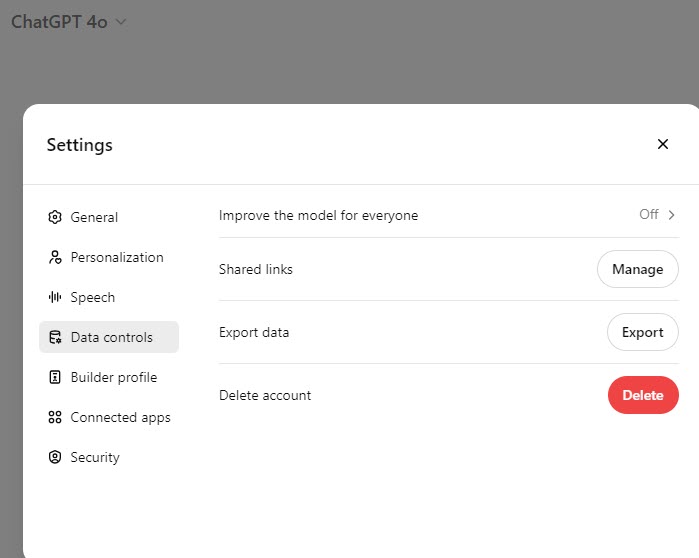
What happens to data that I share with the model? You need to be aware of a model’s privacy policies before sharing your confidential information with it – it’s too easy to share financial numbers and ask it to make you a budget! In some, perhaps all, of the models you can turn the option off. In ChatGPT, for example, turn Off the Setting to Improve the model for everyone.
Claude’s owner Anthropic says that it does not use conversations for training unless you explicitly opt in and deletes prompts within 90 days.

I couldn’t find Microsoft’s policy for Copilot in this page.

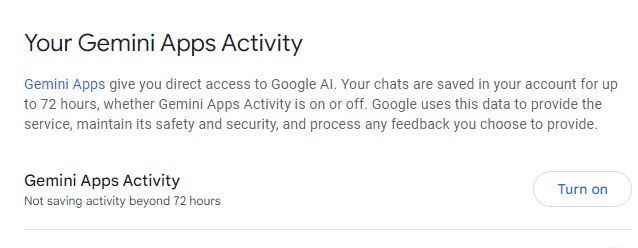
Google lets you control whether Gemini saves your prompts using Gemini Apps Activity.
Disclosure

While norms are still being formed, it’s generally accepted that you do not have to give an AI credit as a source of your data. However, and this is an important but, that does not mean that those who absorb your content do not deserve to know when you’ve used AI to create the content. Groups everywhere are discussing and debating the level of AI involvement necessary to cross the threshold into required disclosure. In this blog, like at my employer, I err on the site of overexposure: If I have used it at all, I let people know. In Worldwide Learning at Microsoft, if we have used AI for the smallest part of our content, we tag the Microsoft Learn page with an AI tag, which creates a disclosure on the webpage.

Especially in these days of AI fakes being profligate and it being hard to determine if an image is real or generated, it’s important to maintain trust by revealing your sources.

Challenge

Your challenge is to seek out different opinions and/or policies on AI disclosure. Let us know where YOU think the line should be, in the comments below!

Summary

In summary, ethics in AI is about ensuring that the technology develops in a way that is fair, transparent, and beneficial to all members of society. It’s about safeguarding rights, promoting equality, and maintaining trust in the systems that increasingly shape our world.

Further resources

  1. Transparency and Explainability: Timnit Gebru: Gebru’s work emphasizes the importance of transparency and has been influential in discussions about AI ethics. You can read more about her work in the article “How Timnit Gebru’s Exit from Google Changed AI Ethics” by Wired.
  2. Fairness and Bias Mitigation: Cathy O’Neil: O’Neil’s book Weapons of Math Destruction discusses the dangers of biased algorithms. The book is available for purchase or preview on Amazon. She also writes extensively on this topic on her blog.
  3. Accountability and Governance: Stuart Russell: Russell has written about the need for AI alignment with human values. His book Human Compatible provides a deeper dive into this topic. You can find it on Amazon. He also discusses these ideas in interviews like this one on Wired.
  4. Privacy and Data Security: Shoshana Zuboff: Zuboff’s The Age of Surveillance Capitalism is a critical analysis of how AI affects privacy. The book is available on Amazon. You can also read some of her articles and interviews on her website.
  5. Human-Centric AI Design: Fei-Fei Li: Li advocates for a human-centered approach in AI. You can read more about her views in articles like “How to Make AI That’s Good for People,” published by Wired. She also gave a TED Talk on this topic, which you can watch here. [Janet’s note: the TED talk does not seem to exist any longer, but her speaker page is here.]
  6. Sustainability and Environmental Impact: Kate Crawford: Crawford’s work on the environmental impact of AI is discussed in her book Atlas of AI. It is available on Amazon. She also co-authored an article, “AI and the Environmental Crisis,” which provides insights into this issue.
  7. Public Engagement and Education: Yoshua Bengio: Bengio emphasizes the importance of public understanding of AI. He has spoken on this topic in various forums, such as in his interview with IEEE Spectrum. His work and views are also discussed in this Nature article.

Disclosure

AI was used in several places in this post: to create the title, to create the outline, for the further resources. Main image created by Bing Image Creator.

Posted in artificial intelligence, Exploring the Power of AI | Tagged , , | 1 Comment

Kickstart Your AI Journey: Essential Tools and Resources to Get Started

Blog Series: Exploring the Power of AI

This is part 5 in an ongoing series to acquaint people with AI.

Part 1: The AI Revolution: Why You Should Care and Why You Should Trust Us

Part 2: Demystifying AI: What It Is and Why It Matters

Part 3: Intelligent Innovations: AI in daily life

Part 4: The Future of Work: AI’s Role in Professional Settings

Introduction

It’s hard to identify resources for artificial intelligence models, because the technology is changing so fast. Significant advances are expected throughout 2024 and beyond. But that’s precisely why we need to identify resources – to have a grounding for the next releases and updates.

When I started in Axapta, there was such a thing as a know-it-all, or seemed to be anyway. As the software grew (it is Enterprise Resource Planning (ERP) software after all), that idea went out the window and we became specialists.

Similarly with AI, we are at the ground level and we will benefit greatly from having a good overview of many of the big (popular) offerings out there.

Discussion

A burning question

AI Students’ frequently asked question: What are the tools people use most, according to Mark Thompson and Steve Little of The Family History AI Show (Episode 6). This is students who had a median of about 20 hours of experience in AI models prior to a weeklong set of 18 classes.

Well I’m not going to spoil, but you will have covered that and more in the prior four entries in this blog series.

Hands-on experience

Happy adults at computers

Hands-on experience is considered crucial in learning AI and most topics. In all my Instructional Design courses and experience creating training courses at Microsoft, we strive to create the best learner experience which includes the hands-on work necessary to cement learnings and enhance problem-solving skills.

Hands-on experience is particularly crucial for AI due to several unique aspects of the field:

  1. Complexity and Nuance: AI involves complex algorithms and models that require practical understanding. Hands-on experience allows individuals to see how these algorithms function in real-world scenarios, providing insights beyond theoretical learning.
  2. Rapid Technological Advancements: AI is a fast-evolving field with new tools and technologies emerging regularly. Practical experience helps individuals stay updated with the latest developments and understand how to apply new tools effectively.
  3. Interdisciplinary Nature: AI combines elements of computer science, mathematics, and domain-specific knowledge. Hands-on projects help integrate these diverse areas, enabling learners to develop a holistic understanding of how AI solutions are built and applied.
  4. Problem-Solving Skills: Implementing AI solutions often involves tackling unstructured problems. Hands-on experience cultivates problem-solving skills, allowing individuals to experiment with different approaches and learn from failures.
  5. Customization and Optimization: AI models often need to be tailored and optimized for specific tasks and datasets. Practical experience allows learners to understand the intricacies of model tuning and customization for different applications.
  6. Ethical and Responsible AI: Working directly with AI tools provides insight into the ethical considerations and potential biases in AI models. This understanding is crucial for developing responsible AI systems.
  7. Feedback and Iteration: AI development is iterative, involving continuous testing, feedback, and improvement. Hands-on experience facilitates this iterative process, enabling learners to refine models and approaches based on real data and outcomes.
  8. Collaboration and Communication: Many AI projects require collaboration with other team members or stakeholders. Practical experience helps develop communication skills necessary for working effectively in multidisciplinary teams.

Overall, hands-on experience bridges the gap between theoretical knowledge and real-world application, making it essential for mastering the complexities and dynamic nature of AI.

Overview of available AI resources

(AI-generated spelling always cracks me up)

As in the rest of life, we will have to “learn to learn” so take the following list in that spirit, as inspiration and as a start, but not a complete static encapsulation.

  • Please make sure to take a peek at a great “cheat sheet.” Steve [Little]’s Family History AI EDC [EveryDay-Carry] for Genealogists – oriented toward genealogists but broadly applicable. Note that he freely shares the information with a Creative Commons release. I may disagree with some of his categorizations (ahem!) but the best compact summary I’ve seen to date.
  • Training: for free ones, see Paul Storm’s post of Denis Panjuta’s list here, and my blog entry 4 in 2. Take training of How to Adapt to AI-driven changes including my biased favorite Microsoft Learn; for paid see Coursera, edX, Udacity, Udemy, Pluralsight, and LinkedIn Learning.
  • For news and updates, see Newsletters, blogs, podcasts, and the like. Some newsletters I get are The Rundown AI, Ethan Mollick from One Useful Thing, Charlie Guo from Artificial Ignorance, Eliot at Perplexity, Semafor Technology, and Last Week in AI.
  • Community and collaboration – nothing beats learning alongside others. Search for communities including GitHub, which is a platform for sharing code.
  • How do you get to Carnegie Hall? Practice, practice, practice! I’ve tried to give good and helpful examples in several earlier blog posts in this series. If you’d like to see more, drop me a comment! 

Challenge

Your hands-on work this week is to come up with a way that you can save a bit of time (or error) on something, and figure out how to make AI do this for you. Feel free to ask ChatGPT or another model for suggestions and help!

Summary

To coin a phrase, the best way to learn is to start. The beautiful thing about AI is that we don’t need to have mastery of it in order to see great benefits. Try the resources above and open up a whole new world.

To close, I’ll quote Professor Ethan Mollick in this LinkedIn post:

AI can’t do what you as an expert can do. But it can probably help you with something important that scatters your attention.

Disclosure

AI was used in several places in this post: to create the title, to create the outline, for ideas of trainings, for images.

Posted in artificial intelligence, Exploring the Power of AI | Tagged , , | 2 Comments

The Future of Work: AI’s Role in Professional Settings

Blog Title: The Future of Work: AI’s Role in Professional Settings

Blog Series: Exploring the Power of AI

This is part 4 in an ongoing series to acquaint people with AI.

Part 1: The AI Revolution: Why You Should Care and Why You Should Trust Us

Part 2: Demystifying AI: What It Is and Why It Matters

Part 3: Intelligent Innovations: AI in daily life

Introduction

Companies are using AI to improve, and they are not shy about stating it. I asked ChatGPT 4o about the top ten Fortune 500, and all have stated that they leverage AI. See the answer here. (Yes, you can share chats! How cool is that?)

Company RankingCompany NameIndustryUse of AI
1WalmartRetailInventory management, customer service via chatbots, personalized shopping experiences
2AmazonE-commerceProduct recommendations, warehouse automation, AWS AI services
3Exxon MobilOil and GasPredictive maintenance, optimizing oil extraction processes
4AppleTechnologySiri, camera features, health monitoring on devices
5UnitedHealth GroupHealthcarePatient data analysis, predictive health analytics, operational efficiency
6CVS HealthHealthcarePersonalized healthcare solutions, medication management, optimizing store operations
7Berkshire HathawayConglomerateInsurance underwriting, energy management in subsidiaries
8AlphabetTechnologySearch algorithms, autonomous driving (Waymo), healthcare (DeepMind)
9McKessonHealthcareSupply chain optimization, predictive analytics in pharmaceuticals, patient care logistics
10AmerisourceBergenHealthcareDrug distribution efficiency, inventory management, customer insights

Note that 4 of the top 10 are in healthcare and leverage AI to create efficiency and increase patient safety. Many of the others use it to drive results and increase customer satisfaction. Alphabet is even doing autonomous driving.

It’s clearly believed to be important for businesses to adapt to the AI-driven world.

Discussion

But how does that translate for you, assuming you are not running a company?

Companies are investing heavily in artificial intelligence to see how it can help. The results are generally not translating to the bottom line yet, but corporations are betting that it will. The New York Times said last week that Microsoft and Deepwater Asset Management expressed unequivocally that “[i]nvestors aren’t about to abandon their long-term A.I. bets.”

Importance of adapting to AI-driven changes

Workers who can adapt to a changing workplace have always been more employable than those who are not. AI is simply the next evolution of workplace shift, albeit a fast one. My dad always taught me, and I taught my children, “Keep your options open.” Knowing AI will help you improve your job performance, demonstrate adaptability, develop problem-solving skills, and create the potential for incredible innovation – all of which give you a competitive advantage and could advance your career.

How to adapt to AI-driven changes

What do you do for a living? How can you use AI to make you a better <role>? These days, that’s the million-dollar question! But there are ways you can get started narrowing down and figuring this out.

Here are some thoughts – and I encourage you to add others – drop a comment!

  1. Try examples and use cases. (I recommend in no particular order my blog 2, my blog 3, Steve Little’s Use case how to guides, Professor Mollick’s How to Use AI to Do Stuff, Kevin Scott telling Brad Smith about Putting AI into the hands of people everywhere, and absolutely anything that you find in a search that piques your interest.)
    1. While doing these, see how you can adapt them to your situation. Try these new exercises that could make your work life better.
  2. Take training. There is so much available, paid and free. For the free ones, I naturally have a bias toward Microsoft Learn (AI and Copilot) but you won’t go wrong with TED talks, Harvard University, or Coursera. I’m not going to recommend a paid course because I haven’t enough experience, but I will say that I took a course called “Empowering Genealogists with Artificial Intelligence” given by Steve Little of the National Genealogical Society because genealogy is my interest. I hope you find your entry into AI.
  3. Develop technical literacy. Odds are, readers of my blog are already there, but if not – no worries! AI can help you learn. “Write python script to say “Hello, world” and comment the lines so I know what each command does.” Notice in the previous parts of this series, we refine all the prompts – this develops analytical skills.
  4. Stay informed. There are many ways to get your industry news. Newspapers (online and in print), blogs, podcasts, YouTube channels, the sky is the limit!
  5. Develop a specialty. While still expanding your skills, develop one AI-related thing that you do well. Becoming the “go-to” person will help you develop it even further.

Hands-on

  1. Go see how others in your field or industry are using AI. Select a model (we’ve been using Copilot, ChatGPT, Claude, Gemini, and Perplexity) and enter
What are good ways to use AI in <field or industry>?

And, of course, refine the prompt until you get what you’re looking for.

2. Come up with your own ways. Think about the more mundane things in your job that you’d love to offload. Could this be done by artificial intelligence? Remember last week’s blog post, it’s totally valid to save small amounts of time many times, as large chunks. Choose a model, according to the strengths given in “The tools” section of post 2, and leave it open during a day or a week. Use it wherever you think it’s possible an impact can be made in the future.   

3. Take the poll to shape the future direction of this blog. Thank you for your input!

Summary

Knowing AI will help you improve your job performance, demonstrate adaptability, develop problem-solving skills, and create the potential for incredible innovation – all of which give you a competitive advantage and could advance your career.
To keep on top of the game, figure out how you can use AI to help you and your company. For inspiration, see the Resources links below.

Resources

Disclosure: AI was used in several places in this post: to create the title, to create the outline, for ideas of uses. I used Canva for the “Keep your options open” graphic.

Posted in artificial intelligence, Exploring the Power of AI | Tagged , , , | 3 Comments

Intelligent Innovations: AI in Daily Life

Blog Title: AI in Action: Everyday Technologies Powered by AI

Blog Series: Exploring the Power of AI

This is part 3 in an ongoing series to acquaint people with AI.

Part 1: The AI Revolution: Why You Should Care and Why You Should Trust Us

Part 2: Demystifying AI: What It Is and Why It Matters

Introduction

AI is everywhere. What are some ways we use it? What are some ways we can use it to make our lives better?

How does AI help in everyday life?

  • Navigation: If you use Waze, or similar real-time tools to navigate around traffic jams, you are already using AI to help you save time.
  • Shopping: Have you ever been to a website which said, “You might also be interested in…” which tries to drive sales by understanding and predicting customers’ interests? Dynamics 365 Commerce is just one example of this; I’m sure you’ve seen others. Personalized shopping experiences can help save filtering, searching, and drilling down time.
  • Education: AI is being used to create lesson plans, outline syllabi, and create practice questions for students of every kind, in order to help teachers focus on the teaching portion of their jobs.
  • Ride-sharing: AI can be used to group people traveling to and from nearby places in order to save fuel and reduce waiting times.
  • Fitness: You may wear a fitness band whose app shows you insights. For example, mine helpfully pointed out that I often miss my steps goal on Thursdays. So I set a reminder for lunchtime Thursdays to take a walk.

How can AI help in everyday life?

We’re not looking for huge time savings here, like, “AI write a novel for me.” Rather, users see many benefits just by saving several minutes a day. A study of Copilot for Microsoft 365 users found that once AI saved users 11 minutes a day, the users saw real value in it. 11 minutes a day is a work week every year. A blog entry / podcast episode on AI Genealogy Insights makes a strong case for 6 minutes a day.

  • Meetings: Who among us has not seen our number of meetings jump drastically in the past few years? Copilot in Teams allows us to skip meetings where our input isn’t needed and get recaps and to-do lists later.
  • Travel planning: Use any AI to get suggestions for places to travel, or things to do when you are traveling, saving much research time.
  • Content curation: In an example last week, we asked Gemini to suggest YouTube videos similar to one we specified. (You did do last week’s hands-on, right?) I fed ChatGPT a list of my top-rated Goodreads books and asked for recommendations for next books. We can use AI to find articles, videos, blogs, TikToks, webpages, etc., to suggest what we might like, saving us time spent on duds.
  • Scheduling: AI-driven calendar apps can schedule meetings for you, looking for times without conflicts, saving a lot of manual work.

Hands-on exercises

So, how might you use AI to gain your six or eleven minutes a day? Let’s do some more hands-on and see!

Copilot

Let’s create an agenda for an upcoming meeting, to efficiently use everyone’s time. I’ve used this many times.

  1. Navigate to Copilot at https://www.bing.com/chat
  2. in the Ask me anything… prompt, enter:

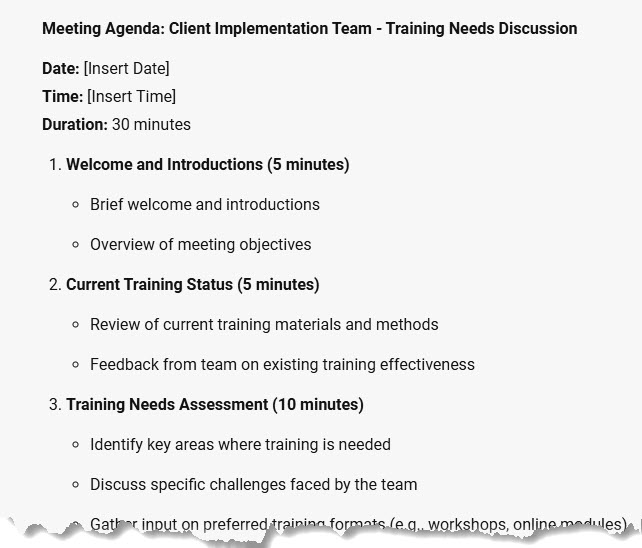
Create a meeting agenda for a 30-minute meeting with my client implementation team to discuss their training needs in the new software.

3. Note the helpful response includes numbers, bullets, and timings

    4. Let’s refine it. Enter:

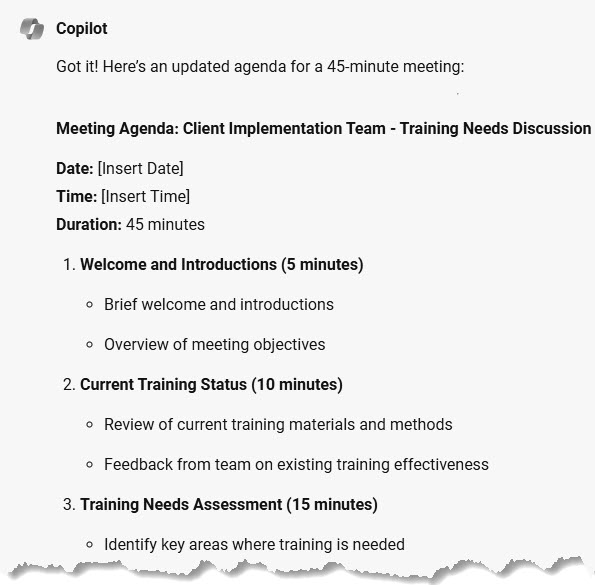
    That's really tight. Make the meeting 45 minutes instead.

    5. Note that it did not just proportionally increase all the timings. Welcome and introduction stayed at 5 minutes, but the meatier portions got their time increased.

    ChatGPT

    I would love to get my Finance certification! I always work better with a deadline, so I’ve set it to be August 31, so that I can enjoy my (U.S.) Labor Day weekend. Let’s create a study schedule.

    1. Navigate to https://chatgpt.com and make sure the model ChatGPT 4o is selected.
    2. At the Message ChatGPT prompt, enter

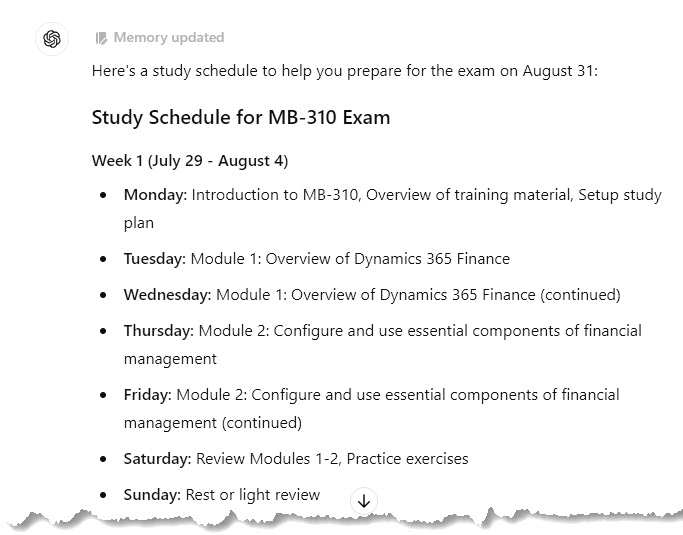
    I want to take the training at https://aka.ms/mb310learnlinks , have a practice assessment, and then take the exam on August 31. Please create a study schedule.

    3. Note that it gives me a day of rest per week!

    It even gave me tips for success.

    4. Oops! Just remembered I have some vacation time coming up. Let’s allow for that:

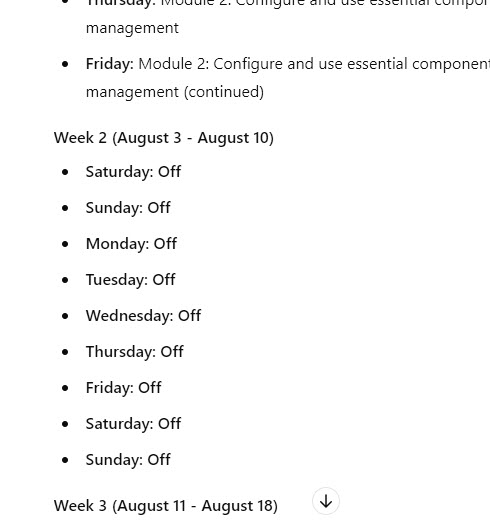
    Give me August 3 to August 10 off.

    5. See how it adjusts for us.

    Claude

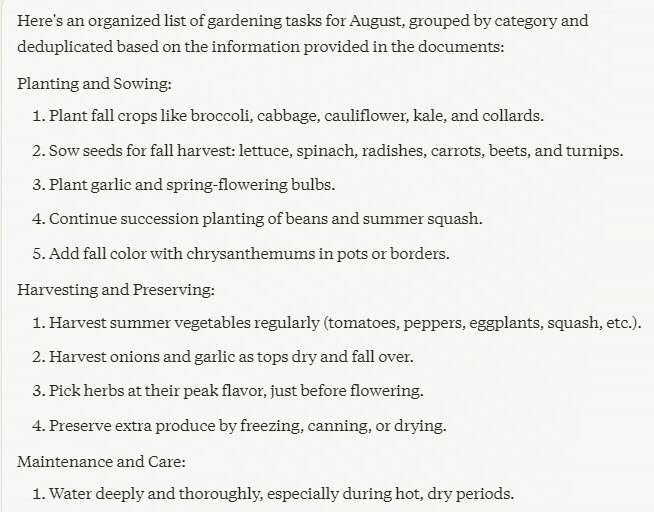
    I did try to put links into Claude, but it told me that it cannot access them. So I pivoted. I need to see what monthly garden tasks I should look into taking care of in August. I did a search for “monthly garden tasks for august zone 7 northern hemisphere” and printed my top 3 results to pdf.

    1. Navigate to https://claude.ai/new

    2. At the How can Claude help you today? prompt, enter the following text. Make sure to attach the pdf files using the Add content button.

    Please use the attached documents to create a list of gardening tasks for me for August. Organize, deduplicate, and group them.

    3. Wow! Claude took 37 pdf pages and created a neat, organized list that I feel I can actually tackle.

    4. I see something inspiring on the list. Let’s ask for more detail. Enter

      Tell me more about creating a pollinator garden.

      5. See the great suggestions it came up with.

      Gemini

      Let’s say you want to provide constructive feedback for an employee or coworker but want to make sure it’s diplomatic and helpful. Let’s let Gemini do the heavy lifting.

      1. Navigate to https://gemini.google.com/app
      2. At Enter a prompt here, enter:

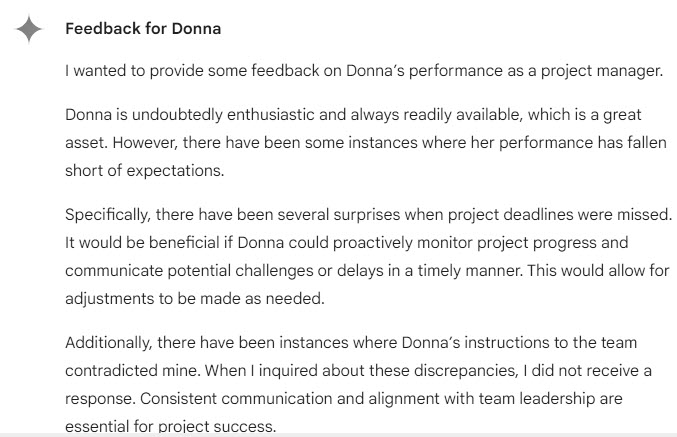
      I want to provide constructive feedback for a project manager named Donna to her manager.

      I found that she was very eager and always available.

      However, she dropped the ball several times.

      I was taken by surprise more than once when deadlines were missed – I wish Donna had proactively checked to make sure things were coming along OK, and let me know when they weren’t.

      She provided instructions to the workers which contradicted mine, and did not answer when I asked her about this.

      Please craft this feedback for me.

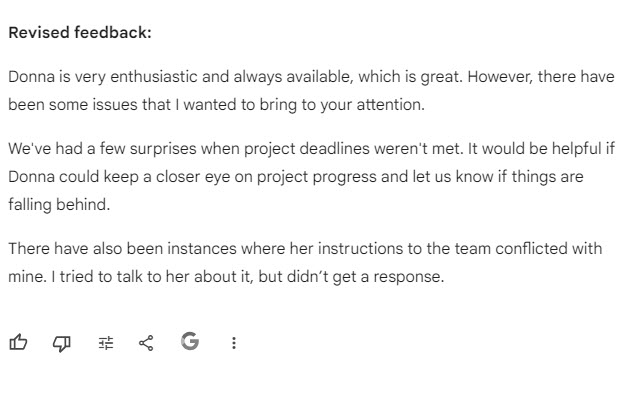
      3. Notice that it did provide her positives, and made specific suggestions for improvement. After the end of the screenshot, it did wrap on an upbeat note.

      4. The tone isn’t 100% there. At the prompt, enter

      “Beneficial” and “inquired” are slightly too formal. Make it more realistic, while keeping it professional.

      5. The response was way too short, but I can merge, or I can refine further.

      Perplexity

      I have a bunch of open tabs of Copilot training that I want to take! Let’s organize them.

      1. Navigate to https://perplexity.ai

      2. At the Ask anything… prompt, enter:

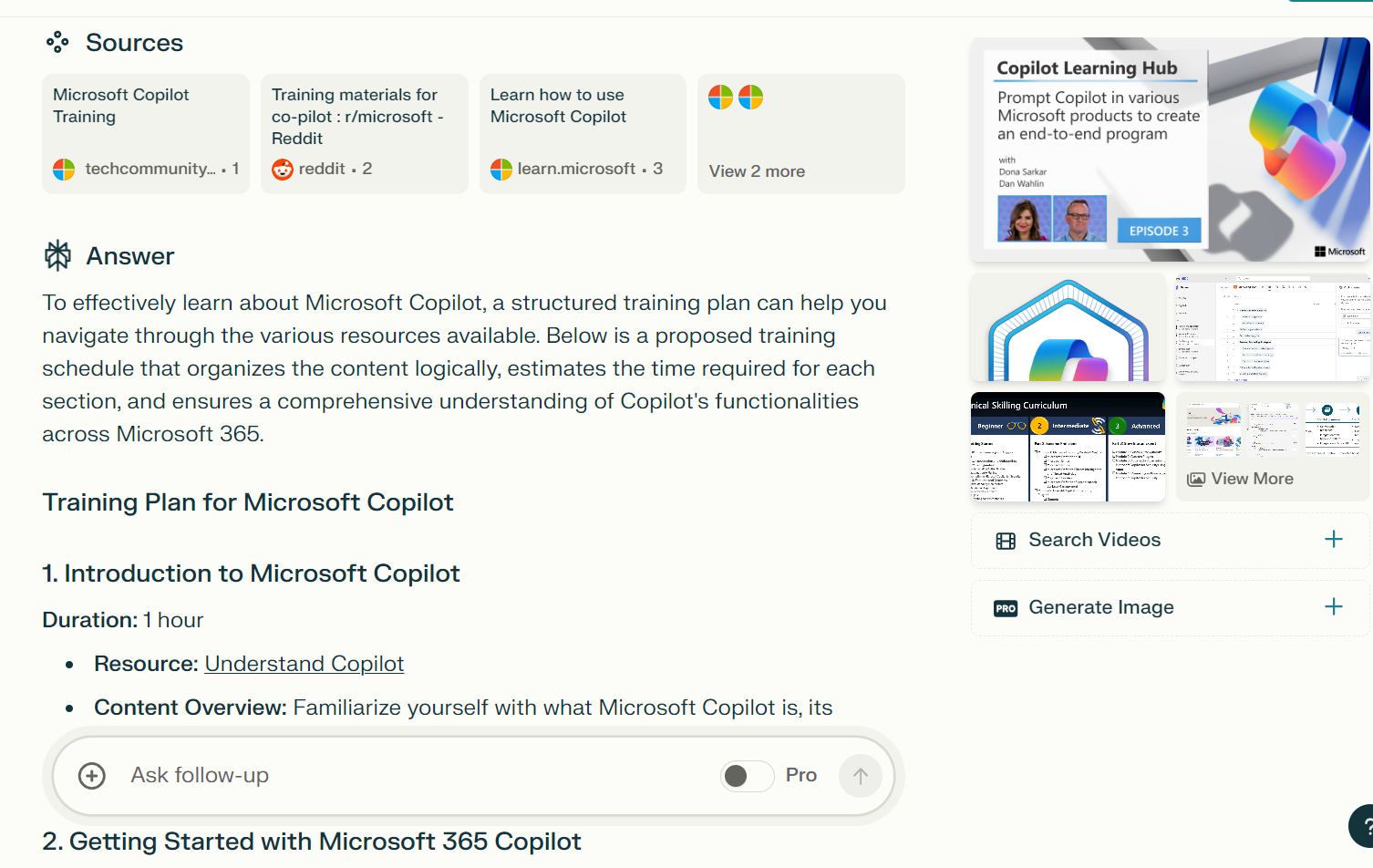
      I need to learn all about Copilot. Using the following links, organize a training plan in a logical sequence. Estimate the time on each portion. You can use other links on the web. Only use Copilot which is broadly applicable. Do not use Copilot for GitHub and very specific applications. These are some links:

      https://learn.microsoft.com/en-us/search/?terms=copilot&category=Training

      https://learn.microsoft.com/en-us/training/paths/get-started-with-microsoft-365-copilot/

      https://learningpath.microsoft.com/8814

      https://learn.microsoft.com/en-us/training/paths/empower-workforce-copilot-use-cases/

      https://learn.microsoft.com/en-us/training/courses/ms-4005

      3. Note that it has organized a training plan just as asked (and it also entered a total at the end)

      4. It offered related questions after the response, so I selected 

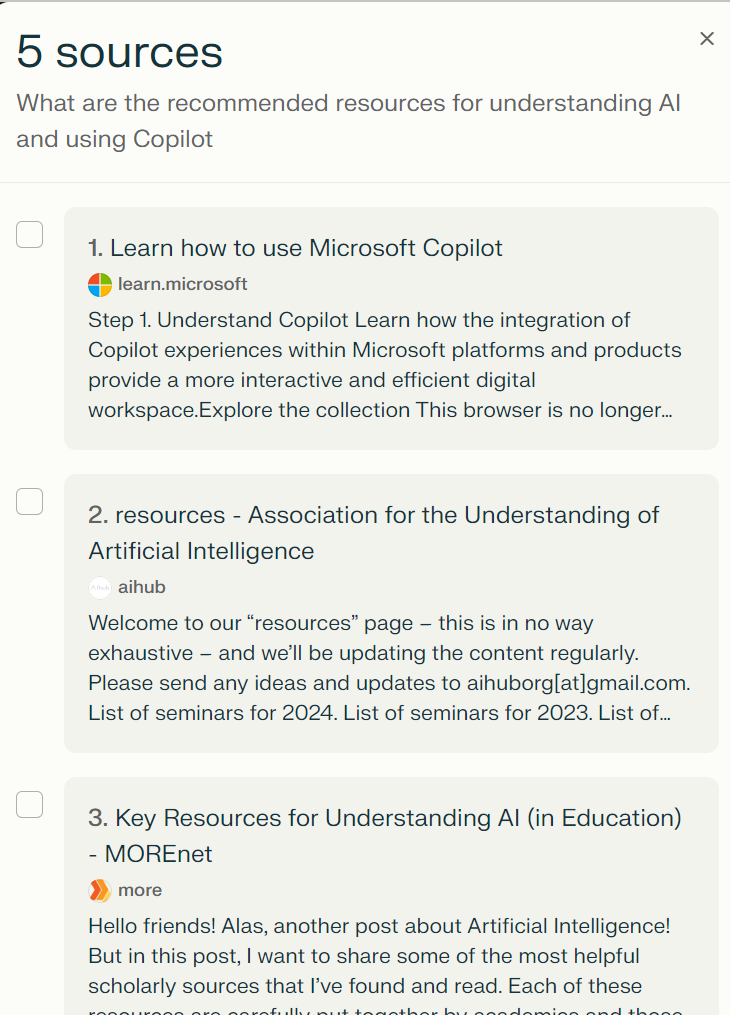
      What are the recommended resources for understanding AI and using Copilot

      5. Check out the reply; it offered five sources with synopses of each; only one of them was Microsoft

      Note that I’ve used the same models that I introduced last time. If you’d like to see other models, drop a comment and let me know!

      Summary and call to action

      Today, we’ve used AI to:

      • Create a meeting agenda
      • Create a certification study schedule
      • Create a manageable gardening task list
      • Provide constructive feedback for a coworker
      • Organize Copilot trainings (can you tell I’m biased toward learning?)

      Call to action!

      • Try these exercises
      • Create a prompt that will help you. Try it in two different models, and compare the two results. Which do you prefer? What does it tell you about the strengths?
        • Further refine one of them.

      Hope you’ve had fun! Please do leave comments and feedback. How do YOU use AI?  “See” you next week!

      Posted in artificial intelligence, Exploring the Power of AI | Tagged , , , , , | 5 Comments

      Demystifying AI: What It Is and Why It Matters

      Blog Series: Exploring the Power of AI

      Blog Entry 2: Introduction to AI: Beyond the Hype

      Demystifying AI: What It Is and Why It Matters

      This is part 2 in an ongoing series to acquaint people with AI. Part 1

      Introduction

      In the second year of burgeoning popularity of Artificial Intelligence (AI), many companies are working to figure out how it can benefit them. My own company has hackathons where we try to introduce and flesh out ideas to use AI to work better, faster, more efficiently.

      When I was growing up, computer science was the burgeoning field and ambitious people could make an impact by taking up the new challenges and opportunities that it offered.

      Similarly, AI offers opportunities to those who are ready to learn and utilize this new technology. Steve Little feels that 20 hours of hands-on practice are needed in order to become reasonably fluent. (See his great blog post about the Dunning-Kruger Cliff of learning the technology.)

      But where to start? Good news, it is easy to get going in it. In this blog series, we will offer easy hands-on experience to start feeling competent, in a range of models and a wide variety of applications.

      This can only open doors for you – be they employer doors or doors in your mind!

      The tools

      AI is not a search engine. Use Bing (or Google, if you must) for that. GPT is Generative Pre-trained Transformer and refers to Large language models (LLMs). GPT models are a subclass of LLMs. They are essentially language tools.

      A brief introduction to some of the big models you may have heard of and some things they are known for:

      • Copilot by Microsoft – it is being built into many tools we already use, such as Bing, Office, and, of course, GitHub: I have it summarize my emails and meetings
      • ChatGPT by Open AI – this is good for reasoning: I used ChatGPT to help me decide among RFP responses, and explain why a vendor was or was not chosen
      • Claude by Anthropic–consider Claude for writing and summarizing: I fed it a very long will and had it summarize it
      • Gemini by Google – also considered good for writing and it has a large capacity
      • Perplexity by Perplexity AI – this is great for research

      There are many other specialized tools such as Transkribus for reading handwriting in many languages, MyHeritage photo tools which make your ancestors’ heads and lips move, and, hey, isn’t Grammarly AI?

      Hands-on work

      Without further delay, let’s get into it! I’ll do my best to keep this blog focused on the free versions of the models, though most or all have both free and paid tiers.

      Copilot by Microsoft

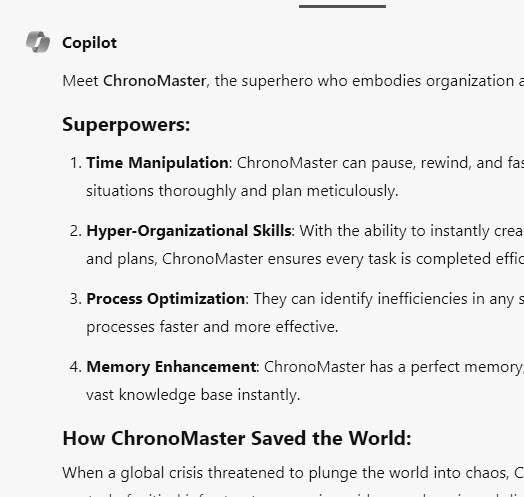
      • In this example, we’ll use Microsoft’s AI chatbot in Bing to create a superhero. On Edge or Chrome, navigate to https://www.bing.com/chat
      • Select a strength of yours. In the New topic box, where it says Ask me anything… type:

      Create a superhero for me who is <your strengths>. Tell me about their superpowers and how they saved the world.

      • Now refine the prompt:

      Select a new more exciting name, and create an avatar for this character

      • Finally, let’s see your avatar, since it didn’t really “get” what you meant last time:

      Create the image for this avatar

      ChatGPT by Open AI

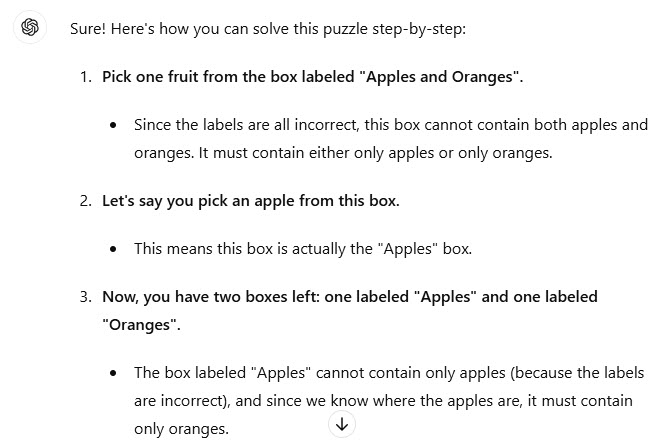
      • In this example, we’ll create a logic puzzle. Navigate to https://chatgpt.com/ and log in with a Google, Microsoft, or Apple account. This will enable you to step up from ChatGPT 3.5 to the latest version, ChatGPT 4o.
      • At the Message ChatGPT prompt, enter:
        • Puzzle: There are three boxes, each with a label. One box contains only apples, another contains only oranges, and the third contains both apples and oranges. The boxes are labeled incorrectly. You are allowed to pick one fruit from one box. How can you determine which box contains what fruit?
      • Let’s refine the prompt:
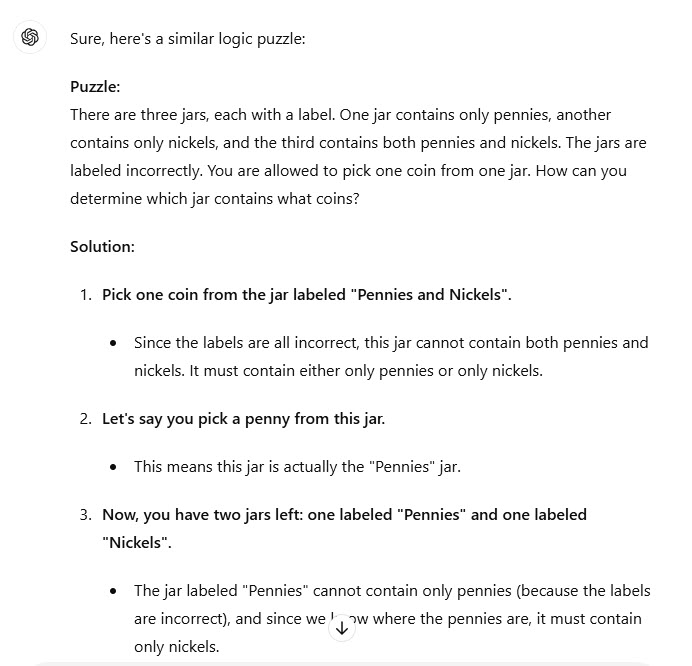
        • Create a similar logic puzzle for me to give someone.
      • OK, it was a little too similar, but it can of course be further refined!

      Claude by Anthropic

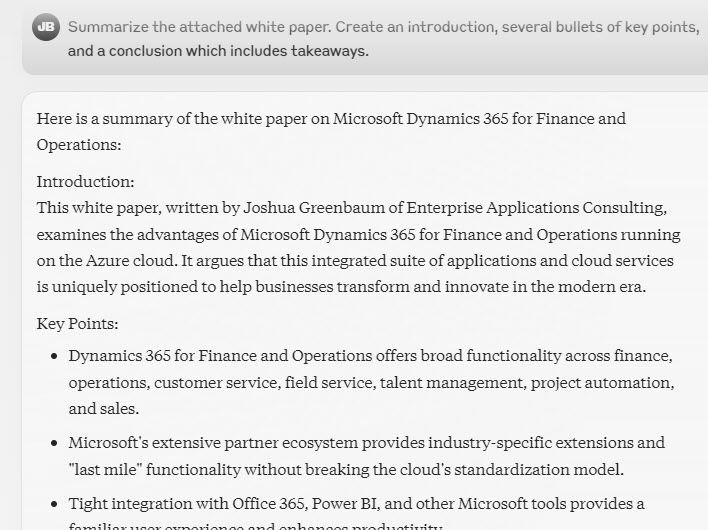
      • Let’s summarize a white paper. Navigate to https://claude.ai/login and use a Google account, or your email
      • In another tab, download the Dynamics 365 for Finance and Operations in the Azure Cloud white paper from https://info.microsoft.com/rs/157-GQE-382/images/FO-whitepaper-final-differentiators.pdf
      • For the prompt, enter the following text and attach the white paper you downloaded by selecting Add content:
        • Summarize the attached white paper. Create an introduction, several bullets of key points, and a conclusion which includes takeaways.
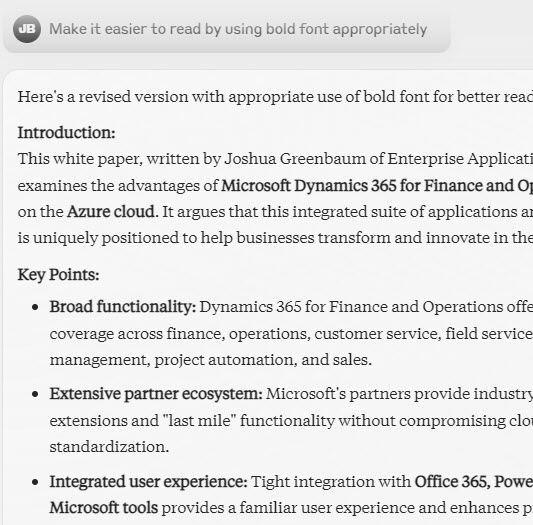
      • Refine the prompt:
        • Make it easier to read by using bold font appropriately

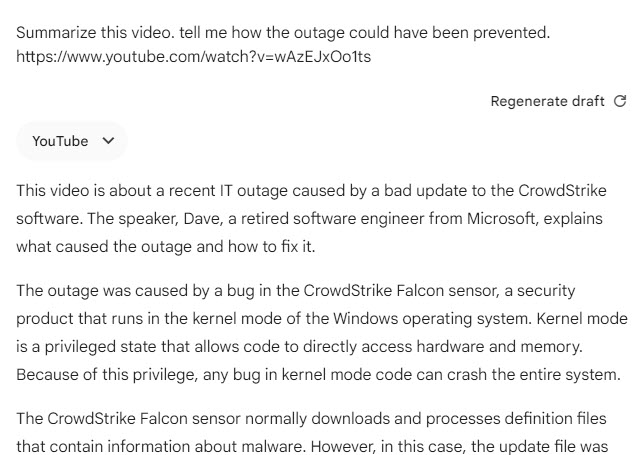
      Gemini by Google

      Perplexity by Perplexity AI

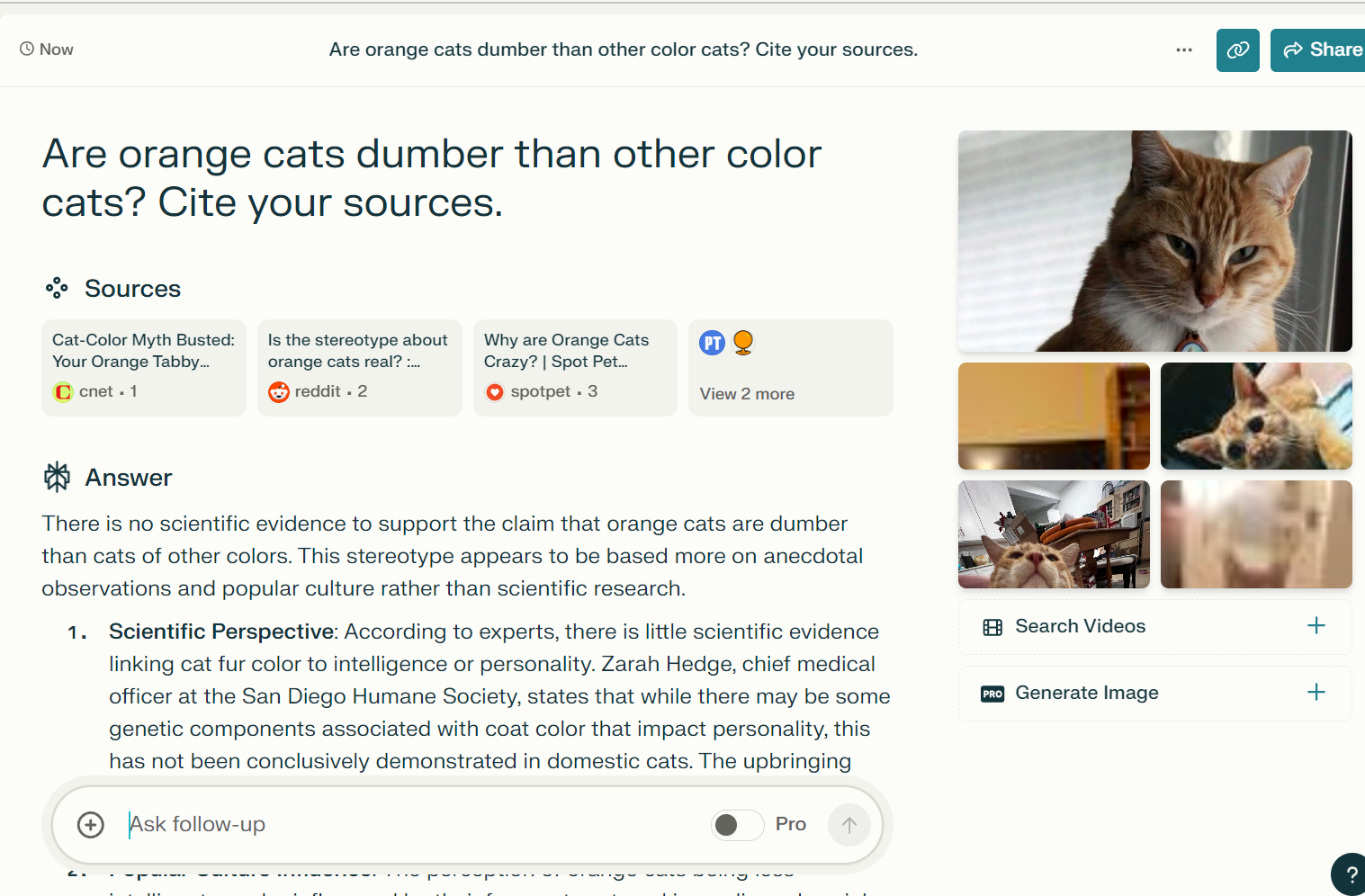
      • Let’s do some research. Navigate to https://www.perplexity.ai/
      • Enter a prompt in the Ask anything… box:
        • Are orange cats dumber than other color cats? Cite your sources.

      • I think you’ll be as pleased as I was to find the good news. Refine your prompt:
        • How about boy orange cats and girl orange cats?

      Note that it has forgotten we were talking about intelligence and moved on to other characteristics.

      Summary

      I hope that this has been a fun start to your dabbling in AI! The key takeaways here are:

      • There are many different models available, each with its own strengths
      • You don’t need a paid subscription to get valuable results
      • Prompts are not a “one and done” thing but are meant to be refined
      • AI can be fun and useful!

      Go practice! Let us know what you think, what you do, what you find! Next week we will talk about AI in everyday life.

      p.s. Please forgive my formatting, I have a learning curve with WordPress! 🙂

      For further information

      https://www.oneusefulthing.org/p/which-ai-should-i-use-superpowers – this blog is an introduction to the great Ethan Mollick, a professor at Wharton and one of the leading minds in AI today

      Posted in artificial intelligence, Exploring the Power of AI | Tagged , , , , , | 8 Comments

      The AI Revolution: Why You Should Care and Why You Should Trust Us

      Blog Entry 1: Why Learn AI and Why Trust This Blog


      Introduction


      This blog has a long history of informing technical people about goings-on, particularly in the world of Microsoft Dynamics. I appreciate the followers and support, including the giants in the field who contributed, commented, or gently corrected, as well as everybody who hit subscribe or like and made my day!


      It’s time now to iterate to artificial intelligence, as the world heads inexorably toward the next huge leaps and bounds with the machine. This does not exclude Dynamics, as Copilot is rolled out with every major update and most minor ones.


      Why Learn AI


      Never in my memory has a new technology swept markets across the board so rapidly. No matter your field, specialty, interest, AI has probably already seized it and is starting to be leveraged there. Software updates include AI capabilities that we should learn to properly use the software. AI offers us advantages including time savings, analytical and creative gifts, and overall efficiency. If you ‘re reading this, you’re probably curious about how AI can help you. While it’s not a critical skill at this point, the ability to use large language models effectively will increase in demand.


      Why Trust This Blog


      You’ve perhaps been reading this blog since 2011! I call them as I see them and I
      laugh till I cry
      . I earned a bachelor’s degree in Computer Science from New York University many moons ago, an MBA in Information Systems from the same school, and was technical for decades (programmer, developer, technical consultant).


      My artificial intelligence chops are younger. 😊 I joined an internal “ChatGPT hackathon” when ChatGPT 3.0 was the latest version (yipes!) in January 2023 when there was a call out for volunteers to lead a workstream to increase our team’s knowledge in generative pretrained AI. (Shout out to Marlina for leading this!) Starting in October 2023, I’ve taken three courses offered by the amazing Steve Little https://aigenealogyinsights.com/). I achieved two Microsoft AI certifications: AI-900 and AI-102.


      I readily disclose that I am a proud employee of Microsoft, but this is not an official Microsoft blog. I encourage you to try Copilot but will be offering exercises around many different AI tools so that you get familiar with the vast array that’s out there.


      I subscribe to several AI newsletters and podcasts, and am committed to providing accurate, up to date, and unbiased information.


      I disclose my use of AI as a helper, and I take full responsibility for the content myself.


      You may have seen me speak at DynamicsCon Live 2024 in Denver CO in May. I emphasized how we are starting to integrate artificial intelligence tools into our content creation while still maintaining guardrails. I fully believe that this is a critical technology.


      But how? I have been as intimidated as anyone by this new technology and how to get started! To that end, I’ll be offering up practice exercises as use cases to help us all see that the learning curve is perhaps not so steep as it appears at first. Give it a shot!


      Come along on yet another learning journey with us! Subscribe today!


      Credit: AI (ChatGPT) created the outline for the blog series for me. I wrote the entries. AI (DALL-E) also created the banner image for this blog.


      Posted in artificial intelligence, Exploring the Power of AI | Tagged , , , | 6 Comments

      Functional consultant learning paths

      Microsoft’s corporate mission is “to empower every person and every organization on the planet to achieve more.” To that end, the company is looking to skill up everyone. I transferred early this year from consulting to learning, and as such you may have seen a shift in the focus of my blogs.

      I want to point out that Microsoft Learn has posted free online trainings for four functional Dynamics 365 for Finance and Operations courses. There is a Core course, which can be extended with either Finance, Manufacturing, or Supply Chain Management. In my humble opinion, these courses are great for business users of the software, in addition to functional consultants. Take a free look, and see if you don’t agree!

      Please enjoy!

      Learning paths:

      Core:

      Get started with Dynamics 365 for Finance and Operations

      Use Lifecycle Services (LCS) to design and plan an implementation of Dynamics 365 for Finance and Operations

      Configure your organization in Dynamics 365 for Finance and Operations

      Migrate data and go live with Dynamics 365 for Finance and Operations


      Finance:

      Configure and use the General ledger in Dynamics 365 for Finance and Operations

      Configure and use cash and bank management, and sales tax in Dynamics 365 for Finance and Operations

      Work with accounts payable in Dynamics 365 for Finance and Operations

      Work with accounts receivable in Dynamics 365 for Finance and Operations

      Configure and use budgeting in Dynamics 365 for Finance and Operations

      Configure and manage fixed assets in Dynamics 365 for Finance and Operations


      Manufacturing:

      Configure and use discrete manufacturing in Dynamics 365 for Finance and Operations

      Configure and use lean manufacturing in Dynamics 365 for Finance and Operations

      Configure and use process manufacturing in Dynamics 365 for Finance and Operations

      Use warehouse management in manufacturing in Dynamics 365 for Finance and Operations


      Supply Chain Management:

      Configure and manage products and inventory in Dynamics 365 for Finance and Operations

      Configure and manage procurement and vendors in Dynamics 365 for Finance and Operations

      Configure and work with warehouse management in Dynamics 365 for Finance and Operations


      Happy DAXing! (AX or not, I don’t think I can ever stop saying that)


      Readers: I am a proud employee of Microsoft, but do not speak for the company.


      Posted in Dynamics AX | Leave a comment

      Developer learning paths

      Readers: I am a proud employee of Microsoft, but do not speak for the company.


      Microsoft’s corporate mission is “to empower every person and every organization on the planet to achieve more.” To that end, the company is looking to skill up everyone. I transferred early this year from consulting to learning, and as such you will see a shift in the focus of my blogs.


      I want to point out that Microsoft Learn has posted free online trainings for Dynamics 365 for Finance and Operations Developer. They are in four core learning paths: Introduction, Build, Connect, Extend.


      Please enjoy!


      Learning paths:

      Introduction to developing with Dynamics 365 for Finance and Operations

      Building Dynamics 365 for Finance and Operations

      Connect to Dynamics 365 for Finance and Operations

      Extending Dynamics 365 for Finance and Operations


      Happy DAXing! (AX or not, I don’t think I can ever stop saying that)

      online-learning-icons_23-2147592274

      Posted in Dynamics AX | 2 Comments

      Microsoft Dynamics Technical Conference, 2016 / What Excites You?

      My report from the technical conference.


      For my very last blog on #AXTechConf #DynTech2016, let’s have a little fun. Microsoft posted a whiteboard asking us “What most excites you with the new Microsoft Dynamics AX?” I had time between the end of the conference and my flight home, so I checked out the board. It was a lot of fun! I saw some answers I expected, and some I didn’t. Some made me laugh, and some made me shake my head. Enjoy the variety of answers received!

      IMG_1279 - Copy


      No more EP

      IMG_1280

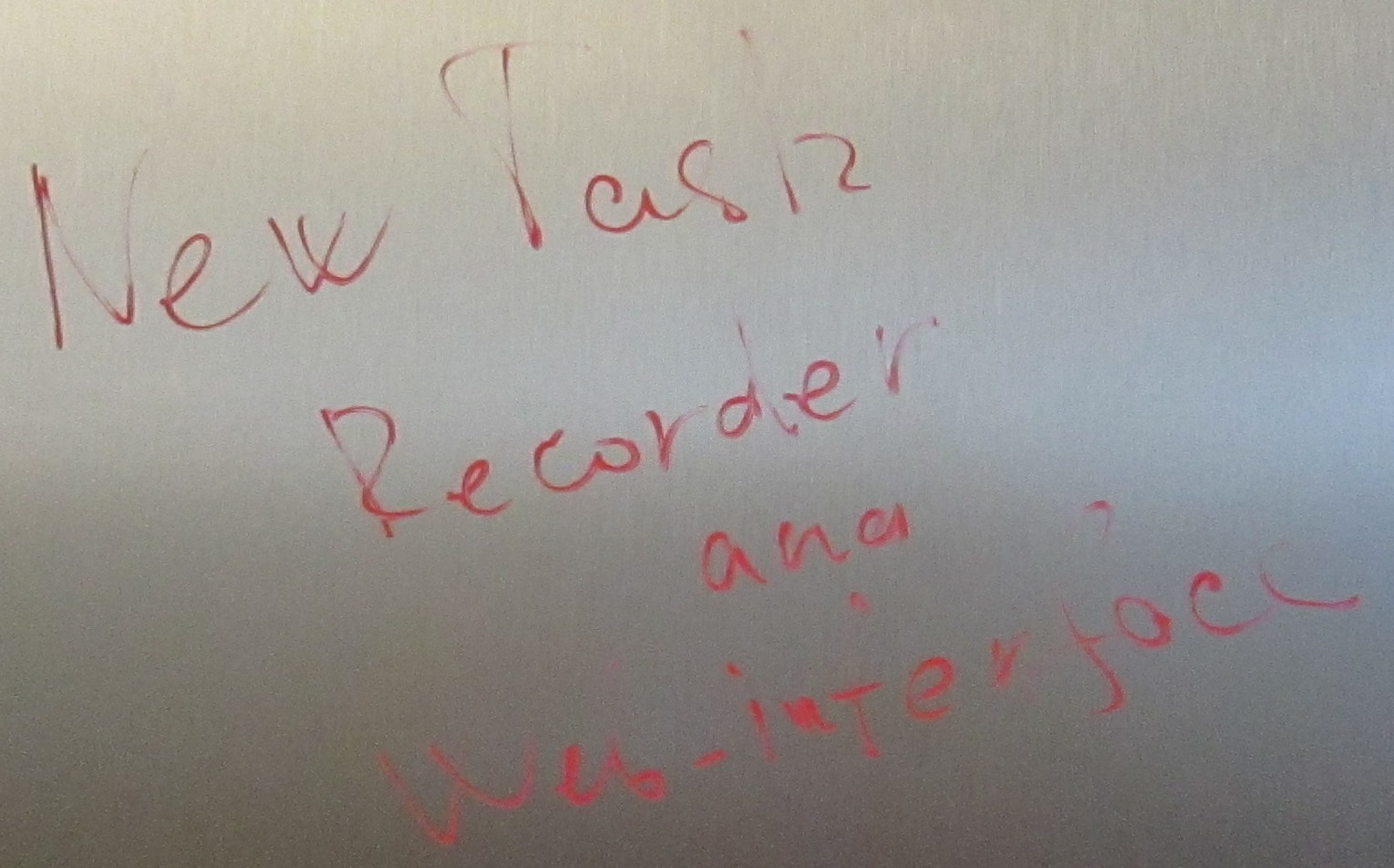
      New Task Recorder and web interface

      IMG_1281

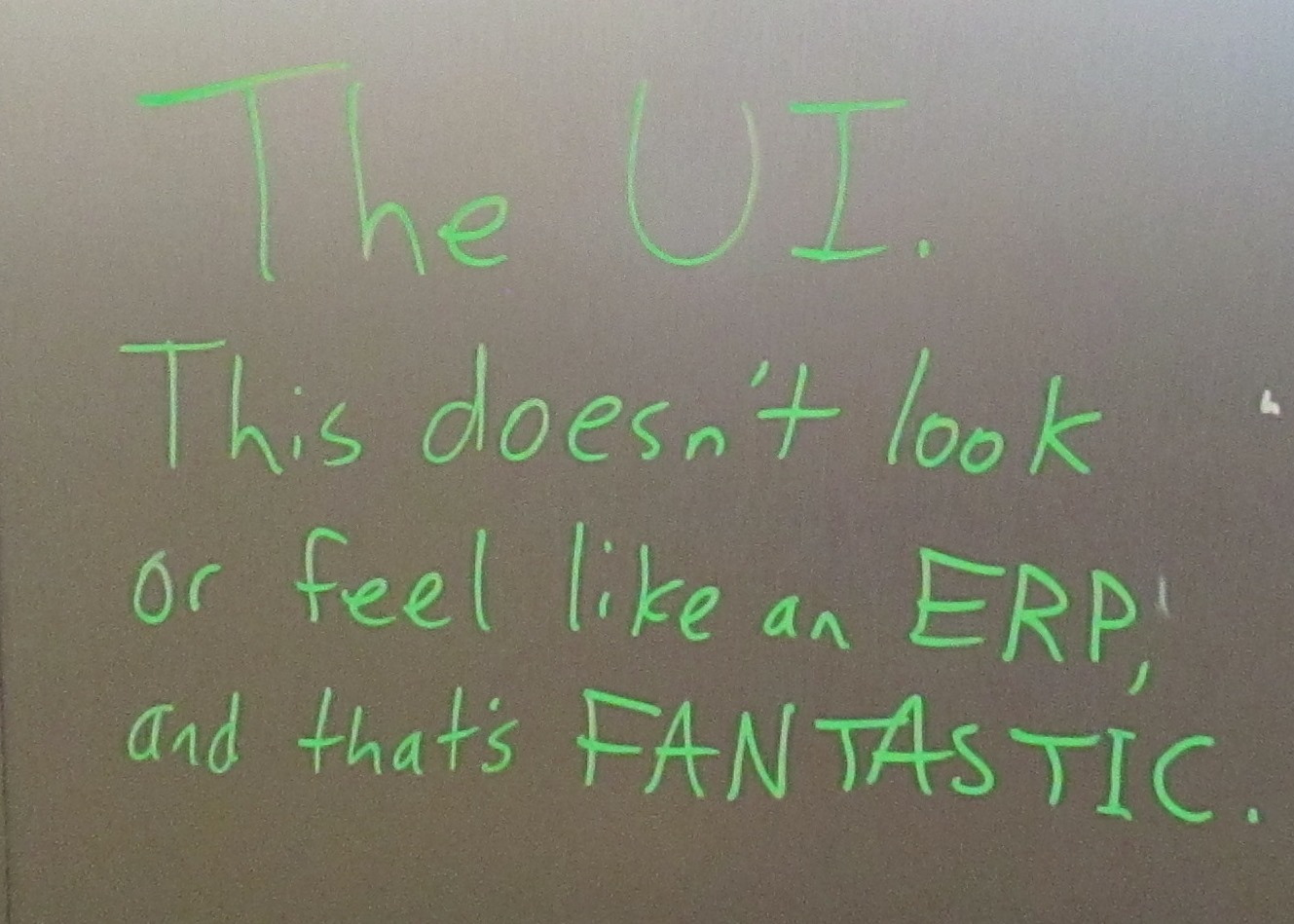
      The UI. This doesn’t look or feel like an ERP and that’s FANTASTIC.

      IMG_1282

      It looks so sexy.

      IMG_1283

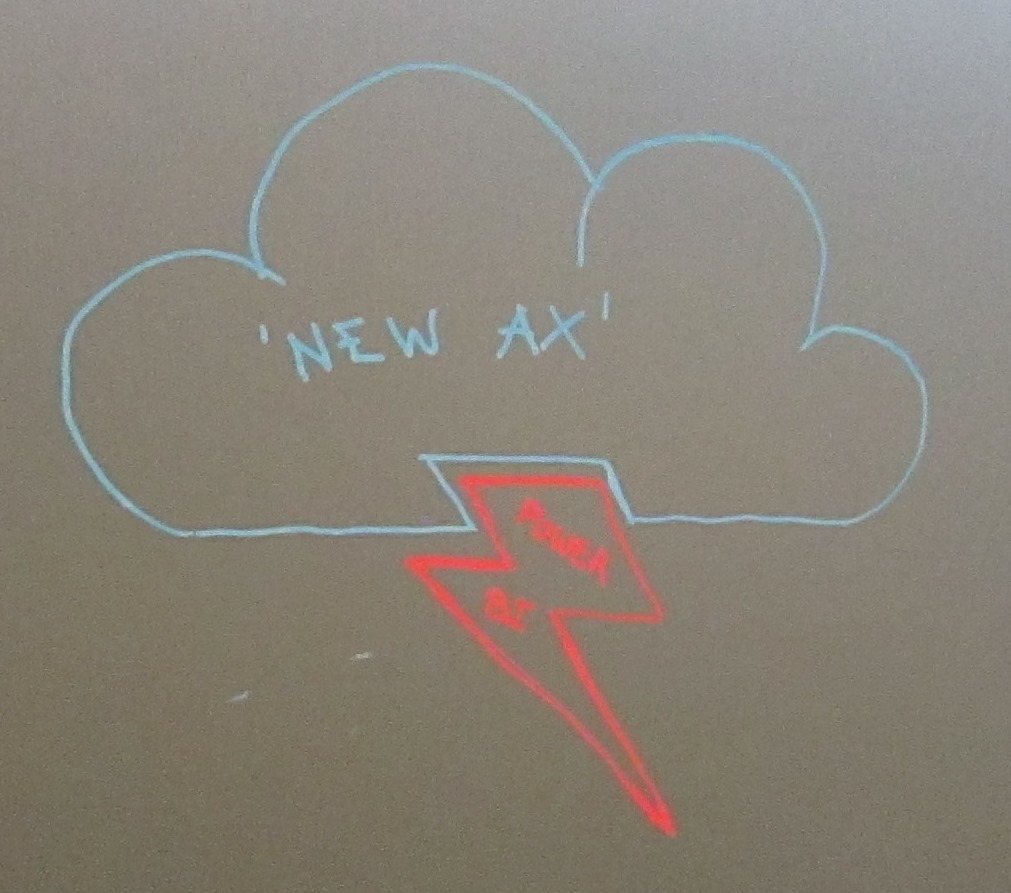
      New AX – Power BI logo?

      IMG_1284

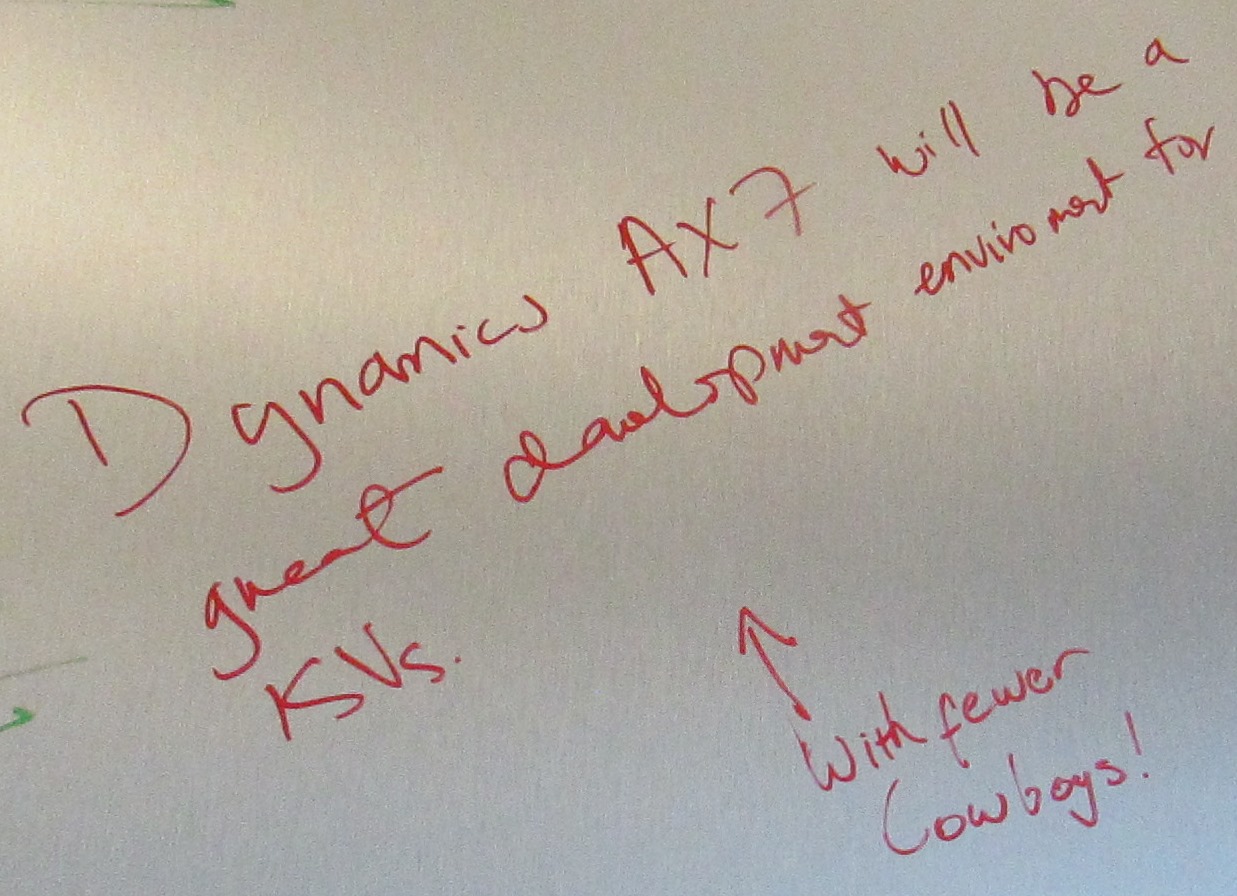
      Dynamics AX7 will be a great development environment for ISVs. With fewer cowboys!

      IMG_1285

      Deploy Prod env in hours!!

      IMG_1286 - Copy

      Your passion… we are excited.

      IMG_1286

      That MS listens to the customer – keep doing so

      IMG_1287

      Personal workspaces!

      IMG_1288

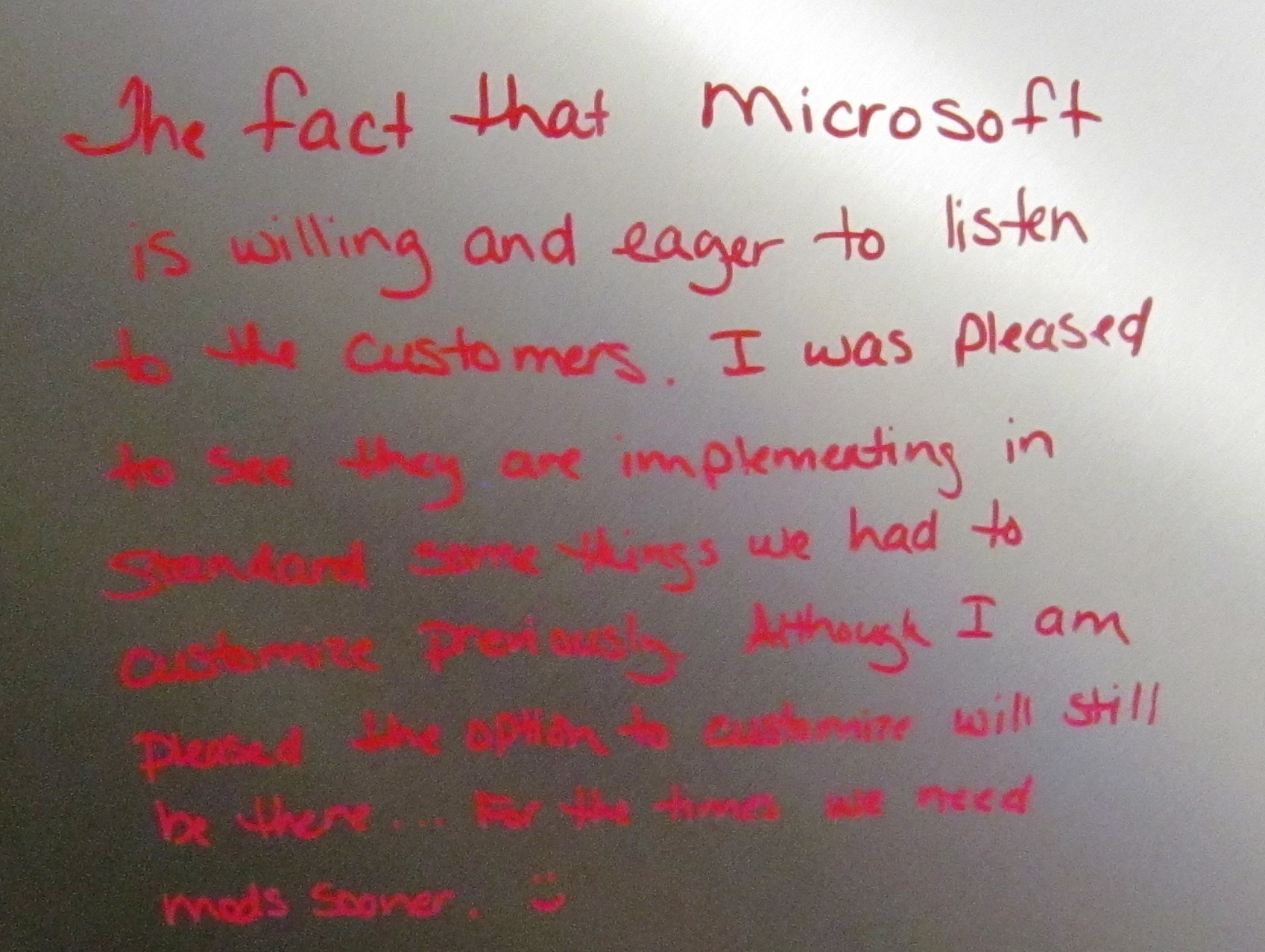
      The fact that Microsoft is willing and eager to listen to the customers. I was pleased to see they are implementing in standard some things we had to customize previously. Although I am pleased the option to customize will still be there… for the times we need mods sooner. 🙂

      IMG_1289

      Paying for every bit transferred and every CPU cycle. [Who hasn’t left their Azure machine up inadvertently?]

      IMG_1290

      We are making ERP ‘sexy’ 🙂

      IMG_1291

      Moving from P-code to managed code!!

      IMG_1292

      After 20 years working with Sage, it’s refreshing and exciting to see passion again. Masterpiece from Microsoft.

      IMG_1293 - Copy

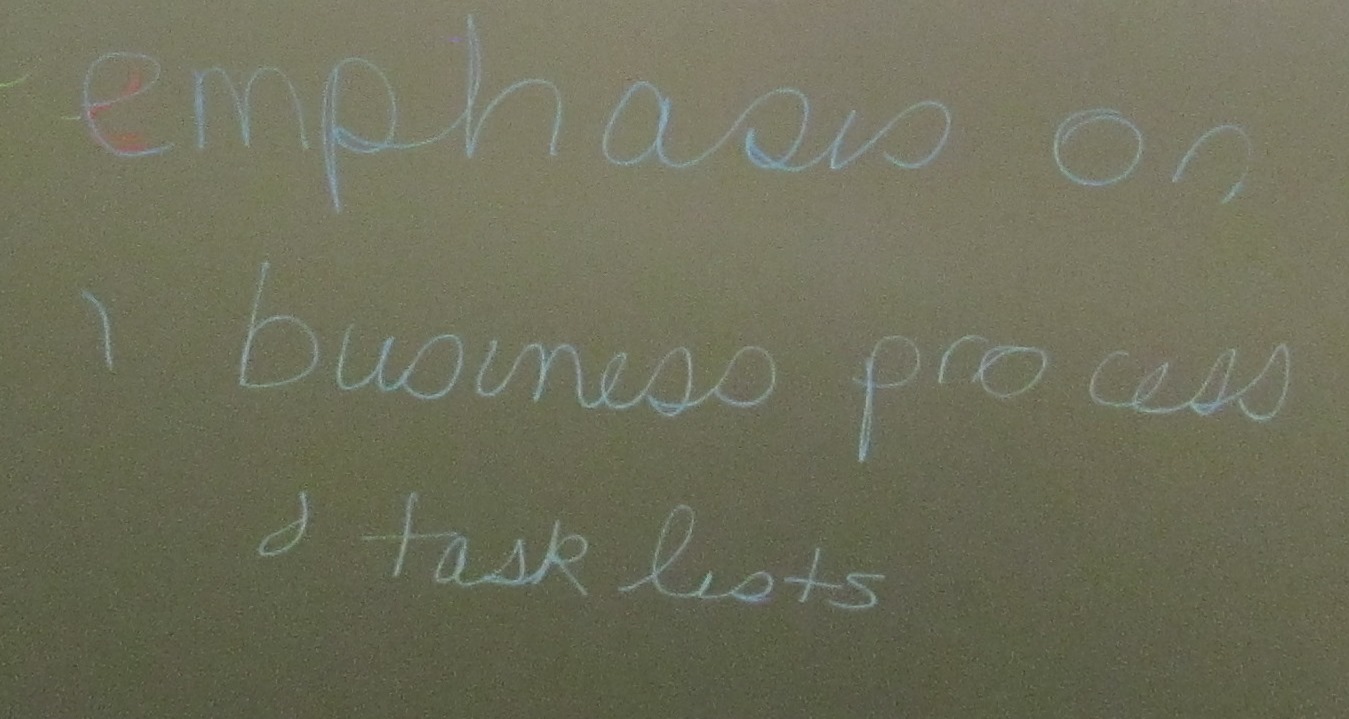
      Emphasis on business process and task lists

      IMG_1293

      Mobile POS

      IMG_1295

      Cloud.

      IMG_1296

      This, folks, has been your intrepid reporter, signing off from the technical conference… I will be taking a smidgen of time off from the blog but will be back!


      Happy DAXing!


      Posted in ax 7, AX7, Dynamics AX | Tagged , , , | Leave a comment

      Microsoft Dynamics Technical Conference, 2016 / Day 3 Session 4

      My report from the technical conference.


      For the last session in the conference 😦 , I went to Code Migration to the Latest Release of Dynamics AX with Kiril Val, Senior Solution Architect.


      This was kind of a gimme for me. I had already been to Kiril’s five day code upgrade workshop given for ISVs in October. (Secret: The Seattle area photos I’ve put in a few of these blogs are actually from then. I didn’t get time to tourist this time.) I wanted to see how it came together, perhaps contribute, and note differences between a CTP and the RTW.


      I noted that the last part, “What I wish I knew” is crucially important. These contain real pain points that were hit along the way.


      Session Objectives

      1. Understand code migration approach for Dynamics AX and beyond
      2. See a real solution being migrated
      3. Discover how to prepare for Dynamics AX
      4. Learn developer’s tips and tricks for the code upgrade

      Out of scope: Data upgrade

      Data upgrade we hope to have available with update 2 perhaps 6 months. Also perhaps data migration from 2009.


      How did we get here?
      – AX 2012 Migration

      • Challenging
      • Dynamics AX goals
        • Seamless, Easy, Predictable
      • Existing Momentum
        • Code migration started with partners March 2015
        • Partner readiness well underway

      “We are as close as it gets to a magic button”


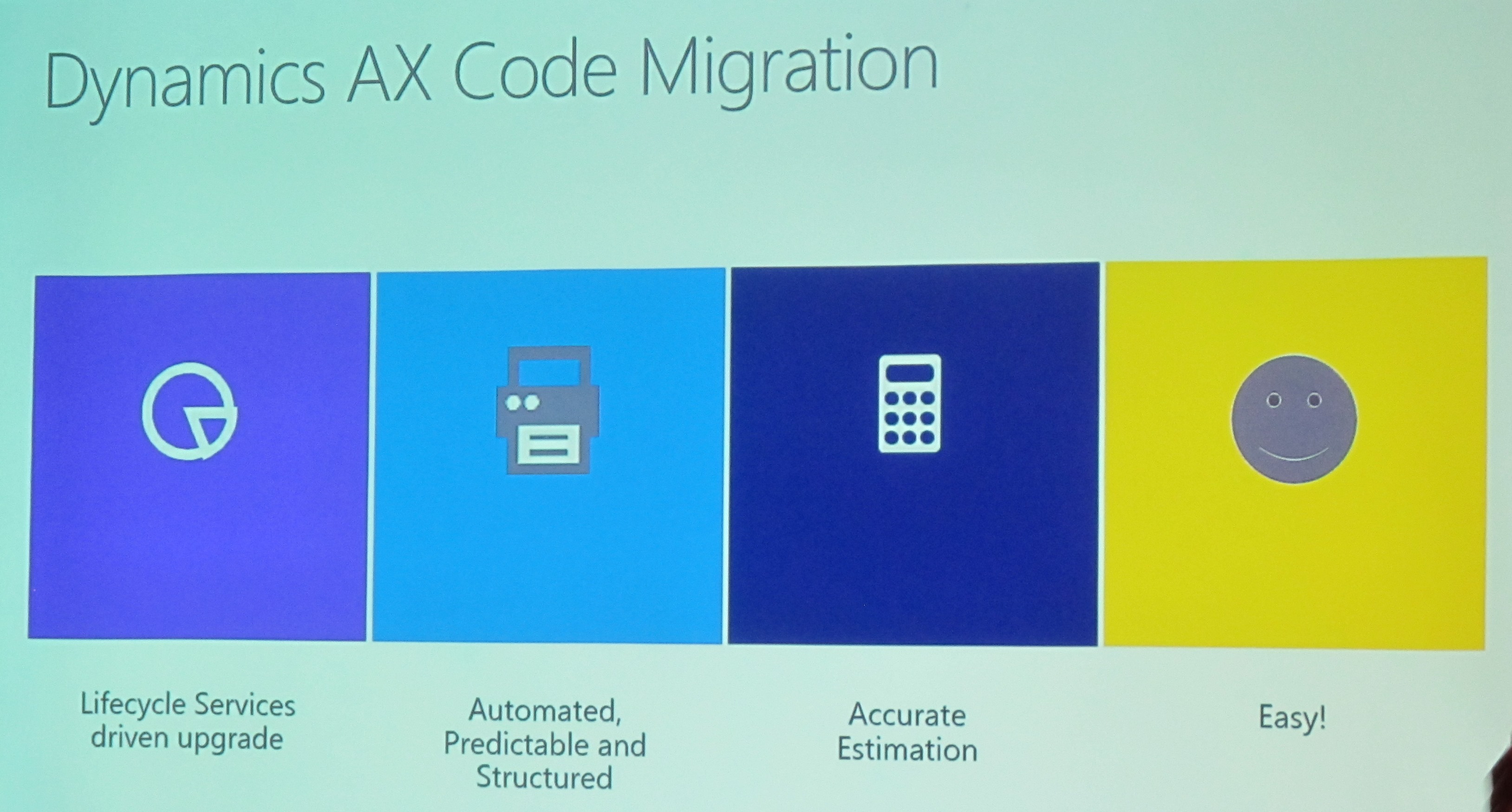
      Dynamics AX Code Migration

      IMG_2213

      AX 2012 to current Dynamics AX

      • All types convert as is, major exceptions:
        • Enterprise Portal is not supported in current Dynamics AX and needs to be rewritten
        • Custom client controls will not run in current AX
        • Document Services are not supported in current AX
        • Form parts are replaced by current AX form parts
        • Cues
        • Visual Studio Projects


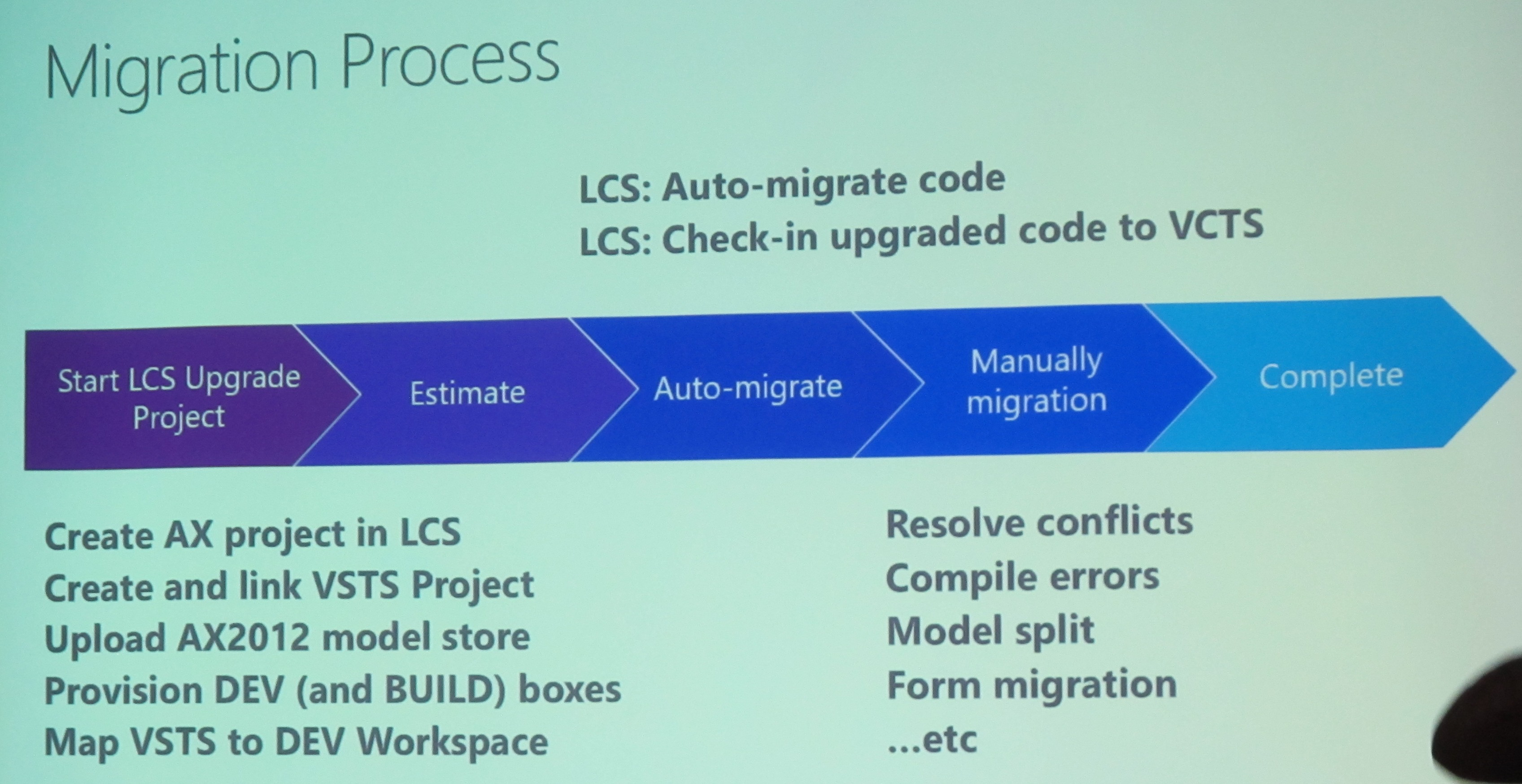
      Migration Process

      IMG_2220

      Those steps are important

      The manual part takes the most time


      Q&A: Document services replaced with entities

      2009 to AX7: Data migration is preferable to data upgrade


      Demo

      Export modelstore

      Zip it

      LCS > Create project > Project settings > Azure connectors

      Connect lcs project to azure and vice versa using certificate

      Connect Visual Studio Team Server account

      VSTS > Profile > Security > Personal access tokens

      Deploy environment, recommend Azure. Issues locally with multiple developers. D13 or D14 are good machines. Use V2 for dev machine. D4 for build machine

      Code upgrade > create job. Estimate only does not check anything in to Visual Studio

      You can’t upgrade only one project, one model – you must upgrade the entire modelstore

      Build box will be connected to VSTS automatically

      Build machine can be changed: continuous integration

      Recommend upgrade from R3 CU10, but the tool will accept lower versions

      VSTS > project > code


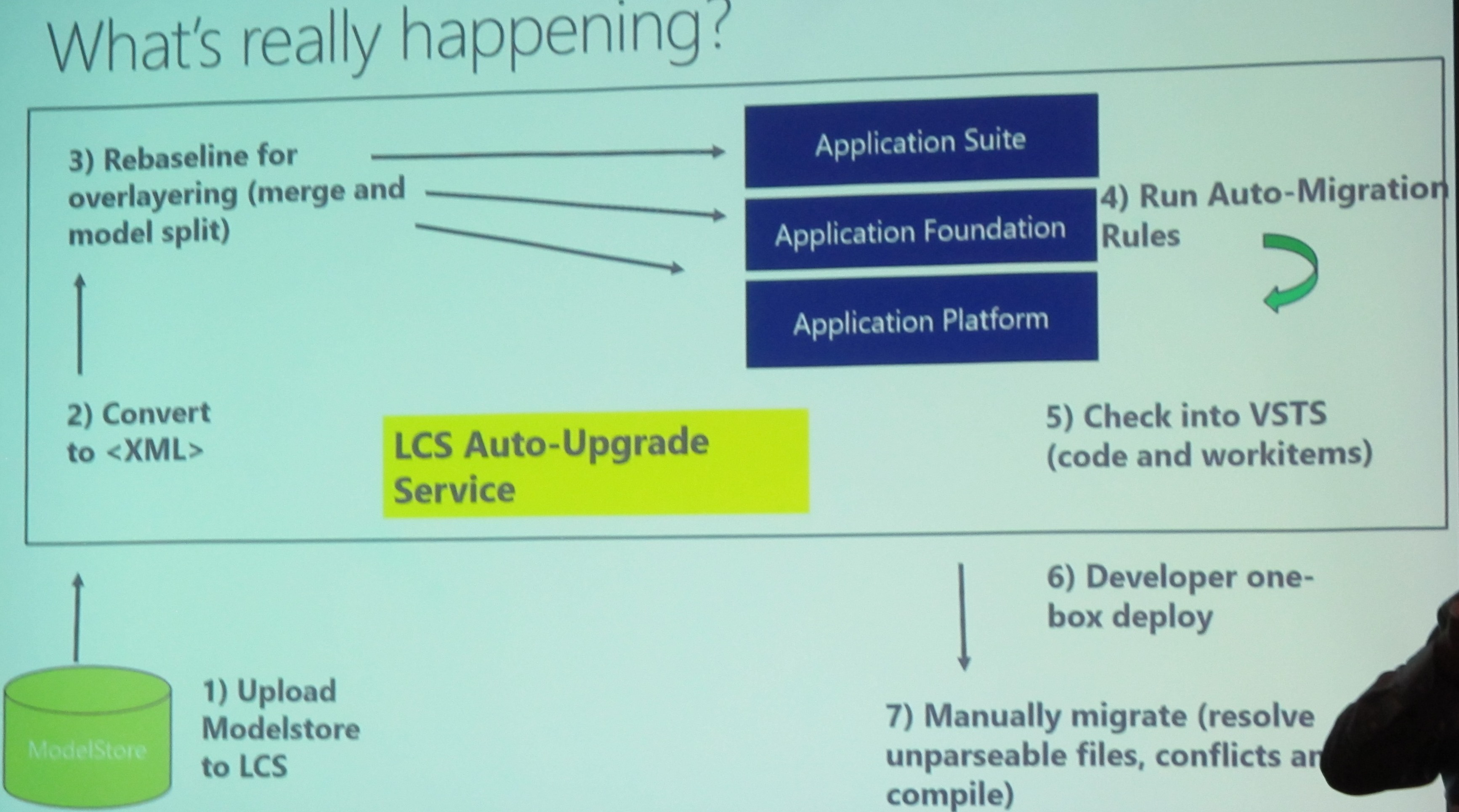
      What’s really happening?

      Model management is there

      IMG_2221

      Auto-migration rules

      How does auto migration work?

      Best Practice Framework

      What is auto-migrated?

      • Renamed and deprecated APIs, metadata
      • Apply form patterns
      • Deprecated controls (e.g. Segmented Entry Control and Dimension Entry Control)


      Manual Upgrade

      Use LCS links within your project

      • Unparseable files
      • Conflicts
      • Compile errors
      • Package/Model split extensions, events and delegates
      • Form patterns
      • Modern reports and BI

      Tip: Use LCS for whitepapers and patterns learning


      Demo

      Manage workspaces, get latest, 3 solutions. 1. unparseable, 2. code merge, 3. upgraded

      Open code merge solution

      Building from the solution won’t work the first time

      Build from Dynamics AX one at a time bottom up


      Am I done?
      This is for solutions to be on the marketplace

      How to make it a “Dynamics AX” Solution

      • Build your workspaces
      • Get 100% coverage of form patterns
      • Build your entities
      • Extend or create rich controls
      • Extend base AX (where possible)
      • Integrate rich BI scenarios
      • Fix BP errors and TODOs
      • Record your task guides


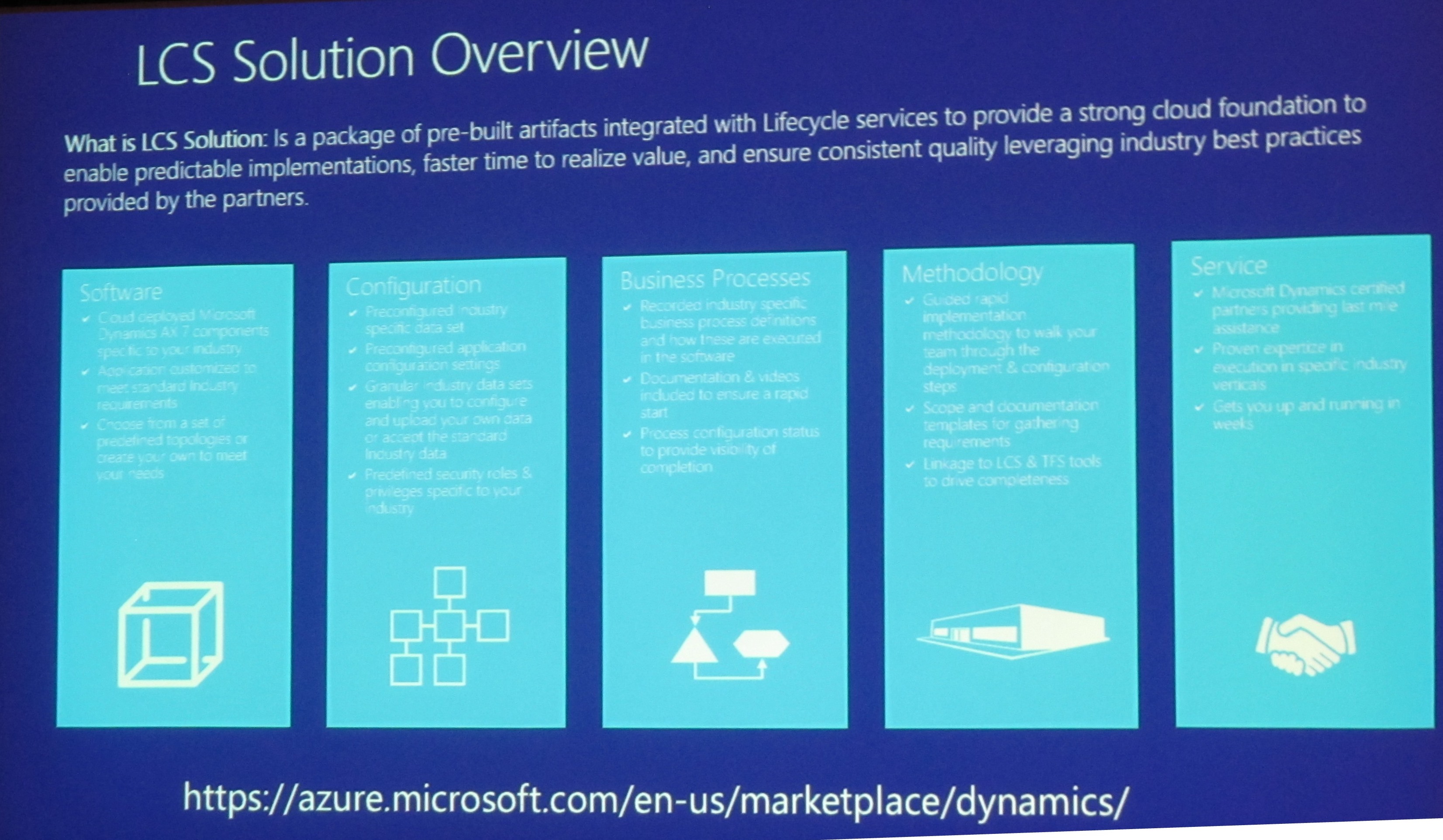
      LCS Solution Overview

      IMG_2226

      Dynamics AX to Dynamics AX upgrade

      Goals

      Automate build to build migration

      Keep history (check-ins and work items)

      Trunk/main is your primary development branch


      Branch Management

      1. Stop development on trunk\main
      2. Run VSTS migration
      3. Integrate from releases\version => trunk\main
      4. Complete trunk\main upgrade
      5. Done!


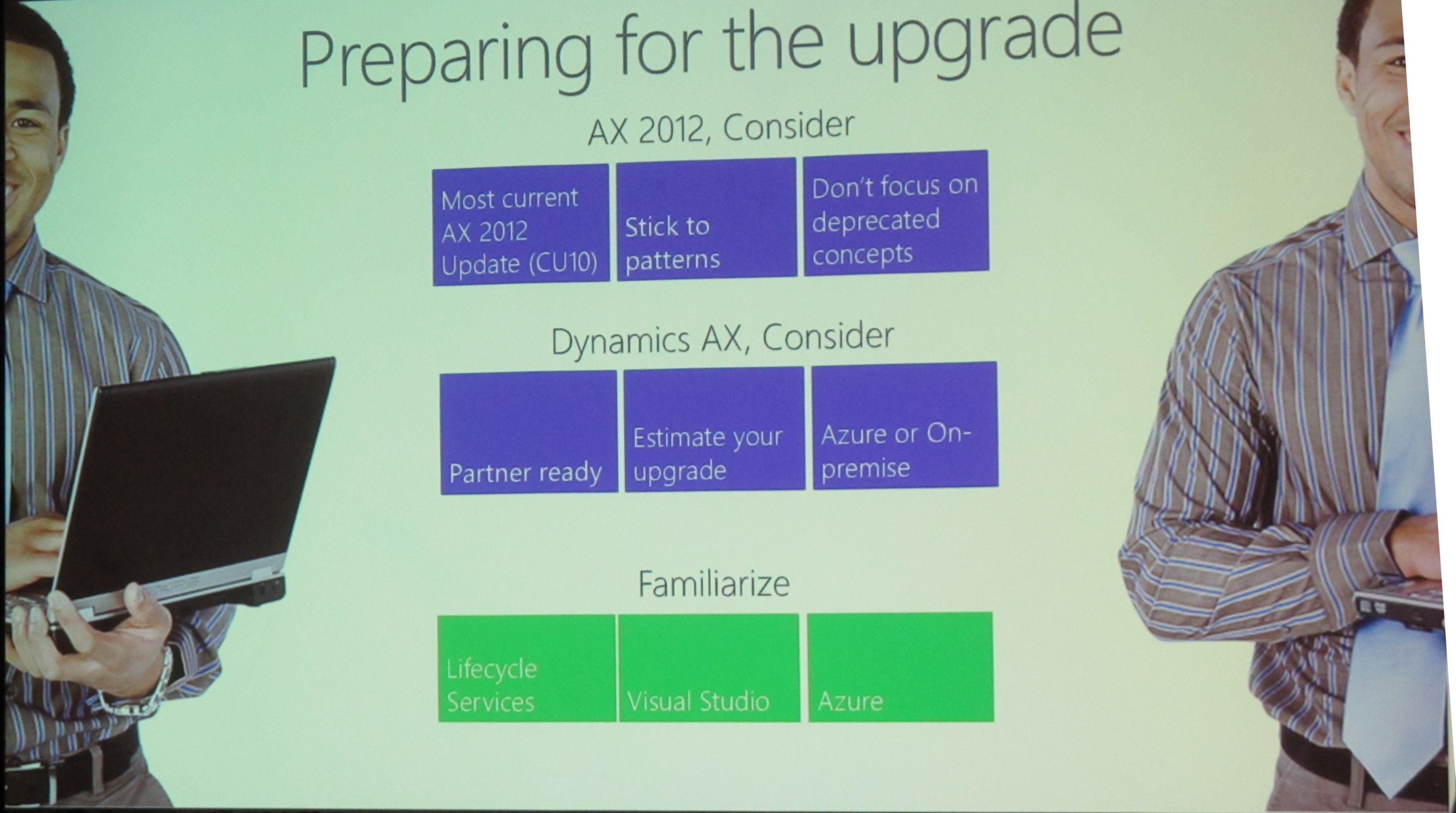
      Preparing for the upgrade

      IMG_2229

      I wish I knew this before I started my upgrade…

      • Run Visual Studio as Administrator
      • Embrace and love extensions and delegates
      • Build packages from AX7 menu – not build solution
      • Do not import Microsoft hotfixes to AX2012 as XPOs
      • Check full error log if an error does not make sense (the full error log is in the model folders)
      • Save $$$ by using Azure Automation Runbooks to shut down development environment overnight
      • Remember to “Add Solution to Version control” to ensure your new elements are added to VSTS
      • Check-in “Descriptor” file for your model to VSTS else your automated build will fail
      • Do not customize Microsoft report designs, copy them instead. When Microsoft reports are updated they will be reimplemented, losing your changes
      • If unsure how to upgrade a pattern, compare Microsoft code of AX2012 and the new Dynamics AX


      There are deprecated APIs including filesystem ones


      Happy DAXing!


      Posted in ax 7, AX7, Dynamics AX | Tagged , , | 2 Comments