Five Good Minutes – Dynamics AX 2012 Grids, Filters, and Role Center Cues

“I need a report for that” – maybe not! Please see installment 2 of Five Good Minutes with Dynamics AX. I learned on this filtering, and even attempted to use it on a request I got! 🙂


Five Good Minutes – Dynamics AX 2012 Grids, Filters, and Role Center Cues

Happy DAXing!

Posted in AX2012, Dynamics AX, Video tutorials | Leave a comment

Five Good Minutes in Microsoft Dynamics AX: Part 1: PowerPivot

I’m so excited to share word of my colleague Chad Carnes’ new video series “Five Good Minutes in Microsoft Dynamics AX.”

Chad shows AX users how to make things they do or need to do, easy! With my years of AX, I’m even learning some pointers.

The first in the series is about PowerPivot, SharePoint, and Role Centers – but my advice – don’t try the SQL at home! Leave that to us developers to muck up! 🙂

Thank you for making AX easier, Chad!

Happy DAXing!

Posted in AX2012, Dynamics AX, Video tutorials | Leave a comment

Data Import/Export Framework – AX 2012

I recently had the opportunity to introduce the “inside team” at my client to the new Data Import/Export Framework (released on InformationSource), and we were all very pleased with the results.


The class consisted of a Project Manager, production consultant, and technical lead. I spent Tuesday morning instructing them, then told them to go try it. They divvied up the work and long before end of day Wednesday, they had successfully migrated customers, vendors, and items!


We added custom fields to existing entities. We learned lots of troubleshooting. One of us created a custom entity, but someone forgot to teach the PM to compile his code. 😉


We are very, very hopeful for the possibilities of this tool! Can’t wait to start doing header/detail (read: transactional) data, and adding setup tables.


http://blogs.msdn.com/b/axsa/archive/2013/03/13/microsoft-dynamics-ax-2012-data-import-export-framework-old-name-data-migration-framework-is-now-available-on-information-source.aspx


Happy DAXing!

Posted in AX2012, Data migration, Dynamics AX | Leave a comment

Using the Excel add-in to update custom fields

Our application consultant came to me wanting to update custom fields which had been added to the InventSerial table.

He could pull the data down to Excel, but couldn’t push it back up to AX.

The first step (with thanks to http://dynamicsuser.net/forums/p/57272/307667.aspx#307667) was to add parm methods to the AxBC table class.

Yet that didn’t solve it, so I researched further and found that InventSerial table is part of the InventASNService.

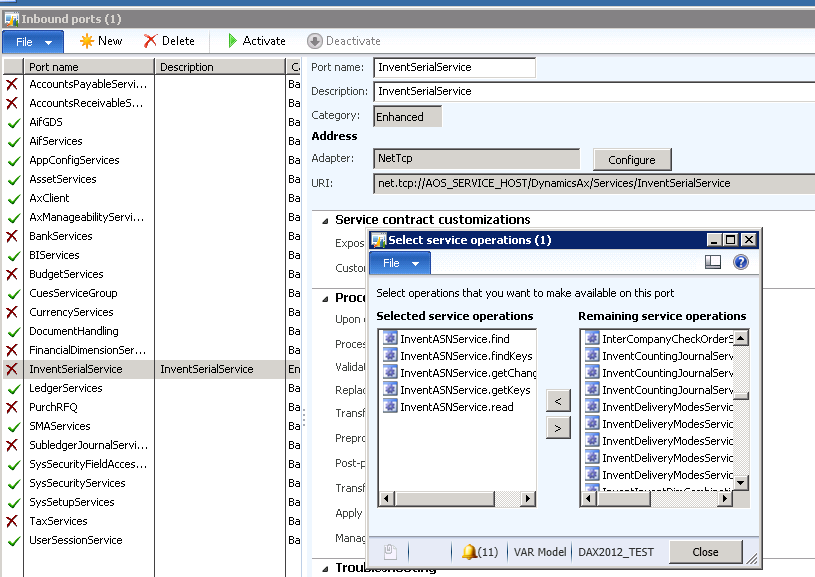
Then I added an inbound port using that service’s operations (click screenshot) and activated the port.

AddToService

Then I published data from excel to ax.

Happy DAXing!

Posted in AX2012, Data migration, Dynamics AX | 1 Comment

“My purchase order is doubling the item description.”

A client had reported this issue to me, but it magically self-resolved. Time constraints being what they are, I didn’t get back to it. But this morning, a second client reported it. I was sure it was data. Close. It was setup. Here is the solution I sent my functional consultants.

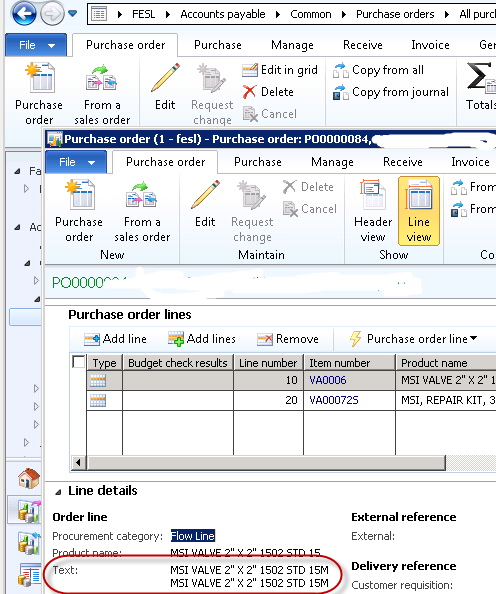
It’s a setup issue.

blog1

Make sure this box is unchecked at the time of PO creation and it won’t be doubled.

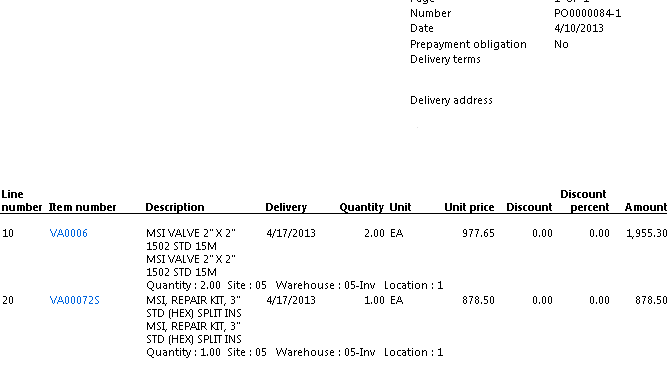
PO 84 in test is an example of a doubling:

blog2

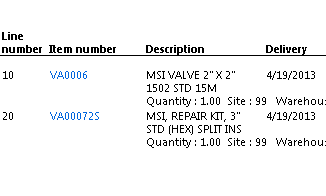
So I unchecked the box (in both test and prod so we don’t get bit later), created PO 104 with the same items, and it prints fine:

blog3

Whereas (it’s important to note) 84 still prints badly:

blog4

If the images don’t come out well; I apologize; click on the pictures. Way too many balls in the air to debug blogging!

Happy DAXing!

Janet

Posted in AX2012, Bug, Dynamics AX | 2 Comments

“Exception has been thrown by the target of an invocation” – solved

Blogging this so that I don’t forget it yet again.

The users logged into a new AX 2012 CU3 environment, and got this error when they tried to run the Purchase Order, the bane of 2012, it would seem!

“Exception has been thrown by the target of an invocation.”


1-22-2013 5-01-34 PM


The fix is simple – for every user, go to “Tools > Options > Development > General” and UNCHECK the “Execute business operations in CIL” box.


1-22-2013 5-27-57 PM


Presto.


Happy DAXing!

Posted in AX2012, Bug, Dynamics AX | 16 Comments

2012 Lessons learned

Sitting at the airport, waiting for a late incoming plane, thought I would put these together.


2012 professional lessons learned


–          Life is fluid; flexibility is key

–          Software release = new bugs (we already knew that, but this year emphasized that, did it not?)

–          There are some really cool tools out there (for example, just a start, https://informationsource.dynamics.com/RFPServicesOnline/RfpServicesOnline.aspx )

–          The business is tailored to the go-getter (unlike other softwares out there)

–          If you’re smart, you’ll learn from others’ mistakes (example http://www.computerworld.com/s/article/9235213/Avanade_sued_over_alleged_ERP_project_failure )

–          RF is a headache even with MS support (same reference)

–          True geeks love sharing their knowledge (evidence the number of quality blogs out there)

–          OTOH, people will wh_re themselves over a Dynamics AX 2012 book (you’ll have to find that yourself)

–          “Purchase order stack trace error” – them’s fighting words!


Happy DAXing!

Posted in Dynamics AX | Leave a comment

Why didn’t my CIL generate?

Up till now, when I did a full CIL generate and it didn’t work, I knew I had an error in my AOT compile. But that takes forever. Found a GREAT shortcut today.


http://axfaq.blogspot.com/2012/07/cil-generation-ax-2012-error-when.html


Thanks to Julian!


Happy DAX’ing!

Posted in AX2012, Dynamics AX | Leave a comment

My grid fields won’t sort – solved

Just a quick note on a problem I just worked around.

My grid fields wouldn’t sort. You click the gray heading bar, and they pretend they sort, but they don’t.

My main form data source was table A. I also had table B joining to A, table C joining to B, and table D joining to C. The grid datasource was A. Only the fields in the grid which were from datasource A would sort – and it took me a while to realize this, because I’m not really displaying fields from that table.

Once I figured out they must be on A to sort, I tried putting methods on table A to retrieve the data from B, C, D – but those didn’t sort either. Had to actually be fields. (Hm, I wonder if methods on the datasource would work?)

Not a big deal to me to add fields, since A is a temp table. But I can see this being problematic in other situations. I welcome input.

Happy DAXing!

Posted in AX2012, Dynamics AX | 2 Comments

Microsoft Dynamics AX 2012 R2 is released!

On PartnerSource:

https://mbs.microsoft.com/partnersource/deployment/resources/productreleases/MicrosoftDynamicsAX2012R2

Posted in AX2012, Dynamics AX | Leave a comment