Five Good Minutes – Grids, Reports, Thanksgiving Favorites

In the US it is time to be thankful for all we have, and I am thankful for so many things. Thank you for reading my blog and accompanying me on my AX journey!

Chad has released his latest Five Good Minutes in Microsoft Dynamics AX video blog. It’s centered on favorites (how to add and organize favorites) and viewer feedback.

Amazingly enough (to me) I am in my eighth year of AX. And I still benefit from stepping back and taking a fresh look. I would not have watched a video on AX favorites if it was not done by my co-worker – but I ended up learning things I didn’t know. So do invest just a few minutes and make this video blog a regular part of your repertoire – I promise it will take less time than your RSS feeds! 🙂

So, sit back for a few minutes and enjoy Chad’s latest efforts!


Happy DAXing!

Posted in AX2012, Dynamics AX, Video tutorials | Leave a comment

Five Good Minutes: “The scariest thing I could think of”

naileditIn honor of Halloween, Chad dressed as “the scariest thing I could think of – an MCA tech lead.”

I have to admit, “he nailed it” – 2 out of 3 for me.

Chad’s latest video speaks a lot to planning… take one commonly used datasource, set it up for BI, and presto, you can create as many as thirty or so reports from it. Of course, Chad illustrates this for us – with customer invoices.

You need to watch this video sitting down; the number of possibilities presented here are staggering. To quote Chad, “If you create a strong datasource, your reporting possibilities are endless.”


For those who must know, the one out of three which is not me, is the sunglasses. My clients typically don’t let me out into the sunshine long enough to need them. 😀

Happy DAXing!

Posted in AX2012, Business Intelligence, Dynamics AX, Video tutorials | Leave a comment

Tips and tricks: Moving customizations without losing element IDs

This tip comes directly from my esteemed colleague Noah Teal. Thanks for sharing, Noah!

THE PROBLEM:LostId
How do I move objects from VAR layer to CUS layer WITHOUT losing Element Id’s?

THE INTERIM UPDATE:

I tried several things, mainly involving exporting all mods in one layer as an XPO, importing the XPO in to a higher layer (USR = high; SYS = low), then deleting the mods from the original layer. Remember that Models are specific to layers, so they can’t be imported in to a different layer. The result of each of the various scenarios were the same: didn’t work. The CUS layer never contained the full object.

Scenarios: Moving VAR mods to CUS layer, then delete VAR mods.

1)      Export VAR, import CUS directly without modification. (No difference in VAR and CUS.)

2)      Export, modify VAR objects, import directly. (VAR difference in CUS.)

3)      Modify VAR objects, export, remove mods from VAR objects, import CUS.(CUS difference in VAR.)

AX smartly determines that CUS layer is the same as VAR and does not import/modify CUS objects. In Scenario #3, the CUS only showed the new object elements (class method, table field); therefore, when the actual object was deleted from VAR, CUS only had an “unknown object reference” left.

My next step is to see what happens when I modify the layer specification of the Model and Elements in the Model Store of the db. Danger! Danger! Update to follow.

THE SOLUTIONS:

Here are the results of testing the three scenarios offered:

1) Model XPO export-import with data backup-restore;

2) AxUtil export-import with conflict push to new layer;

3) Use a Job with that calls Class\ReleaseUpdateDB to update SQLDictionary. An example of this was found at http://dev.goshoom.net/en/2011/11/id-change/


I ran the scenarios with minimal number of objects, so more testing should be done with a full set of customizations.

Note: Only the Table Id’s matter when Element Id’s change since AX tracks and synchs SQL table definitions by Table Id and Field Id. Changing those properties will cause data loss when AX recreates the tables in SQL Server. Note: Stopping/starting the AOS for Model deletion is assumed in the option procedures.

Option 1:

Data backup-restore of data db after Model delete and XPO import in target layer.

Procedure:

Export XPO of Model with all customizations. Backup the data db. Delete Model. Import XPO in to the target layer, new Model. Restore the data db.

Results:

Inconclusive with a small data set, but won’t work based on what I know, now. There are several methods for exporting and importing SQLDictionary data, but the result is still the same. Restoring the old data db – or just SQLDictionary table – after the custom objects are moved to different layer restores SQLDictionary to its old values, which don’t match what is now in AX. The AOS manages creation of new Element Id’s/Table Id’s and stores in Model Store. SQLDictionary only stores table metadata based on what is defined in the Model Store. AX looks up the Table Id and Field Id in the Model Store, checks SQLDictionary if those table id’s and field id’s exist, then creates them in the business data db if they don’t exist. This is why SQL Server throws an error, “Table XXX” already exists”, when the Table Id’s don’t match, but there is an existing table with the same name. The condition is that the Model Store and SQLDictionary are out of synch.

Option 2:

AxUtil Model import with conflict push to another layer.

Procedure:

Export custom Model. Import same Model with conflict push to target layer. Delete custom Model from original layer.

Results:

Doesn’t work. AxUtil sees the import Model matches an existing Model name, id, layer, version, etc.. Therefore, the user is prompted to replace the existing Model in the source layer, which is an overwrite. No conflict Model is created. (I tried changing Model manifest so AxUtil sees them as diff Models, but could not change the details.)

Option 3:

Create a Job that compares Model Store Table and Field Id’s to existing SQLDictionary values and update differences.

Procedure:

Export custom Model as XPO. Stop AOS. Delete Model. Start AOS. Import the XPO in to the target layer and Model. Run the Job to update SQLDictionary to match the new Model Store Table and Field Id’s.

Results:

Worked! Since at no time was a data dictionary synch executed nor the AOS stopped, SQLDictionary was never updated and no data lost. Essentially, this process synch’s SQLDictionary to the Model Store without recreating the tables in SQL Server.

Janet here: Happy DAXing!

Posted in AX2012, Dynamics AX | 3 Comments

DIEF: New version released

Microsoft has just announced a release of a new version of the data import export framework. There are some very exciting features listed. I’ll copy and paste some highlights and a link below.


Happy DAXing!


http://blogs.msdn.com/b/axsa/archive/2013/11/01/microsoft-dynamics-ax-2012-data-import-export-framework-new-release.aspx

What’s New :


  • Part of foundation layer in CU7.
  • 150  Entitiesout of the box ( 80+ new entities added)
    • Master Data
    • Reference Data
    • Journals
    • System Configuration data
    • Application configuration data – Parameters, Reference data, etc.
  • New Retail specific entities
  • New file types added for import as well as export
    • XML file – attribute and element based.
    • Excel file
  • Compare and copy entity data across companies
  • Copy entity data across companies
  • Support for exporting data in multiple formats – delimited, fixed width, XML and excel for bulk data.
  • Role based security and privacy extension for Entities and Processing Group
  • Securing Processing group by company.
  • Enhancements to custom entity creation


Posted in AX2012, Data migration, Dynamics AX | Leave a comment

DIEF error: Issue exist in generate staging data

I emailed this to a colleague, who hadn’t seen it before… so I thought I’d blog it just for fun.

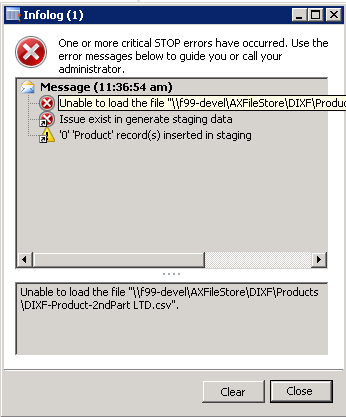
Do not try to load out files with spaces in the name, or you get this: “Issue exist in generate staging data”

blog20131031a

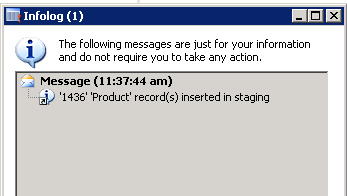
Once you remove spaces, you get this:

blog20131031b

Happy DAXing!

Posted in AX2012, Data migration, Dynamics AX | 1 Comment

Slow running SSRS reports

TappingFingersA colleague had clients complain of slow running SSRS reports… apparently they would time out after ten minutes. He found the post at http://sinedax.blogspot.com/2012/11/ssrs-report-ax-2012-operation-has-timed.html which provided the key. It talked about using userConnection to populate the data in a pre-process way. But he had trouble completing the circle.

In this case it was VendLedgerReconciliation… in VendLedgerReconciliationDP.processReport, he used parmUserConnection(), then he passed it to VendReport_LedgerReconciliation.processVendLedgerReconciliation. Once in that method, he did another setConnection using the passed parm.

And presto, the report works. Info about that is in the comments to the blog referenced, but I’m hoping this blog provides a clearer example.

Happy DAXing!

SSRSReportsTimeOut

Posted in AX2012, Dynamics AX | Leave a comment

Possible bug in DIEF – Opening balances – fixed assets

Back on June 12 of this year, I reported (to MSbugreporter and on this blog here) a bug in the data import export framework. Microsoft was very responsive and published a KB on June 18. (I’m flattered that the KB quotes me liberally 🙂 )

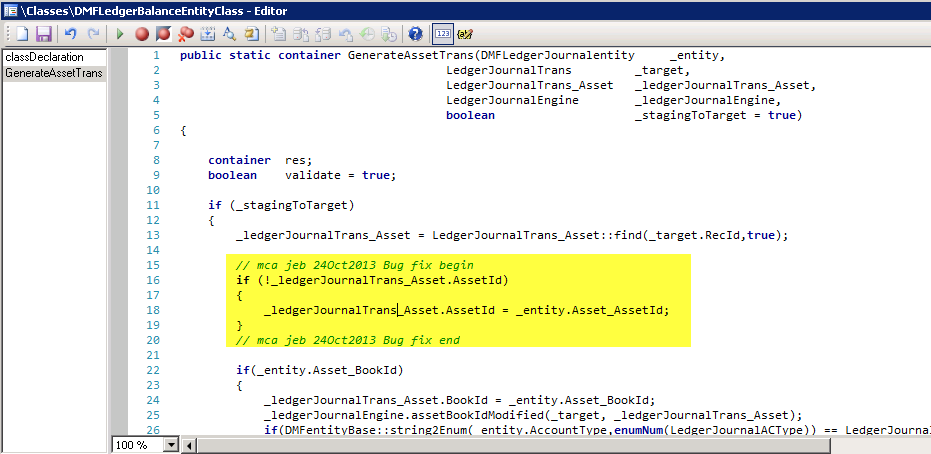
I found another potential bug. I haven’t the time at the moment to track down every detail, so I’m only calling it a potential bug. This one is in the Opening balances entity – when you import a Fixed asset type. The DMFLedgerBalanceEntityClass, which generates a record in LedgerJournalTrans, has a method to generate a corresponding record in LedgerJournalTrans_Asset. However, as far as I can tell, it does not populate the AssetId. So I threw in some code to fill it, and the functional person tells me it works (where it didn’t before).

The symptoms, BTW, were very subtle – go to the journal, line, fixed asset, and the transaction type was incorrect – it was the default type of Acquisition – because there was no _asset record.

Caveat emptor! It worked for me! It may or may not work for you!

Happy DAXing!

And on a personal note… Happy Birthday to my late dad, who inspired and encouraged me.

DIEFBugFixedAssetBalance

Posted in AX2012, Bug, Data migration, Dynamics AX | Leave a comment

How to view the data in a query

I was recently poking around community.dynamics.com and someone asked how to view the results of a query. This is essential as Microsoft clearly moves from views to queries in each successive version (thanks to their flexibility, I’m sure). I’m sure most of you know this but just for the occasional person who doesn’t –

Essentially you create a view whose datasource is the query. Here is the step by step.

1. Open up the AOT using Control+DWheres-my-data

2. Open up Data Dictionary node

3. Right click the Views node, select New View

4. Hit the Properties Icon and change the name to ViewQuery

5. Open up the ViewQuery node, open up Metadata node

6. Open up a second AOT using Control+D

7. Open up the queries node and highlight the query that you want to view

8. Drag and drop it to the first AOT’s, ViewQuery metadata node

9. Open up these nodes in the view: Metadata, your query, Data Sources, tableName, Fields

10. Highlight several fields and drag them down to the view’s Fields node (this is where the scroll on your mouse comes in really handy)

11. Highlight the view name and hit the Save icon to save your view

12. Hit Control+O to open the view, and see your data

Happy DAXing!

Posted in Dynamics AX | 2 Comments

Dynamics AX 2012 books

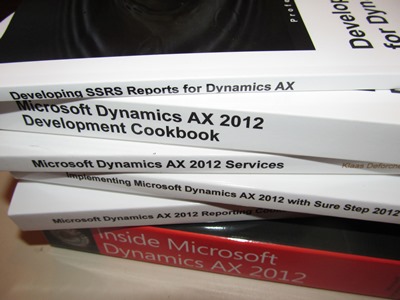
The biggest thing that struck me when I moved from “some other system” to Dynamics AX was the apparent lack of resources. Well, they’re there – they’re just in a different format. Still, it doesn’t hurt to gather together a roll call of books out there. And now that 2012 has been out for a couple of years, we’re starting to actually get a decent number of books published, too. Some are of higher quality than others – this is a list, not an endorsement. It’s meant to update some resources (for example, http://msdn.microsoft.com/en-us/dynamics/ax/cc546579) and run parallel to other resources (for example, axaptapedia’s list of blogs at http://www.axaptapedia.com/Axapta_Communities#Other ).

Administration

Moustafa, Ahmed Mohamed Rafik, Microsoft Dynamics AX 2012 Security How-To, Packt Publishing, 2012

Buxton, Simon, Microsoft Dynamics AX 2012 R2 Administration Cookbook, Packt Publishing, 2014

Zhen, Mr. Martin, and Mr. Daniel Liao, Dynamics AX Performance Optimization Guide: Fixing Troubles with Microsoft Dynamics AX and SQL Server, CreateSpace Independent Publishing Platform, 2013

Development

The Microsoft Dynamics AX Team, Inside Microsoft Dynamics AX 2012, Microsoft Press, 2012

Pocius, Mindaugas, Microsoft Dynamics AX 2012 Development Cookbook, Packt Publishing, 2012

Official Training Materials available on CustomerSource and PartnerSource

Enterprise Portal

Meenakshisundaram, Mey, and Anees Ansari, Microsoft Dynamics AX 2012 Enterprise Portal Development Cookbook, Microsoft.com, 2012, accessible at http://www.microsoft.com/en-us/download/details.aspx?id=30171

Implementation and Use

Dunkinson, Keith, and Andrew Birch, Implementing Microsoft Dynamics AX 2012 with Sure Step 2012, Packt Publishing, 2013

Fife, Murray, Extending Microsoft Dynamics AX 2012 Cookbook, Packt Publishing, 2013

Luszczak, Andreas, Using Microsoft Dynamics AX 2012: Updated for Version R2, Springer Vieweg, 2013

Hamilton, Scott, Discrete Manufacturing using Microsoft Dynamics AX 2012, Visions Inc., 2012

Hamilton, Scott, Food Products Manufacturing using Microsoft Dynamics AX 2012, Visions First, 2012

Ramsö, Stefan, Introduction to Dynamics AX 2012, lulu.com, 2012

Reporting

Elangovan, Kamalakannan, Microsoft Dynamics AX 2012 Reporting Cookbook, Packt Publishing, 2013 http://j.mp/GIXdGh

Hirwani, Mukesh, Developing SSRS Reports for Dynamics AX, Packt Publishing, 2013

Services

Deforche, Klaas, and Kenny Saelen, Microsoft Dynamics AX 2012 Services, Packt Publishing, 2012

Happy DAXing!

axbookmeme

EDIT:

1. I am sure I’ve forgotten some. Please let me know!

2. I’ve been pointed to a very good page also on books, with ratings too: http://daxmusings.codecrib.com/p/dynamics-ax-books.html


Posted in AX2012, Dynamics AX | 2 Comments

Data migration – NOT plug and play!

We’ve had some customers lately who thought they could just pick a data migration solution (typically Data import export framework, or DIEF), drop it in, and go.

While anyone who’s been in Dynamics AX 2012 for a while will tell you that DIEF is a HUGE step above anything that preceded it… the fact remains, it’s going to have to be something you plan. If it’s an afterthought, your project will certainly run late. 

In fact, migration is so complicated that Microsoft created a matrix to help us decide which method to use – specifically because there is no one size fits all. http://technet.microsoft.com/en-us/library/aa548629.aspx 

ow4nd

There is an old carpenter’s saying, “Measure twice, cut once” meaning planning before doing is the crux.

So migrate, like I vote – early and often!

Happy DAXing!

Posted in AX2012, Data migration, Dynamics AX | 1 Comment