
AI Series 2: AI for Everyone: Unlocking the Potential of Everyday AI Tools
AI Series 1 was Exploring the Power of AI
This is part 1 in a second ongoing series to acquaint people with AI
Series 2: AI for Everyone: Unlocking the Potential of Everyday AI Tools
Post 1: Getting Comfortable with AI: Easy-to-Use Tools for Daily Tasks
Introduction
To the series
Welcome to our second AI series! In this series, we’ll discuss practical and accessible ways to incorporate AI into our daily lives.
Whether you’re managing tasks, boosting creativity, shopping smarter, or exploring smart home innovations, this series has something for everyone. Each part is packed with hands-on challenges and easy-to-follow steps, making AI not just understandable, but genuinely useful. Join us on this journey to unlock the incredible potential of AI—no technical expertise required!
By the end of this series, learners will confidently integrate AI into their daily lives, leveraging user-friendly tools to enhance productivity, creativity, smart shopping, home automation, and exploring more advanced AI applications.
To the post
In this post, we’re going to talk about how AI may touch our daily lives – of course, your mileage may vary – but there will be many practical examples of how to use AI to assist your life, without a background in Data Science. We’ll become familiar with user-friendly AI tools for managing emails, schedules, and tasks. We’ll implement an AI-powered email organizer or task management app to enhance productivity and organization.
Discussion
AI can streamline a variety of daily tasks, making them more efficient and less time-consuming. Here are some common tasks that can be enhanced with AI:
- Managing emails
- Organizing schedules
- Task automation
- Communication
- Content creation
- Personal finance
- Online shopping
- Fitness and health tracking
- Home automation
- Learning and development
In a prior post, we’ve talked about making small gains (which add up). With that in mind, we’re going to select one or more of the above tasks as this week’s challenge. But not all of the gains that we will get from AI are measured by time savings. We’ll have a second part to our challenge this week as well.
AI can manage our email by filtering and prioritizing it, and perhaps already is. In my Gmail, I see that the system throws some messages into my Spam folder. If I open the email, it may tell me something like “Why is this message in spam? It is similar to messages that were identified as spam in the past.” And you will have the option to report the email as “not spam,” so you will be training the AI with a click of a button. Your incoming emails may be auto-sorted into folders like Primary, Promotions, Social, and Updates. If you drag an email into a different category, Gmail will ask if you want all future emails from that sender to go into the new folder. You can use AI here by using these available options in your email system (Gmail isn’t the only one that has them). You can also create Rules and Filters, which may not be AI, but are time-saving. Don’t miss this great post by Scott Hanselman: The Three Most Important Outlook Rules for Processing Mail. You can use AI like Copilot to draft email replies, or to rewrite replies that you wrote.

AI is helpful for scheduling. Like many of us, I am experiencing meeting overload but must still schedule them. I often use Outlook’s option to AutoPick a time slot where all required attendees (or a different option) are within their set working hours and not already scheduled. Gmail will let you create events from emails.
AI can help with task lists. When mine gets too long, I run it through AI and ask it to categorize and deduplicate (example, the Claude hands-on in this post: Intelligent Innovations: AI in Daily Life | janeteblake). Suddenly the task lists look much less overwhelming and I can start attacking them, and realize time savings from grouping like tasks. It’s always a personal boost to see my to-do list get shorter!
How many of us have too many meetings? AI to the rescue! My coworkers and I frequently use Copilot to summarize Teams meetings, create action items, catch up on what we missed, and collaborate with those who weren’t there. I’m using AI in translating my content to other voices and other languages (when I publish my Finance course update in September, check out the videos). All sorts of communications are possible and/or easier and faster now.

I’m hoping you’ve noticed that I’ve been disclosing AI assistance in content creation for this blog. We also use it a lot in Microsoft’s Worldwide Learning in keeping our content fresh and current. Note that this type of effort is not a one-time thing, but an ongoing process to keep improving – kind of like all of us! I asked AI when was the best time to publish posts and it replied Tuesday and Wednesday mornings. You may have noticed that not only do I publish my posts at that time, but more subtle is the fact that I schedule my posts. I finish them when I can and they publish at the time I set (currently 11am EDT, 8am PDT, 5pm CET). This helped me tremendously when I was traveling recently and active in a workshop. I took an outline and had Copilot create a PowerPoint presentation from it. The possibilities are far too many for this post.
A perfect application for AI is financial management. AI can automatically track your expenses, categorize them, and suggest budgeting tips based on your spending habits. AI can advise you by analyzing market trends and making recommendations, based on your level of risk comfort.
AI already helps you with online shopping, by offering product recommendations based on what you’ve purchased, or looked at, or searched for. This can save a lot of time when some retailers’ website search functions are rather limited. AI can track prices for you across multiple websites with tools like Honey, CamelCamelCamel, Capital One Shopping, Rakuten, and many more.
I’ve mentioned before that I’ve used AI for insights into my health data. I’ve fed it my steps data and gotten the insight that I’m least likely to make my steps goal on Thursdays, so I set up a reminder to walk during Thursday lunch. Copilot has a very cool ad that I posted on my LinkedIn last week about how it can help you plan customized workouts and monitor your health metrics.
My son was the one who got me into home automation. He set up some smart light bulbs and plugs, and created an “Alexa, I’m home” routine which turns on the light and the television. I have a routine where certain lights go on at sunset, whenever that may be, and I don’t have to reprogram it (I’m easy to please sometimes). I recently got smart “learning” thermostats which also please me unduly. They learn what temperatures we like at different times of day. They set themselves down during peak times to reduce energy consumption when needed.
While I’d love to go on about how I created a Copilot training plan for myself using AI, there are much bigger things in this world, when discussing how AI helps learning and development. I recently finished reading Brave New Words: How AI Will Revolutionize Education (and Why That’s a Good Thing) by Sal Khan (of Khan Academy), and I am absolutely over the moon at the possibilities that AI is bringing to education! Khan Academy recently powered with Microsoft to bring Khanmigo, the former’s AI-powered teaching assistant & tutor, recently partnered with Microsoft to offer the tool free to teachers in dozens of countries. (See their blog post.) I asked some teacher family members to take it for a test drive and they were quite impressed.
I hope this has sparked your interest in exploring how AI can simplify and enhance your daily life.
Challenge: Hands-On with AI in Your Daily Tasks
Let’s dive into two simple yet effective ways to incorporate AI into your everyday life. This week’s challenge involves experimenting with AI-powered tools to help manage your emails and tasks. We’ll focus on Gmail’s Smart Reply feature and a task management app called Todoist, which has AI capabilities to boost your productivity. Follow these step-by-step guides, and don’t forget to take screenshots along the way to document your journey!
Challenge 1: Get Smart with Gmail’s Smart Reply
Gmail’s Smart Reply is a great way to save time by suggesting quick responses to emails. Here’s how to get started:
- Access Gmail: Open Gmail on your computer or mobile device.
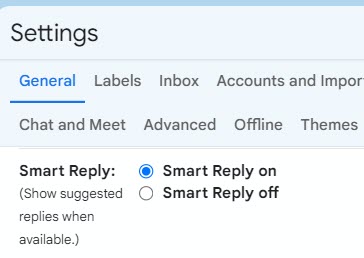
- Check Smart Reply Settings: On your computer, click on the gear icon in the upper-right corner and select “See all settings.” Go to the “General” tab and scroll down to the “Smart Reply” section. Make sure the “Smart Reply on” option is selected. Save Changes if needed.
- Try Out Smart Reply: Open an email that you’d typically reply to. Below the email, you’ll see a few suggested responses like “Thanks!” or “Sounds good.” Click on one of the suggestions to instantly add it to your reply. You can send it as is or edit it further before sending.
- Adjust and Improve: If the suggestions aren’t relevant, simply ignore them. The AI learns from your choices and will improve over time. Experiment with a few different emails to see how well it predicts your responses.
- Set a Goal for the Week: Commit to using Smart Reply for a week and track how much time you save on emails. Consider taking screenshots of before and after scenarios to visualize your progress.

Challenge 2: Boost Your Task Management with Todoist
Todoist is a task management app that uses AI to help you organize and prioritize your tasks efficiently. Here’s how you can get started with AI features in Todoist:
- Download and Set Up Todoist: Download the Todoist app on your mobile device or access it via Todoist’s website. Create a free account or sign in if you already have one.
- Explore AI Task Suggestions: Once logged in, start by adding a few tasks you need to accomplish this week. Click on the “Add Task” button and type your task (e.g., “Prepare report by Friday”). As you type, Todoist’s AI will suggest task labels, due dates, and even break down larger tasks into subtasks.
- Using the Task Prioritization Feature: Todoist’s AI helps prioritize tasks by analyzing their urgency and importance. Click on the three dots next to any task and select “Priority” to rank it. The AI will adjust future suggestions based on your past choices.
- Set Daily Reminders: Enable smart reminders by clicking on a task and selecting “Add Reminder.” Todoist AI will suggest the best time based on your task details and schedule.
- Track Your Progress: At the end of the week, review the completed tasks. Todoist provides productivity insights and suggests ways to improve based on your performance.
- Document Your Experience: Take screenshots of your task list at the beginning and end of the week. Note any improvements in your workflow or time management.
By trying these challenges, you’ll get a firsthand look at how AI can make managing emails and tasks easier and more efficient. Plus, you’ll gain confidence in using everyday AI tools to streamline your routine!

Summary
In this post, we explored how AI can seamlessly integrate into our everyday lives to help manage tasks, emails, and more. From setting up Gmail’s Smart Reply to using Todoist for smarter task management, we’ve shown that AI doesn’t require a technical background to be beneficial. These tools are designed to save time, reduce stress, and increase productivity, making your daily routines smoother and more efficient.
In the introduction, we kicked off our new series, “AI for Everyone: Unlocking the Potential of Everyday AI Tools,” by emphasizing that AI is not just for tech enthusiasts or data scientists—it’s for everyone. The goal is to make AI approachable and useful in everyday tasks, demonstrating how small, practical steps can lead to meaningful improvements in our routines.
In the discussion, we discussed a variety of ways AI can enhance daily tasks, such as managing emails, organizing schedules, and automating tasks. By using AI tools, you can experience the benefits firsthand—whether it’s decluttering your inbox or efficiently prioritizing your to-do list. The discussion also touched on broader applications, including financial management, online shopping, fitness tracking, and home automation, all of which are made easier with AI.
Through the hands-on challenges with Gmail and Todoist, you learned how to set up AI features and use them to make your daily tasks more manageable. By engaging with these tools for a week, you not only gain practical experience but also build confidence in using AI to enhance your productivity.
By embracing tools like Gmail’s Smart Reply and Todoist, you can start to see real, practical benefits from AI in your daily tasks. Not only will you save time, but you’ll also reduce stress and increase your overall productivity. Remember, AI doesn’t have to be complicated—it’s about finding simple ways to make life a little easier.
Final Thoughts:
AI is already part of our lives, often in ways we don’t even realize. By embracing these easy-to-use tools, you can take control of how AI impacts your day-to-day activities. Remember, the aim is not to replace what you do, but to enhance it—making your life a little easier, one task at a time.
Further resources
- Smart Home: Everything you need to know to build a smart home that works for you.
- Beginner’s Guide to Gmail Smart Reply
- Todoist Beginner’s Guide
General AI Resources
- AI Explained: A comprehensive guide to understanding AI: https://blog.google/technology/ai/
- AI in Everyday Life: Examples of AI applications: https://www.forbes.com/sites/bernardmarr/2019/12/16/the-10-best-examples-of-how-ai-is-already-used-in-our-everyday-life/
- AI Tools for Everyone: A curated list of AI tools: https://www.insidr.ai/ai-tools/
Specific AI Tools: Productivity
- Grammarly: Improve your writing with AI-powered grammar and style suggestions: https://www.grammarly.com/
- Todoist: Organize your tasks and prioritize them with AI: https://todoist.com/
- Otter.ai: Transcribe audio and video meetings automatically: https://otter.ai/
Specific AI Tools: Personal Finance
- Mint: Track your spending and budgeting with AI: https://mint.intuit.com/
- Personal Capital: Manage your investments and retirement planning: https://home.personalcapital.com/page/login/goHome
Specific AI Tools: Health and Wellness
- MyFitnessPal: Track your calorie intake and exercise with AI: https://www.myfitnesspal.com/
- Headspace: Meditate and improve your mental health with AI-guided sessions: https://www.headspace.com/
Specific AI Tools: Education
- Duolingo: Learn new languages with AI-powered lessons: https://www.duolingo.com/
- Khan Academy: Access free, personalized learning resources: https://www.khanacademy.org/
Online Communities and Forums
- Reddit: Explore subreddits like r/singularity, r/ai, and r/technology for discussions and recommendations.
- AI Forums: Join online communities dedicated to AI and its applications.
Remember to explore these resources and experiment with different tools to find the ones that best suit your needs and lifestyle. AI can significantly improve your daily life by automating tasks, providing personalized recommendations, and enhancing your productivity.
Disclosure
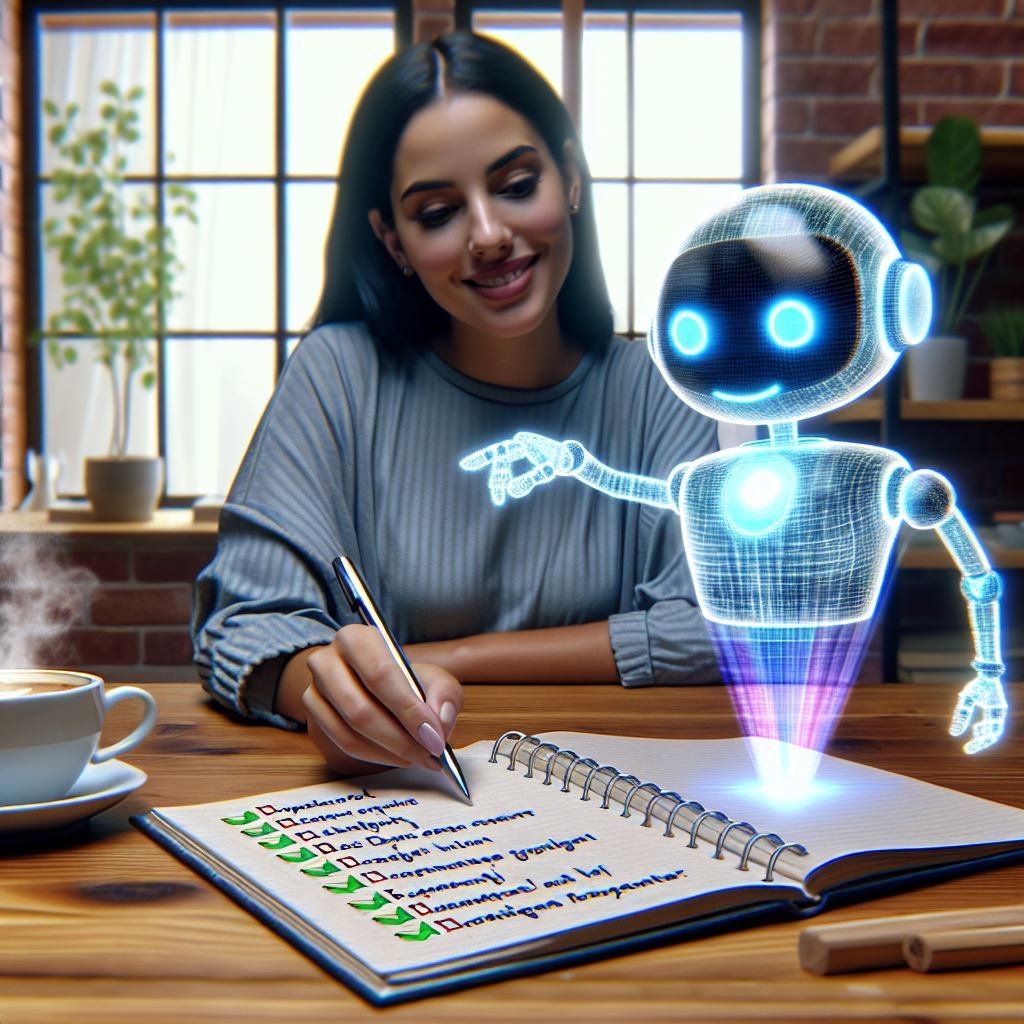
AI was used in several places in this post: to create the title, to create the outline, to suggest the challenges. The second image, the one with the robot, was created with DALL-E, since I missed the Midjourney free trial!




 janeteblake
Pingback: AI in Your Pocket: Leveraging AI on Your Smartphone | janeteblake
Pingback: Boosting Creativity with AI: From Social Media to DIY Projects | janeteblake
Pingback: Smart Shopping with AI: Finding Deals and Making Better Decisions | janeteblake
Pingback: AI in the Home – Making Your Space Smarter and More Efficient | janeteblake
Pingback: Simple Steps to Explore More Advanced Tools | janeteblake
Pingback: Series 2 Wrap up | janeteblake