
Blog Title: AI in Action: Everyday Technologies Powered by AI
Blog Series: Exploring the Power of AI
This is part 3 in an ongoing series to acquaint people with AI.
Part 1: The AI Revolution: Why You Should Care and Why You Should Trust Us
Part 2: Demystifying AI: What It Is and Why It Matters
Introduction
AI is everywhere. What are some ways we use it? What are some ways we can use it to make our lives better?
How does AI help in everyday life?
- Navigation: If you use Waze, or similar real-time tools to navigate around traffic jams, you are already using AI to help you save time.
- Shopping: Have you ever been to a website which said, “You might also be interested in…” which tries to drive sales by understanding and predicting customers’ interests? Dynamics 365 Commerce is just one example of this; I’m sure you’ve seen others. Personalized shopping experiences can help save filtering, searching, and drilling down time.
- Education: AI is being used to create lesson plans, outline syllabi, and create practice questions for students of every kind, in order to help teachers focus on the teaching portion of their jobs.
- Ride-sharing: AI can be used to group people traveling to and from nearby places in order to save fuel and reduce waiting times.
- Fitness: You may wear a fitness band whose app shows you insights. For example, mine helpfully pointed out that I often miss my steps goal on Thursdays. So I set a reminder for lunchtime Thursdays to take a walk.
How can AI help in everyday life?
We’re not looking for huge time savings here, like, “AI write a novel for me.” Rather, users see many benefits just by saving several minutes a day. A study of Copilot for Microsoft 365 users found that once AI saved users 11 minutes a day, the users saw real value in it. 11 minutes a day is a work week every year. A blog entry / podcast episode on AI Genealogy Insights makes a strong case for 6 minutes a day.
- Meetings: Who among us has not seen our number of meetings jump drastically in the past few years? Copilot in Teams allows us to skip meetings where our input isn’t needed and get recaps and to-do lists later.
- Travel planning: Use any AI to get suggestions for places to travel, or things to do when you are traveling, saving much research time.
- Content curation: In an example last week, we asked Gemini to suggest YouTube videos similar to one we specified. (You did do last week’s hands-on, right?) I fed ChatGPT a list of my top-rated Goodreads books and asked for recommendations for next books. We can use AI to find articles, videos, blogs, TikToks, webpages, etc., to suggest what we might like, saving us time spent on duds.
- Scheduling: AI-driven calendar apps can schedule meetings for you, looking for times without conflicts, saving a lot of manual work.
Hands-on exercises
So, how might you use AI to gain your six or eleven minutes a day? Let’s do some more hands-on and see!
Copilot
Let’s create an agenda for an upcoming meeting, to efficiently use everyone’s time. I’ve used this many times.
- Navigate to Copilot at https://www.bing.com/chat
- in the Ask me anything… prompt, enter:
Create a meeting agenda for a 30-minute meeting with my client implementation team to discuss their training needs in the new software.
3. Note the helpful response includes numbers, bullets, and timings
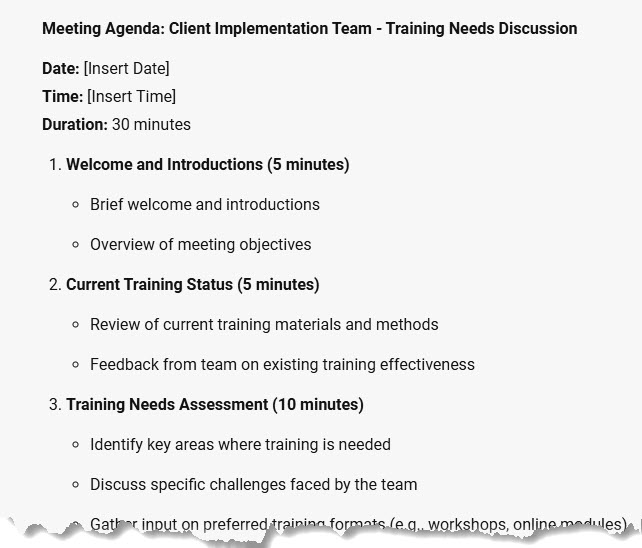
4. Let’s refine it. Enter:
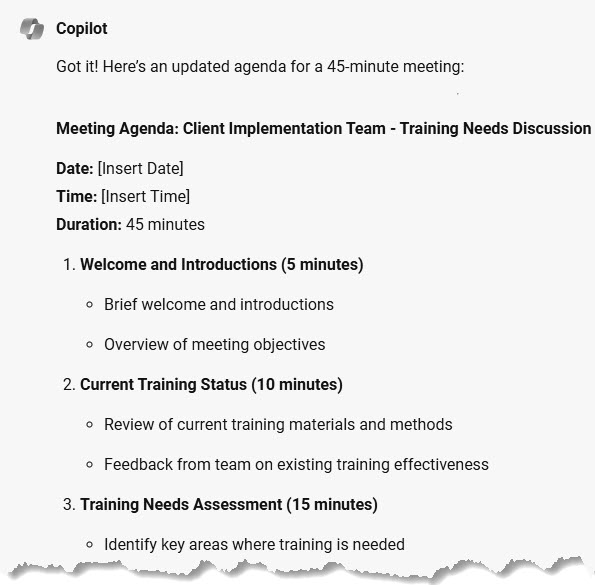
That's really tight. Make the meeting 45 minutes instead.
5. Note that it did not just proportionally increase all the timings. Welcome and introduction stayed at 5 minutes, but the meatier portions got their time increased.
ChatGPT
I would love to get my Finance certification! I always work better with a deadline, so I’ve set it to be August 31, so that I can enjoy my (U.S.) Labor Day weekend. Let’s create a study schedule.
- Navigate to https://chatgpt.com and make sure the model ChatGPT 4o is selected.
- At the Message ChatGPT prompt, enter
I want to take the training at https://aka.ms/mb310learnlinks , have a practice assessment, and then take the exam on August 31. Please create a study schedule.
3. Note that it gives me a day of rest per week!
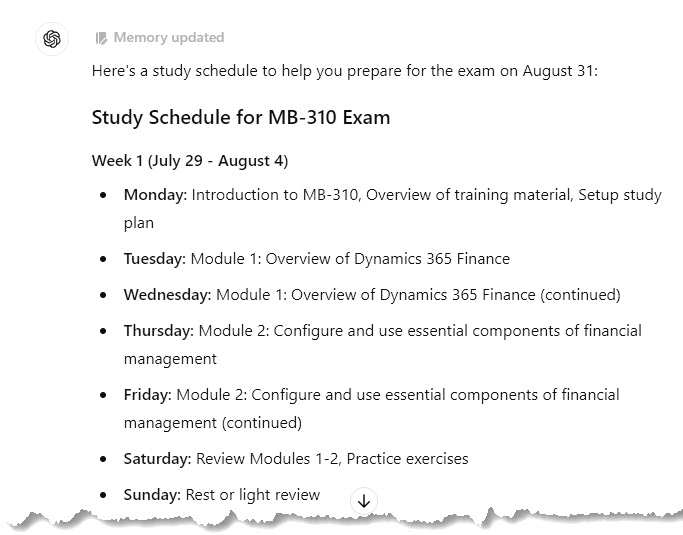
It even gave me tips for success.

4. Oops! Just remembered I have some vacation time coming up. Let’s allow for that:
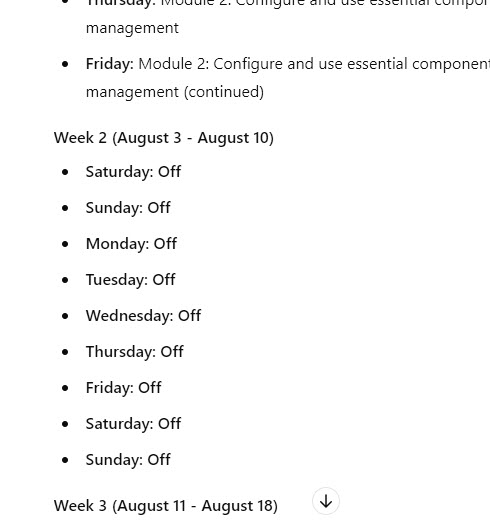
Give me August 3 to August 10 off.
5. See how it adjusts for us.
Claude
I did try to put links into Claude, but it told me that it cannot access them. So I pivoted. I need to see what monthly garden tasks I should look into taking care of in August. I did a search for “monthly garden tasks for august zone 7 northern hemisphere” and printed my top 3 results to pdf.
- Navigate to https://claude.ai/new
2. At the How can Claude help you today? prompt, enter the following text. Make sure to attach the pdf files using the Add content button.
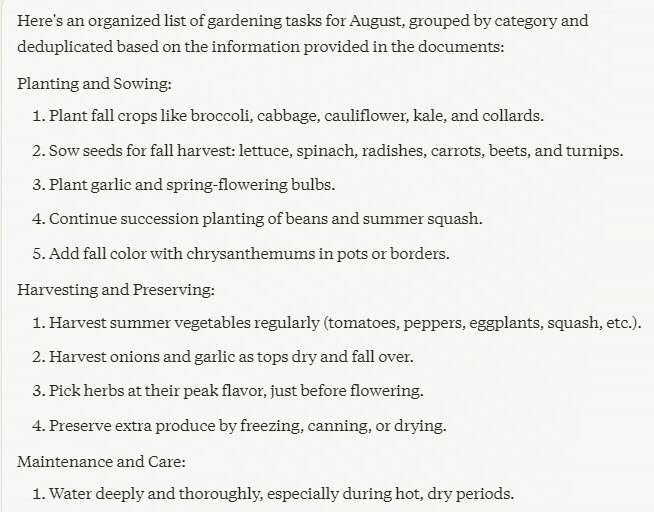
Please use the attached documents to create a list of gardening tasks for me for August. Organize, deduplicate, and group them.
3. Wow! Claude took 37 pdf pages and created a neat, organized list that I feel I can actually tackle.
4. I see something inspiring on the list. Let’s ask for more detail. Enter
Tell me more about creating a pollinator garden.
5. See the great suggestions it came up with.

Gemini
Let’s say you want to provide constructive feedback for an employee or coworker but want to make sure it’s diplomatic and helpful. Let’s let Gemini do the heavy lifting.
- Navigate to https://gemini.google.com/app
- At Enter a prompt here, enter:
I want to provide constructive feedback for a project manager named Donna to her manager.
I found that she was very eager and always available.
However, she dropped the ball several times.
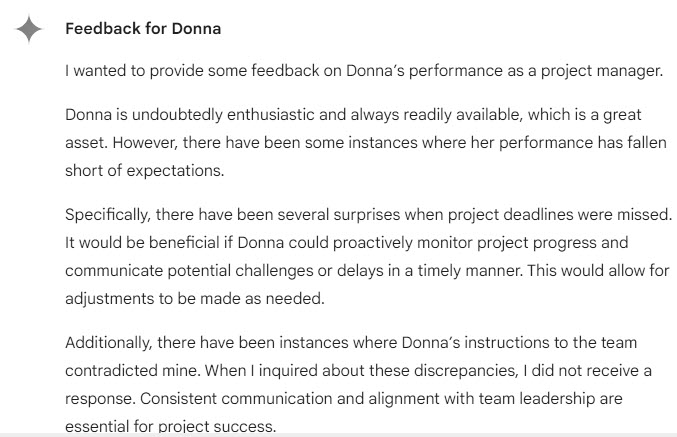
I was taken by surprise more than once when deadlines were missed – I wish Donna had proactively checked to make sure things were coming along OK, and let me know when they weren’t.
She provided instructions to the workers which contradicted mine, and did not answer when I asked her about this.
Please craft this feedback for me.
3. Notice that it did provide her positives, and made specific suggestions for improvement. After the end of the screenshot, it did wrap on an upbeat note.
4. The tone isn’t 100% there. At the prompt, enter
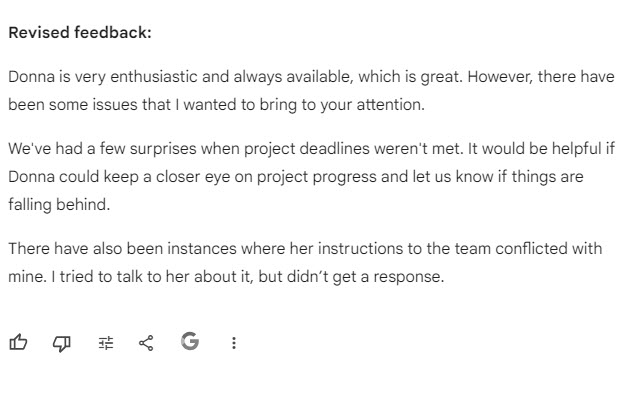
“Beneficial” and “inquired” are slightly too formal. Make it more realistic, while keeping it professional.
5. The response was way too short, but I can merge, or I can refine further.
Perplexity
I have a bunch of open tabs of Copilot training that I want to take! Let’s organize them.
1. Navigate to https://perplexity.ai
2. At the Ask anything… prompt, enter:
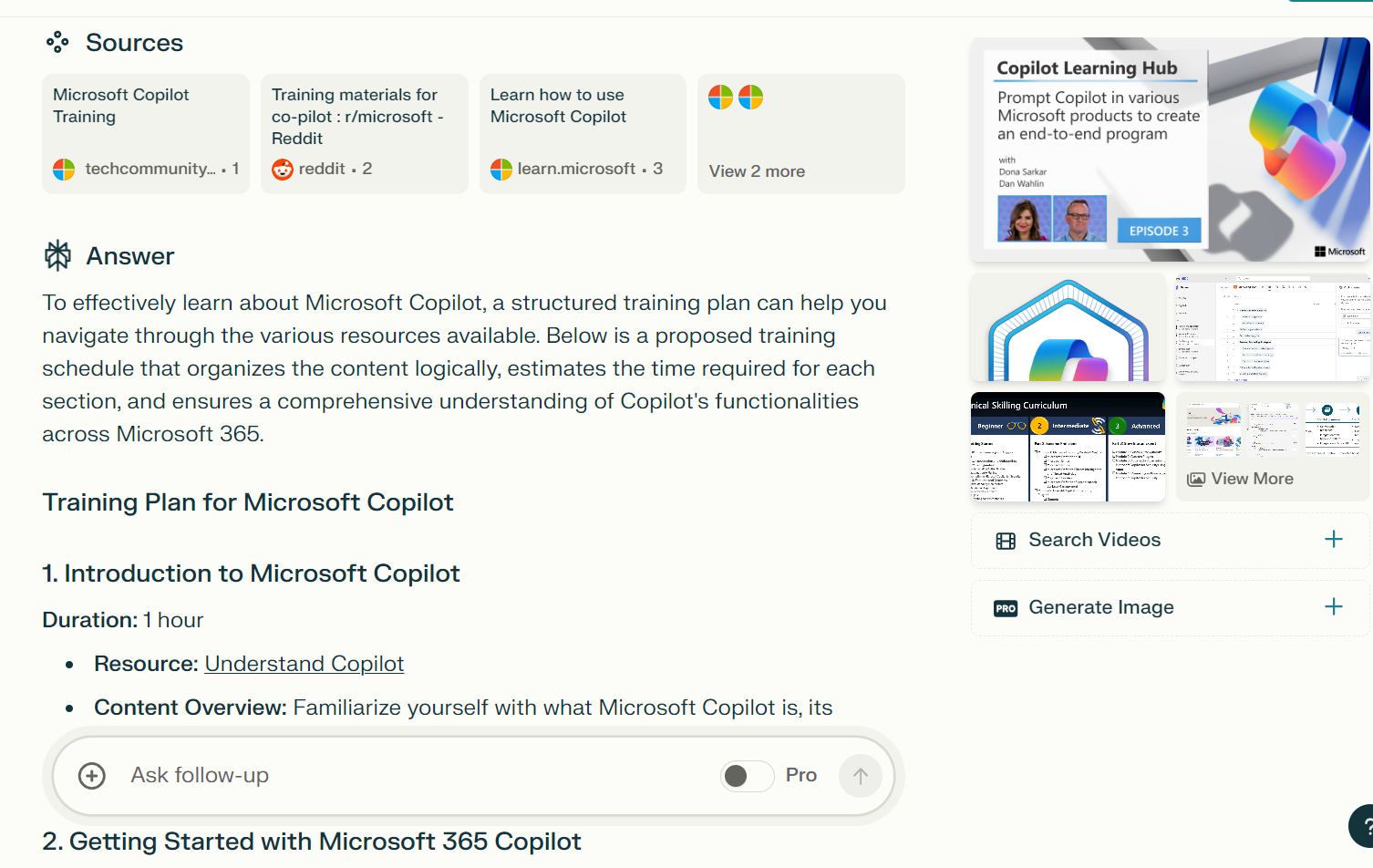
I need to learn all about Copilot. Using the following links, organize a training plan in a logical sequence. Estimate the time on each portion. You can use other links on the web. Only use Copilot which is broadly applicable. Do not use Copilot for GitHub and very specific applications. These are some links:
https://learn.microsoft.com/en-us/search/?terms=copilot&category=Training
https://learn.microsoft.com/en-us/training/paths/get-started-with-microsoft-365-copilot/
https://learningpath.microsoft.com/8814
https://learn.microsoft.com/en-us/training/paths/empower-workforce-copilot-use-cases/
3. Note that it has organized a training plan just as asked (and it also entered a total at the end)
4. It offered related questions after the response, so I selected
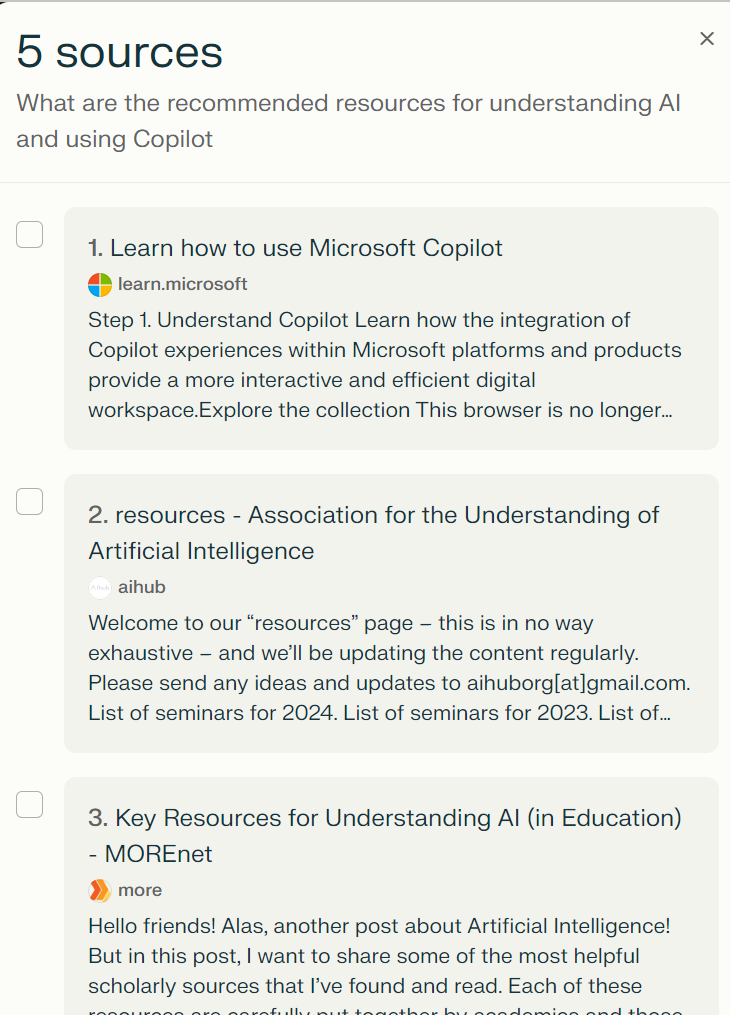
What are the recommended resources for understanding AI and using Copilot
5. Check out the reply; it offered five sources with synopses of each; only one of them was Microsoft
Note that I’ve used the same models that I introduced last time. If you’d like to see other models, drop a comment and let me know!
Summary and call to action
Today, we’ve used AI to:
- Create a meeting agenda
- Create a certification study schedule
- Create a manageable gardening task list
- Provide constructive feedback for a coworker
- Organize Copilot trainings (can you tell I’m biased toward learning?)
Call to action!
- Try these exercises
- Create a prompt that will help you. Try it in two different models, and compare the two results. Which do you prefer? What does it tell you about the strengths?
- Further refine one of them.
Hope you’ve had fun! Please do leave comments and feedback. How do YOU use AI? “See” you next week!




 janeteblake
Pingback: The Future of Work: AI’s Role in Professional Settings | janeteblake
Pingback: Kickstart Your AI Journey: Essential Tools and Resources to Get Started | janeteblake
Pingback: Building Responsible AI: Ethical Challenges and Solutions | janeteblake
Pingback: Exploring the Power of AI: A Journey to Empowerment | janeteblake
Pingback: Getting Comfortable with AI: Easy-to-Use Tools for Daily Tasks | janeteblake