
My report from the technical conference.
Our fourth session on opening day, Tuesday February 23, 2016 was another breakout session. I chose Developer experience and customization in the newest release of Microsoft Dynamics AX with Robert Badawy, Senior Program Manager and Peter Villadsen, Principal Project Manager.
Last year I had mentioned that any Villadsen session was a must-attend. Well, apparently word is spreading! The crowds were spilling out the door (insert foreshadowing to the day 2 sessions). Fortunately, I was able to attend. Here are my notes.
The Development Environment
Extension on top of visual studio that handles all we need
Metadata includes source code (open code, source code, are a recurring theme in this conference)
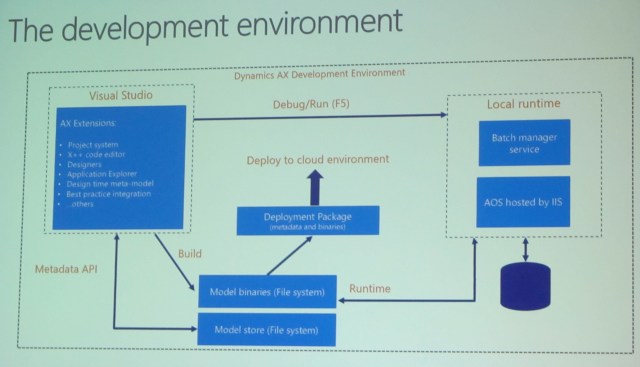
The Visual Studio development tools
Visual Studio is the exclusive integrated development environment
- Familiar AX 2012 concepts and patterns, like model elements, models, tree designers, the AOT, and others have been adapted to the Visual Studio development paradigms
- There is no AOS needed at design/compile time as development is performed against files
- A model element is represented by an XML file containing metadata and source code
- The model store is represented as a set of folders and XML files, organized by model
- Executing X++ code, displaying a form, or running a report is integrated with the familiar Visual Studio debug (F5, Ctrl-F5) experience
- Execution is through the AOS web application that is running in the local IIS
Make sure you understand these bullet points
There are no blobs in the database, everything is open (see?)
Demo
Visual Studio with AX extensions installed
AOT is in Application explorer (AE), similar to 2012, but it’s a read-only view
New in the AOT is the model view
AE has a lot of nice search features
New: Static preview of the form you’re working on
There are XML files behind what you’re working on in VS
You can set your form as a startup object
A Build is an incremental build. It now includes report deploy, cross reference, can do sync
AOS was not running till we hit F5
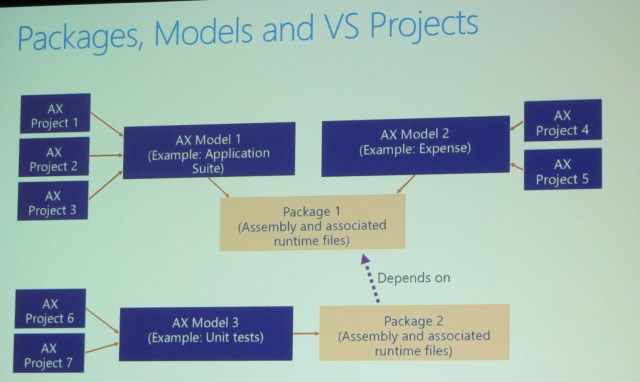
Every project belongs to one model
Overview of packages and models
Definitions
- A Dynamics AX model is a group of elements (metadata and source files) that typically constitute a distributable software solution (including customizations of an existing solution). A model is a design-time concept.
- For example: A warehouse management model, a project accounting model, etc.)
- A Dynamics AX package is a deployment and compilation unit of one or more models. It inclues model metadata, binaries, cubes and other associated resources. One or more AX packages can be packaged into a deployment package, which is the vehicle used for deployment on UAT and production environments.
- Packages are packed into a deployable package file for deployment to Sandbox or production environments.
Package is like a modelstore (already compiled)
Model is source code. Multiple models are in a package.
Packages, models, and Visual Studio projects
Packages on disk
- Packages are folders located in the model store folder of the Dynamics AX application.
- The default model store folder is typically “C:\Packages\”.
Model descriptors
- A package folder contains a descriptor folder that lists all models that belong to the package.
- A model descriptor file contains metadata about a model’s properties.
Application Explorer – we skipped over this slide
Full build dialog
- Access the full build dialog from Dynamics AX > Build models…
- All packages are listed, one package = one compiled assembly.
- Models within a package are shown in brackets.
Package dependencies graph
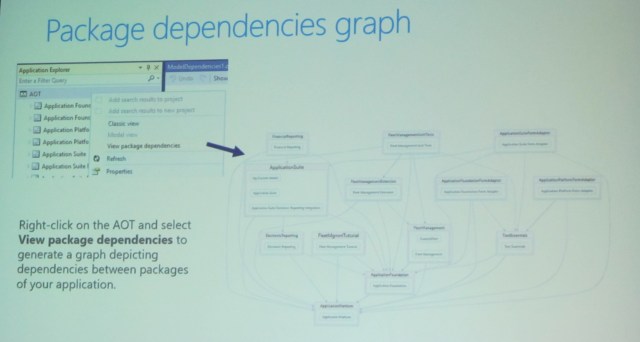
Demo
K service volume\aos services\packages local directory \ package \model \axtables
Productivity features – from an extended TAP program
- Drilling
- Add search results to project
- Add BP errors to new project
- You don’t package a project or a model
The Dynamics AX customization framework
AX 2012: Layers and models. Compile collapses customizations across models and layers
Customization concepts in Dynamics AX
Overlayering, extensions, and hybrids
Don’t overlayer MS code – create an event delegate
Extensions: Concept and value proposition
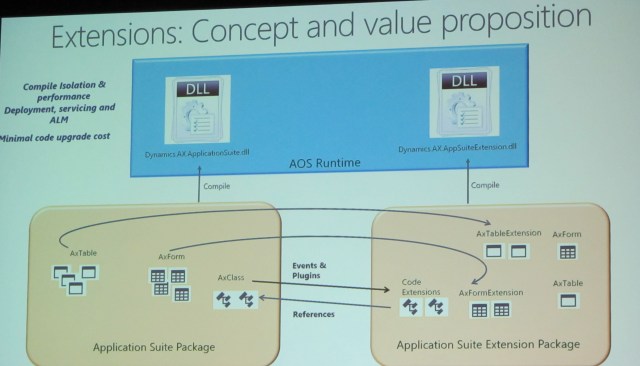
Supported extensions as of today
Metadata: new elements, extend tables, forms, menus, enums, duties/roles, data entities
Source code: New X++ classes, app events, framework events, plugins, extension methods to classes and tables
No more client and server tier (server only)
No more client, only web browser
At this point I needed to leave to take an important call – regarding a new job – the parts that I missed are a demo on customizations and a Q&A.
Happy DAXing!




 janeteblake
Great recap, thanks. I hope the job call went well.
LikeLike
It did, thank you so much! Look for a blog post at the end of the month.
LikeLike