
A client had reported this issue to me, but it magically self-resolved. Time constraints being what they are, I didn’t get back to it. But this morning, a second client reported it. I was sure it was data. Close. It was setup. Here is the solution I sent my functional consultants.
It’s a setup issue.

Make sure this box is unchecked at the time of PO creation and it won’t be doubled.
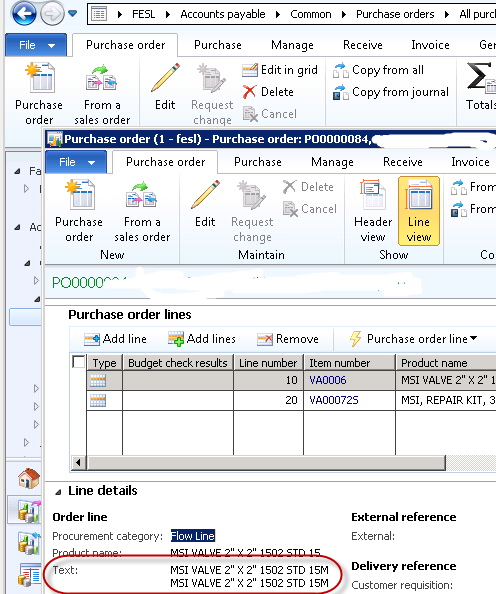
PO 84 in test is an example of a doubling:
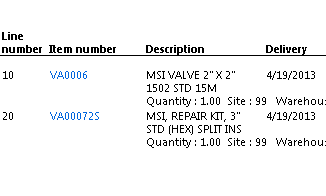
So I unchecked the box (in both test and prod so we don’t get bit later), created PO 104 with the same items, and it prints fine:
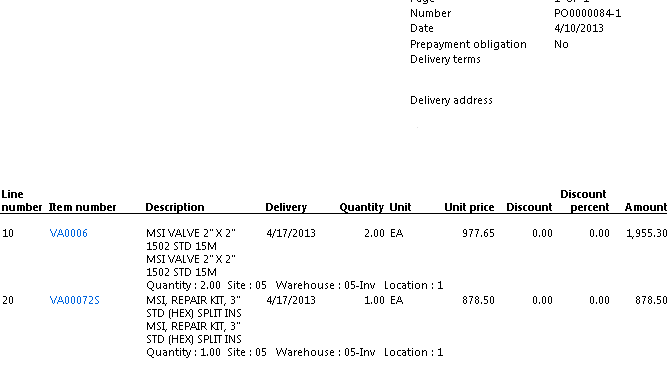
Whereas (it’s important to note) 84 still prints badly:
If the images don’t come out well; I apologize; click on the pictures. Way too many balls in the air to debug blogging!
Happy DAXing!
Janet




 janeteblake
Thanks for the great tip – we were having this problem, but the checkbox in our version of AX 2012 R2 was found under , procurement and sourcing, Setup, Forms, Form Setup. We unchecked the “Included both name and description” box and the doubling went away. We also had POs with no description and it included the name instead, so it always includes something. Thanks again! –Steve
LikeLike
I appreciate the R2 updated information, Steve, thank you!
LikeLike